Chat Mockups for Client Videos: An Agency Workflow Guide
Sooner or later most video work includes a phone conversation. An app launch needs the moment a user gets a reply. A local business wants to show how easy it is to book by message. A recruitment video needs the text that says "you got the job". A training video needs a phishing message for staff to recognise. For agencies, freelance editors and in-house teams, the chat is often a small part of the brief, and it can take a large share of the time.
This guide is about making chat mockups for client work: briefing them, choosing the app, getting sign-off, handling revisions, staying brand-safe, and delivering files that slot into the client's edit. The tool throughout is MockClip, which animates real-looking chat, notification and AI conversations in the browser and exports them as video.
Where chat mockups show up in client work
| Client type | Typical chat video | Usual app |
|---|---|---|
| App and SaaS companies | Launch videos, feature demos, onboarding | Lock Screen Notifications, Text Chat |
| DTC and e-commerce brands | Paid social ads, UGC-style creatives | Text Chat |
| Local businesses | Promo videos, "how to book" clips | Text Chat |
| HR and internal comms | Training, phishing awareness, onboarding | Text Chat, Lock Screen Notifications |
| Production companies | Branded films, music videos for labels | Text Chat, Lock Screen Notifications |
| AI products | Assistant demos | AI Assistant Chat under the product's name |
| Dating and social apps | Launch and feature ads | Dating Swipe |
All of these are the brand-free apps: original designs that carry your client's name and colour, not another company's interface. That is not a style choice; it is what MockClip's licence asks for client work, as the brand safety section below explains.
Step 1: The brief
A chat brief needs more detail than "show a text conversation". Ask for, or propose:
- The goal of the scene. What should the viewer understand or feel by the last message? This decides the payoff.
- The kind of app. A chat between friends, a customer talking to a business, notifications from the client's own app, an AI assistant, a dating app. Each maps to one of the brand-free apps.
- The people. Names, how they relate, and how they write. A grandmother and a teenager do not text the same way.
- The length. For ads, eight to twenty seconds. For explainers, the conversation can be longer, but each bubble still needs reading time.
- The frame. Full-screen chat, a phone floating in the frame, notifications over footage, or a hand-held phone in real footage.
- The placements. Vertical 9:16 for TikTok, Reels and Stories, 1:1 for feed, 16:9 for YouTube and presentations.
- Brand assets. The client's product name as it is written and the exact brand colour (hex), for the app name and accent colour.
Step 2: Write the copy and get it signed off
The most common revision on a chat mockup is a wording change, and the cheapest time to make it is before anything is animated.
- Write the conversation as a simple list: sender, message, rough timing.
- Read it aloud in each person's voice. Cut anything that sounds like marketing copy; people text in fragments.
- Mark the moments that need emphasis: a typing pause before the key reply, a reaction on the product message, a read receipt.
- Send the list to the client and get written approval of the exact text, including emoji and punctuation.
For ad work, the UGC text message ad scripts post has 30 tested structures, and the guide to text message ad creatives covers the hook-problem-product-payoff shape that most paid chats follow.
Step 3: Build it
- Open the brand-free app for the brief, for example Text Chat.
- In Your brand, enter the client's App name and Accent colour. Then set the contact name and avatar. For a business, use the business's name and logo as the avatar if the client owns them.
- Add the messages with sender, text and delay. Turn on typing indicators for the replies that matter, read receipts where they help the story, and reactions for emphasis.
- Choose the theme (light or dark) to match the rest of the video.
- Under Frame & export, pick the frame: iPhone bezel on or off, 9:16, iPhone 9:19.5, 3:2 or 1:1, or a hand-held scene.
- Preview, adjust the timing, and export.
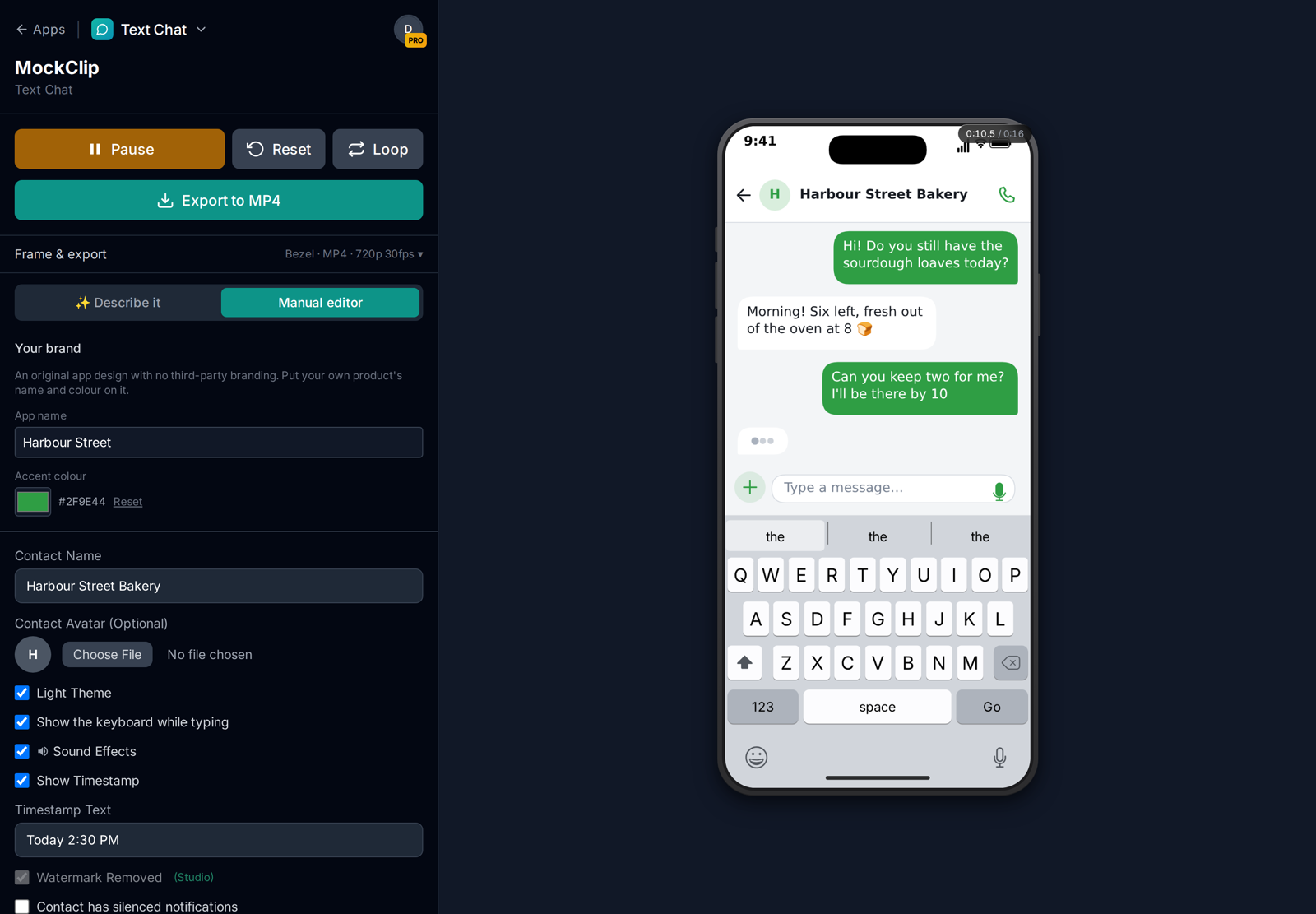
Faster drafts with AI. For a first draft, type the scene into Describe it ("a customer asks a bakery if sourdough is available and reserves two loaves") and the AI writes the messages and timing. Then edit the wording to the approved copy. The Describe it guide covers prompts. MockClip can also be used from Claude or ChatGPT through its MCP connection, which returns a link to the finished clip; see connecting MockClip to Claude and ChatGPT.
Step 4: Choose the deliverable format
Deliver what the client's editor or platform actually needs.
| Deliverable | When | MockClip setting |
|---|---|---|
| MP4, 9:16, Full HD | Vertical ads, Reels, TikTok, Stories | 9:16, Full HD |
| MP4, 1:1 | Feed placements | 1:1 square |
| MP4 with hand-held scene, 16:9 | YouTube, presentations, case studies | A 16:9 scene |
| MP4 with hand-held scene, 9:16 | Filmed-looking social ads | A 9:16 scene |
| Transparent MOV (ProRes 4444) | Notification overlays for another editor | Notification template, Background → Transparent |
| Green screen MP4 | Overlays for editors without alpha support | Notification template, Chroma Key |
| GIF | Email, slides, websites | GIF Animation |
If the client's in-house editor will cut the final video, ask which editor they use. The guides for Premiere Pro, DaVinci Resolve and CapCut explain the import side, and you can send the relevant one with your files.
Three example briefs
The app launch (agency, B2C app). The client is launching a meal-planning app and wants a 15-second vertical ad. The brief: two flatmates arguing about dinner, one opens the app, the argument ends. The deliverables are a 9:16 Full HD MP4 for Reels and TikTok, a 1:1 for feed, and a 9:16 hand-held scene version that looks filmed. Because it is a paid campaign for the client's own product, the chat is built in the brand-free Text Chat with the app's colour, and a Lock Screen Notification from the app ("Tonight: 20-minute pesto pasta") opens the ad.
The recruitment video (in-house team). HR wants a 60-second video for a careers page. The chat is a short team conversation in Text Chat welcoming a new starter, in the company's colour, cut between interviews with real employees. The deliverable is a 3:2 landscape MP4 that sits in a 16:9 edit, with a light theme to match the office footage.
The phishing awareness module (training company). A security trainer needs five short clips of suspicious texts for an e-learning course: a fake parcel delivery, a fake bank alert, a "boss" asking for gift cards. Each one is a Text Chat conversation or a Lock Screen Notifications sequence, exported as MP4 at 720p for the course player. Every name, number and link in the messages is invented and clearly fake, so nobody can follow them by accident.
Step 5: Revisions
Even with signed-off copy, expect a round of timing notes: "can the second message come in faster", "hold on the last one longer". Habits that keep revisions quick:
- Keep the script and settings with the project. Save the approved messages, delays, theme and frame in your project folder, so re-entering a chat for a revision takes minutes.
- Number your exports. "bakery-chat-v3-9x16.mp4" saves confusion when there are several placements and several rounds.
- Batch the placements. Once the 9:16 version is approved, export the 1:1 and any scene versions from the same chat in one sitting.
- Separate timing from copy changes. A timing change is a re-export. A copy change after sign-off is a change request, and it is fair to treat it as one.
Brand safety for client work
This is the question agencies ask most, and MockClip's terms answer it directly. On Free, Pro and Creator, the videos you make are for your own content, monetised posts on your own channels included. Work for clients and paid ads need the Studio plan. And MockClip's iMessage, WhatsApp, Instagram DM, Messenger, Slack and other real-app templates recreate apps whose designs are their owners' trademarks: MockClip is not affiliated with those companies, its licence grants no rights in their brands on any plan, Studio included, and the terms say to use a brand-free app for ads and client work.
MockClip's brand-free apps exist for exactly that: original designs that resemble no real product, under the client's own name and accent colour.
- Text Chat — a modern messaging app with typing, reactions and read receipts
- Lock Screen Notifications — notifications from the client's own app on a lock screen
- AI Assistant Chat — an AI assistant under the client's product name
- Dating Swipe — a swipe app with the client's wordmark
They are free to try with a watermark, so you can build a draft for the pitch before the job is confirmed. The final, watermark-free export for the client is a Studio export.
Two more rules that apply whatever the app:
- Do not use real people's details. Use made-up names and numbers, or get written permission. If a real customer conversation inspired the script, rewrite it and remove anything that identifies the customer.
- Claims in bubbles are still claims. If a message says "it saved me $41 a month", the client has to be able to stand behind it, exactly as in a voice-over.
Pricing a chat mockup job
Building the chat itself is now a small part of the job, so price the parts that take skill: the script, the timing, the integration into the edit, and the versions. A typical breakdown for a freelancer:
- Script and copy sign-off
- Building and timing the chat, one placement
- Additional placements (1:1, 16:9, scene versions)
- Integration into the client's edit, if you are cutting it
- Revision rounds beyond the first
Tools are a business cost. Studio is the MockClip plan that covers client work and paid ads, and every paid plan can get a company invoice with your VAT number. The pricing page has the current prices.
Small businesses doing it themselves
Not every client hires an agency. A café, a salon or a garage can make its own chat video in an afternoon:
- Pick a real question customers ask: "do you have a table for four tonight?", "can I book a cut for Saturday?".
- Write the answer the business really gives, short and friendly.
- Build it in the brand-free Text Chat with the business's name and logo as the contact and its colour as the accent.
- Export a 9:16 MP4 and post it as a Reel or Story with a line like "Book in 30 seconds, just send us a message".
A business posting on its own channels is making its own content, which every plan covers. Boosting that post or running it as an ad is paid advertising, which needs Studio.
Ideas that suit small businesses particularly well: a regular asking "the usual?" and getting a friendly yes, a last-minute booking that still works out, a customer sending a photo of the finished result with a thank-you, or the business announcing a new opening time. Keep the replies in the owner's real voice; customers can tell when the copy was written by someone else.
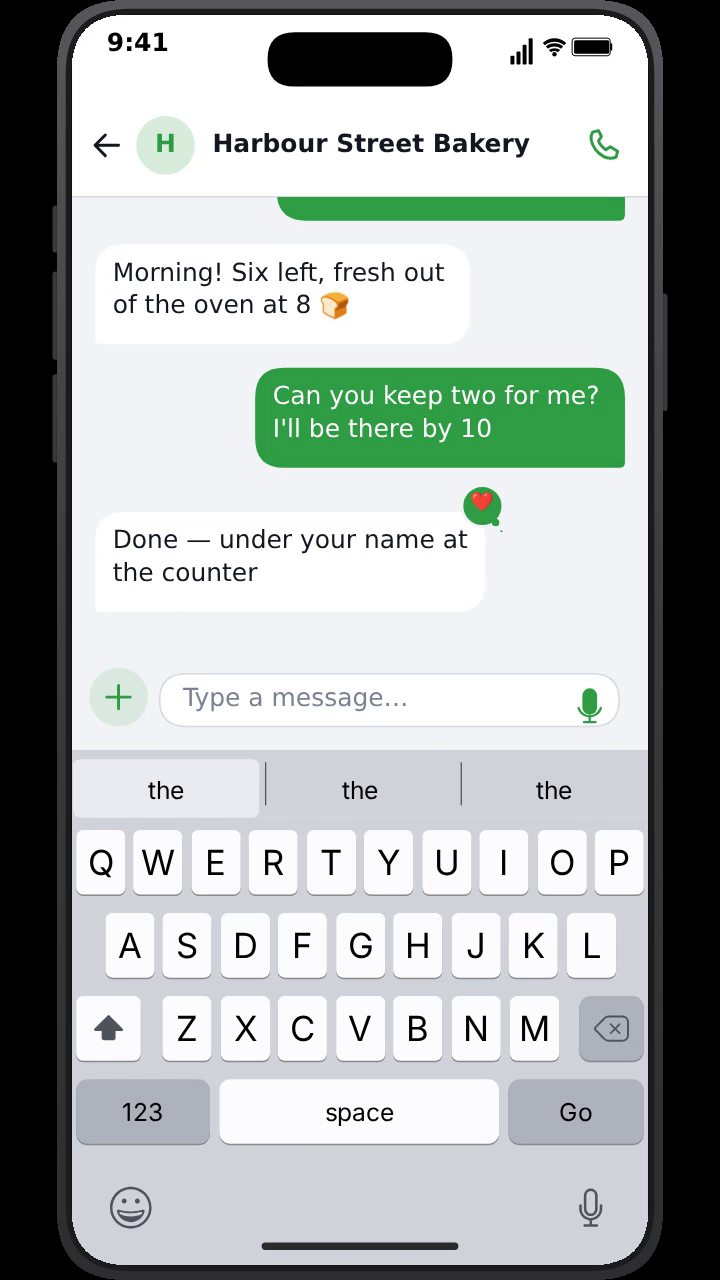
The demo at the top of this post is exactly that kind of clip. It is the most honest kind of chat video: it shows the real experience of dealing with the business.
Write the approved conversation, set the timing, and export every placement your client needs.
Build a client chat mockupRelated guides
For the filmed look without a shoot, read phone screen replacement without After Effects. For creator-led Instagram DM formats, see Instagram DM videos for influencer marketing. And for every export option, the export settings guide lists formats, sizes and frame rates.
Frequently Asked Questions
What is a chat mockup for a client video?
It is an animated phone conversation made for a client's video: an ad, a product launch, an explainer, a testimonial or a training video. Instead of filming a real phone, the conversation is built and timed in a tool like MockClip and exported as a video clip for the edit.
Which plan should an agency or freelancer use?
Studio. On Free, Pro and Creator, MockClip videos are for your own content, monetised posts on your own channels included; work for clients and paid ads need Studio. Studio includes everything in Creator (transparent MOV and WebM, 60fps, hand-held phone scenes) and the brand-free apps, which are the templates made for client work. Every paid plan can get a company invoice with your VAT number.
Can I show WhatsApp or iMessage in a client's video?
MockClip's real-app templates recreate designs owned by other companies, MockClip is not affiliated with them, and its licence grants no rights in those brands on any plan. For client work and ads, MockClip's terms point you to the brand-free apps: original designs under the client's own app name and colour, on the Studio plan.
How do I handle revisions on a chat mockup?
Get the message copy signed off in writing before you animate, keep the script with the project, and expect timing tweaks rather than copy changes. Because a MockClip export takes a minute or two, re-exporting a revised chat is faster than re-editing a hand-built animation.
Can I use a real customer conversation?
Only with permission, and only after removing personal details: names, numbers, addresses, order numbers. In most cases it is better to write a short conversation based on the real one, with made-up names, and have the client approve it.
Related Articles
Text Message Ad Creatives for Meta and TikTok Ads (2026)
How to make text message ad creatives for Meta and TikTok ads: hook formats, script structure, specs and placements, and how to build the chat video in minutes.
Brand-Free App Mockups for Ads: Chat, Notification & AI UIs
Original, unbranded app mockups for ads and client videos: a text chat, lock screen notifications, an AI assistant and a dating app, in your own name and colour
Phone Screen Replacement Without After Effects (2026 Guide)
Put your chat or app animation on real footage of a hand holding a phone without After Effects, Mocha or keyframed corner pins: hand-held scenes in the browser.
UGC Text Message Ad Scripts: 30 Chat Hooks for Paid Social
30 UGC-style text message ad scripts and chat hooks for Facebook, Instagram and TikTok ads, sorted by product type, with timing notes and how to build each one.
Instagram DM Video for Influencer Marketing Content
Create realistic fake Instagram DM conversation videos for influencer outreach, brand collab reveals, and sponsorship storytelling on TikTok, Reels, and Shorts.