Text Message Ad Creatives for Meta and TikTok Ads (2026)
Scroll through any ad library for a direct-to-consumer brand and you will find the same format again and again: a phone screen, a conversation between two friends, and a product that one of them cannot stop talking about. Text message ads work because they do not look like ads. A chat is something people read by reflex, and a recommendation from a friend carries a weight that a voice-over never will.
This guide is for media buyers, agencies and small brands making these creatives for Meta (Facebook and Instagram) and TikTok. It covers why the format works, the scripts that hold attention, the specs that matter for each placement, and a fast way to produce the conversation itself without screen recording a real phone.
Why text message ads convert
Three things make a chat conversation an unusually strong ad unit.
It reads like content, not advertising. On TikTok and in Reels, an ad competes with the post before it and the post after it. A polished product shot announces itself as an ad in the first frame. A grey message bubble does not. The viewer starts reading before they decide whether to keep watching, and reading is a commitment.
The structure creates curiosity. A conversation unfolds in small steps, and each new bubble is a tiny reveal. "Ok I need to tell you something" is an open loop. Viewers stay to see the next message, and the next one, which is exactly what both platforms reward when they decide how widely to show an ad.
It frames the product as a recommendation. In a chat, the product is mentioned by a person, to a person, in the middle of a real-sounding exchange. That is the oldest form of marketing there is, and the format borrows its credibility without having to say "testimonial".
None of this needs a big budget. A text message ad is one of the cheapest formats to test because the creative is just words and timing. You can write ten variants in an afternoon, change only the first message in each, and let the ad platform tell you which hook wins.
The anatomy of a text message ad
Most high-performing chat ads follow the same four beats. The timings below are a starting point for a 15-second creative.
| Beat | Time | What happens | Example |
|---|---|---|---|
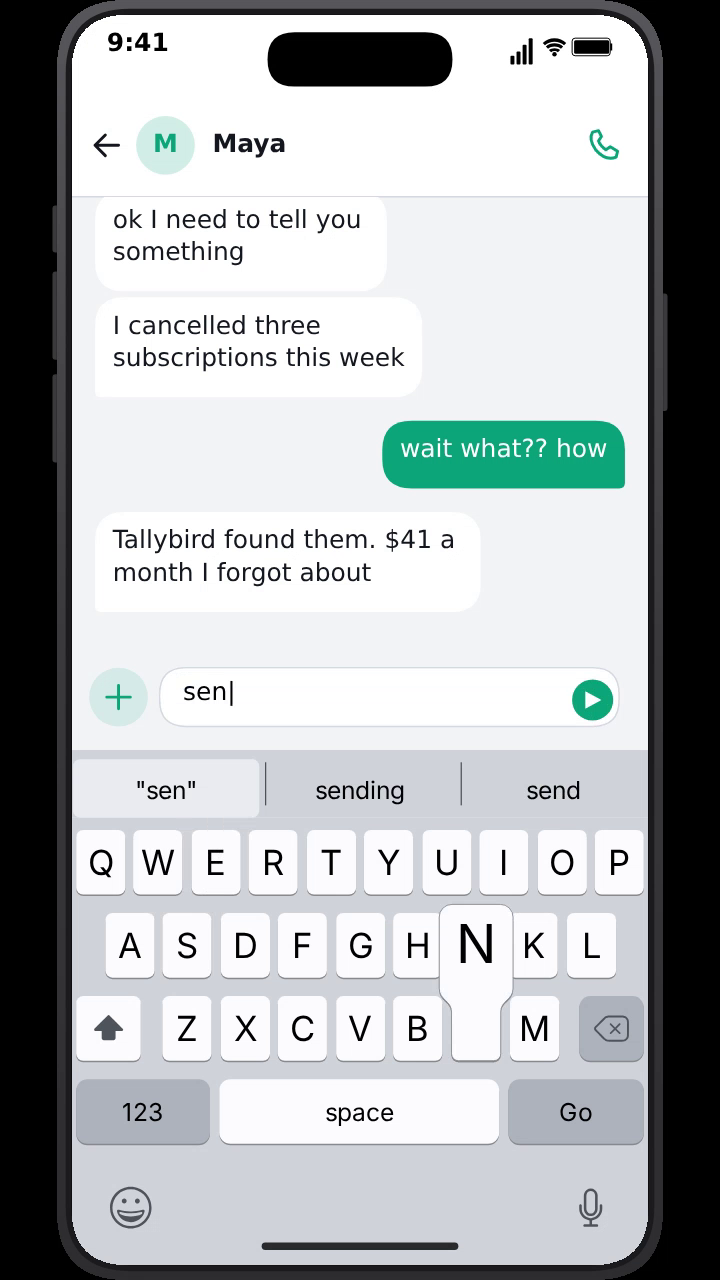
| Hook | 0–2 s | A first message that opens a loop | "ok I need to tell you something" |
| Problem | 2–6 s | The relatable pain, in the friend's words | "I cancelled three subscriptions this week" |
| Product | 6–11 s | The product named as the reason things changed | "Tallybird found them. $41 a month I forgot about" |
| Payoff / CTA | 11–15 s | A reaction and an implied next step | "sending me the link right now" |
A few rules make the difference between a chat that feels real and one that feels written by a marketing team:
- Write like people text. Lowercase, short lines, one idea per bubble. Two short bubbles in a row read faster than one long one.
- Let the friend sound sceptical. "wait what?? how" gives the viewer permission to be sceptical too, and makes the answer land harder.
- Name the product once, clearly. A chat that repeats the brand name three times stops sounding like a chat.
- Show, do not claim. "It found $41 a month" is concrete. "It's the best budgeting app" is an ad.
- End on a reaction, not a slogan. A tapback, a "downloading it now", or a screenshot reply is the call to action. Put the actual offer in the ad's primary text and button.
For more hook lines and full scripts by product category, see chat ad hooks and UGC text message ad scripts.
Specs and placements for Meta and TikTok
The conversation is the creative, but it has to fit the placements you are buying. The safest workflow is one vertical master and a square cut-down.
Vertical 9:16 for TikTok, Reels and Stories. This is where chat ads perform best, because the phone fills the screen and the format feels native. MockClip exports 9:16 at 720×1280 or 1080×1920 (Full HD). Use Full HD for paid placements.
Square 1:1 for feed. Facebook and Instagram feed placements also take square video. MockClip's 1:1 square export lays the six chat apps out to fit the square, so the conversation stays readable instead of being cropped from a tall phone.
4:5 feed. MockClip does not export 4:5 directly. If you want a 4:5 feed version, place the 1:1 or 9:16 export on a 4:5 canvas in your editor and fill the rest with a brand colour, a headline or a product shot.
Leave room for the platform UI. Both TikTok and Reels draw the caption, profile name and buttons over the bottom and right side of the video. In a chat ad the newest message appears at the bottom of the conversation, so check that the last bubble is not hidden behind the caption. A phone frame (MockClip's iPhone bezel) helps here, because it keeps the chat inset from the edges of the video.
Sound on and sound off. Chat ads read perfectly with the sound off, which is how many people scroll. With the sound on, MockClip's send and receive sounds and keyboard taps add a real-phone feel. Add your music or voice-over in your editor or in TikTok's or Meta's ad tools.
A full list of formats, frame rates and sizes is in the export settings guide.
How to build the creative in MockClip
MockClip animates the conversation in your browser and exports it as a video file, so there is nothing to screen record and no real phone with notifications to clear.
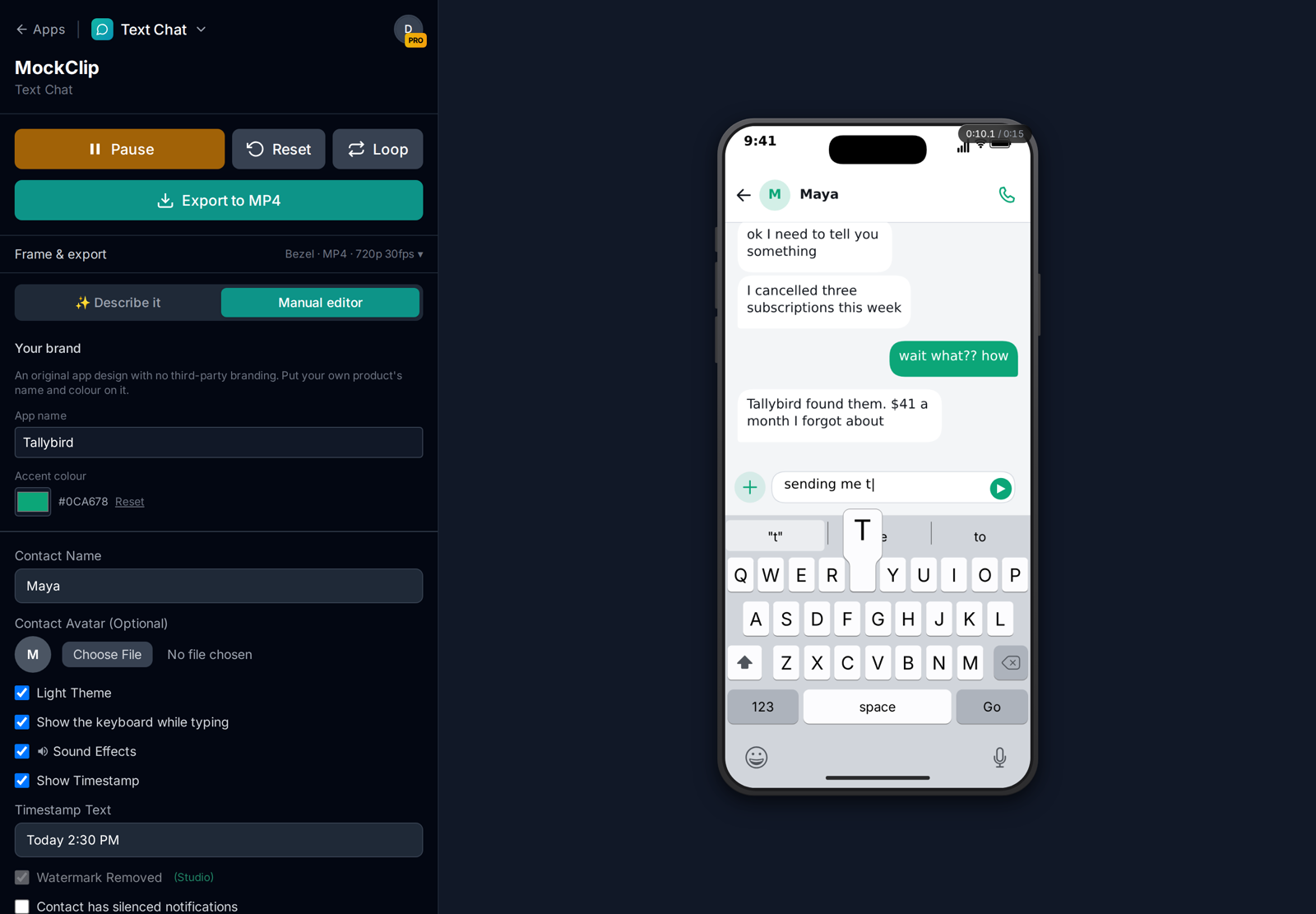
- Open the brand-free Text Chat app. It moves like a modern messaging app (typing indicator, reactions, read receipts, the keyboard sliding up) without recreating anyone else's product, which is what paid ads need (see below).
- In Your brand, set the Accent colour to your brand colour; your side of the conversation takes it. Then set the contact name. A first name and a single-letter avatar is the most believable choice.
- Write the messages. For each bubble, choose the sender, type the text and set the delay before it appears. Turn on the typing indicator for replies that should feel considered.
- Add the small details that make a chat feel real: a reaction on the product message, "Delivered" and "Read" under the last bubble, the keyboard sliding up while "you" type. Text Chat is built on the same engine as MockClip's iMessage template, so the iMessage tutorial covers every option.
- Under Frame & export, keep the iPhone bezel on and the 9:16 format for the vertical master, set Quality to Full HD, and press Export. The MP4 renders in your browser and downloads.
- Change the first message, export again, and repeat for every hook you want to test.
If you would rather start from a sentence, the Describe it mode writes the whole conversation for you. Type something like "a friend tells another how an app found three subscriptions she forgot about, ending with 'sending me the link'", then adjust single moments by time. The Describe it guide covers the prompt rules.
Real-app templates or brand-free apps
MockClip's iMessage, WhatsApp, Instagram DM and other real-app templates are faithful recreations of real apps, and those apps and their designs are their owners' trademarks. MockClip is not affiliated with them, and its licence grants no rights in those brands on any plan. They are made for illustrating, explaining, reviewing and parodying those apps in your own content. For paid ads and client work, MockClip's terms point you to the brand-free apps.
The brand-free apps are original designs that resemble no real product. Text Chat behaves like a modern messaging app but carries no third-party branding, and its accent colour is yours. There are also brand-free Lock Screen Notifications, whose banners come from your own app name, an AI Assistant Chat under your product's name, and a Dating Swipe app. They are free to try with a watermark; using them in paid ads (and watermark-free export) needs the Studio plan.
Whatever you choose, check your ad platform's own rules for the claims you make in the conversation. A chat ad is still an ad, and the same rules on testimonials and results apply to words in a bubble as to words in a voice-over.
Testing text message ads
Chat ads are ideal for structured creative testing because every variable is a line of text.
- Test hooks first. Keep the body and payoff identical and change only the first one or two messages. The hook decides most of a short-form ad's performance.
- Test the sender. The same script performs differently when the recommender is a friend, a sibling, a partner or a co-worker. Change the contact name and the tone.
- Test the format. The same story told as a chat, as a sequence of lock-screen notifications from your app, or as a question to an AI assistant lands differently. The brand-free apps cover all three.
- Test the length. Cut one message from the middle and see whether the shorter version holds attention better.
- Keep a naming scheme. Name each export after its hook ("hook-cancelled-3-subs.mp4") so the winning line is obvious in your ads manager.
Because each variant takes a minute to export, you can run a ten-hook test without booking a shoot or briefing an editor.
Angles by industry
The same four beats adapt to almost any product. A few starting angles that suit the format:
- Subscription and fintech apps: money found, money saved, a bill avoided. Numbers make the payoff concrete.
- Beauty and personal care: a compliment from a friend ("what did you do to your skin"), then the product as the answer.
- Food and delivery: a late-night craving, a friend with the solution, a screenshot of the order.
- Local businesses: the customer chat itself. A bakery, a salon or a garage can turn a real (anonymised) WhatsApp exchange into an ad that shows how easy it is to book.
- B2B software: a chat between colleagues in which one rescues a deadline with the tool, or the tool's own AI assistant doing the job in the brand-free AI Assistant Chat.
- Events and launches: a countdown in messages ("are you coming saturday?"), with the date and place as the payoff.
Common mistakes
- A hook that only makes sense later. "You won't believe this" is weaker than a specific open loop. The first bubble has to stand on its own.
- Bubbles appearing too fast. If viewers cannot finish reading one message before the next arrives, they swipe away. Give each bubble at least the time it takes to read it twice.
- Too much text per bubble. A paragraph in a chat bubble looks like copy. Split it.
- No visual change for the product moment. Mark it: a reaction, a typing pause before it, or an image message with the product.
- Details that break realism. A battery at 100%, perfect punctuation and no typing indicators all make a chat look fake. The post on why fake chat videos look fake lists the tells.
Which plan fits ad work
You can write, build and preview an ad on any plan. Every template, MP4 and GIF at 720p and Full HD, and the chroma-key background are free, with a small MockClip watermark; Pro removes it with a one-time payment, and Creator adds professional export (transparent MOV and WebM, 60 fps, hand-held phone scenes) and more volume. Using a video in paid advertising or in work for a client is what Studio adds: on Free, Pro and Creator, videos are for your own content, monetised posts on your own channels included. The pricing page has the current prices and the terms the exact wording.
Write the conversation, set the timing, export a 9:16 or square ad creative in your browser.
Make a text message adNext steps
Pick one product, write five hooks, and export five variants this week. If you need more script ideas, start with the chat ad hooks and UGC scripts. If the creative is for a client, the guide to chat mockups for client videos covers briefs, revisions and delivery. And if you want the conversation to appear inside live-action footage rather than full screen, see adding an iMessage scene in Premiere Pro or phone screen replacement without After Effects.
Frequently Asked Questions
What is a text message ad creative?
It is a paid social ad in which the story is told through an animated phone conversation: bubbles appear one by one, someone types, a reply lands. The product is mentioned by one of the people in the chat, the way a friend would recommend it, instead of by a voice-over or a banner.
Which aspect ratio should a text message ad be for Meta and TikTok?
Make the master in vertical 9:16, which fits TikTok, Reels and Stories. MockClip exports 9:16 at 720×1280 or 1080×1920, a 1:1 square at 1080×1080 for feed placements, and a 3:2 landscape. For a 4:5 feed slot, place the 9:16 or 1:1 export on a 4:5 canvas in your video editor.
How long should a text message ad be?
Keep the conversation itself to roughly 8 to 20 seconds. The first message has to work as the hook on its own, and the product should be named before the halfway point so viewers who drop off early still see it.
Can I use an iMessage or WhatsApp template in a paid ad?
MockClip's iMessage, WhatsApp and other real-app templates recreate apps whose designs belong to other companies, and MockClip's licence grants no rights in those brands on any plan. For paid ads, use a brand-free app: MockClip's original Text Chat, Lock Screen Notifications, AI Assistant Chat and Dating Swipe designs, which carry your own app name and colour. Paid ads need the Studio plan.
Which MockClip plan do I need for paid ads?
Studio. On Free, Pro and Creator you may use your videos in your own content, monetised posts on your own channels included. Work for clients and paid advertising need Studio, which also removes the watermark from the brand-free apps. You can build and preview an ad on any plan first. See the pricing page and the terms for details.
Related Articles
UGC Text Message Ad Scripts: 30 Chat Hooks for Paid Social
30 UGC-style text message ad scripts and chat hooks for Facebook, Instagram and TikTok ads, sorted by product type, with timing notes and how to build each one.
Chat Mockups for Client Videos: An Agency Workflow Guide
How agencies, freelance editors and small businesses make chat mockups for client videos: briefs, copy sign-off, app choice, revisions, brand safety, delivery.
Brand-Free App Mockups for Ads: Chat, Notification & AI UIs
Original, unbranded app mockups for ads and client videos: a text chat, lock screen notifications, an AI assistant and a dating app, in your own name and colour
ChatGPT Conversation Video for Product Marketing Demos
Create fake ChatGPT conversation videos for product demos and marketing. MockClip renders AI chat animations with streaming text as MP4 video.
How to Make a Fake iMessage Conversation Video (2026 Guide)
Complete 2026 guide to creating realistic fake iMessage conversation videos for TikTok, Reels, and Shorts — typing bubbles, tapbacks, MP4 export, no install.