Brand-Free App Mockups for Ads: Chat, Notification & AI UIs
Chat ads and phone mockups are one of the most effective formats in paid social, and they have one awkward question attached: whose app is on the screen? A conversation in a perfect recreation of iMessage or WhatsApp is instantly familiar, which is why it works. It also shows another company's interface in your ad: those designs are their owners' trademarks, and MockClip's licence grants no rights in them. That is why MockClip's terms say to use a brand-free app for ads and client work, and why brand teams, legal reviewers and ad platforms look twice at a real app in a paid campaign.
MockClip's brand-free apps answer that question. They are original app designs that resemble no real product: a text chat, lock screen notifications, an AI assistant and a dating app. They look and move like modern apps, and they carry your product's name and colour instead of anyone else's.
Why ads and client work need a brand-free design
Real-app templates are made for illustrating, explaining, reviewing and parodying those apps in your own content. Paid ads and client work are different, for MockClip's licence and for practical reasons:
- The licence. MockClip's licence covers its software and the videos it produces, not other companies' brands. For ads and client work, the terms point you to the brand-free apps, on the Studio plan.
- Brand guidelines. Many brand books say the brand should not appear alongside other companies' logos or interfaces.
- Corporate and regulated industries. Finance, health and enterprise clients often run every frame through legal review, and a third-party interface is one more thing to clear.
- Your own product's launch. If you are advertising an app, showing it inside someone else's messaging app muddies the message.
- Ad review. Platforms review ad creatives, and a creative that looks like another company's product can draw attention.
- Long-lived assets. A video that lives on a landing page for a year should not depend on whether a third party changes its design or its rules.
The fix used to be a custom design from a motion designer, which is slow and expensive for a ten-second chat. The brand-free apps are the quick version of that.
The four brand-free apps
Text Chat
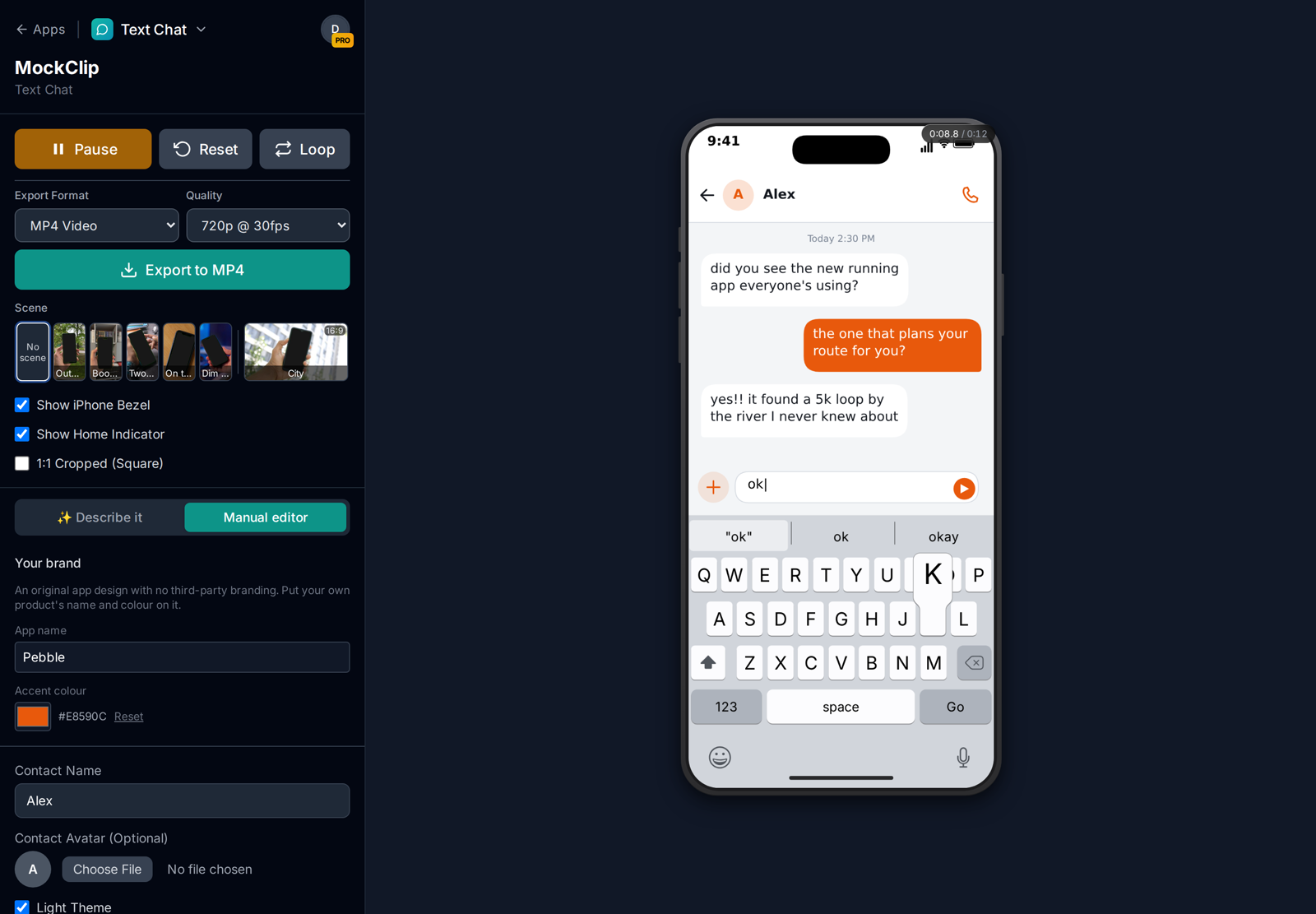
Text Chat is a modern messaging app: bubbles, typing indicators, reactions, read receipts, the keyboard sliding up while you type, image messages. Set the accent colour and your side of the conversation takes it. It is the brand-free counterpart to an iMessage-style chat, and it fits almost any chat ad or explainer script.
Lock Screen Notifications
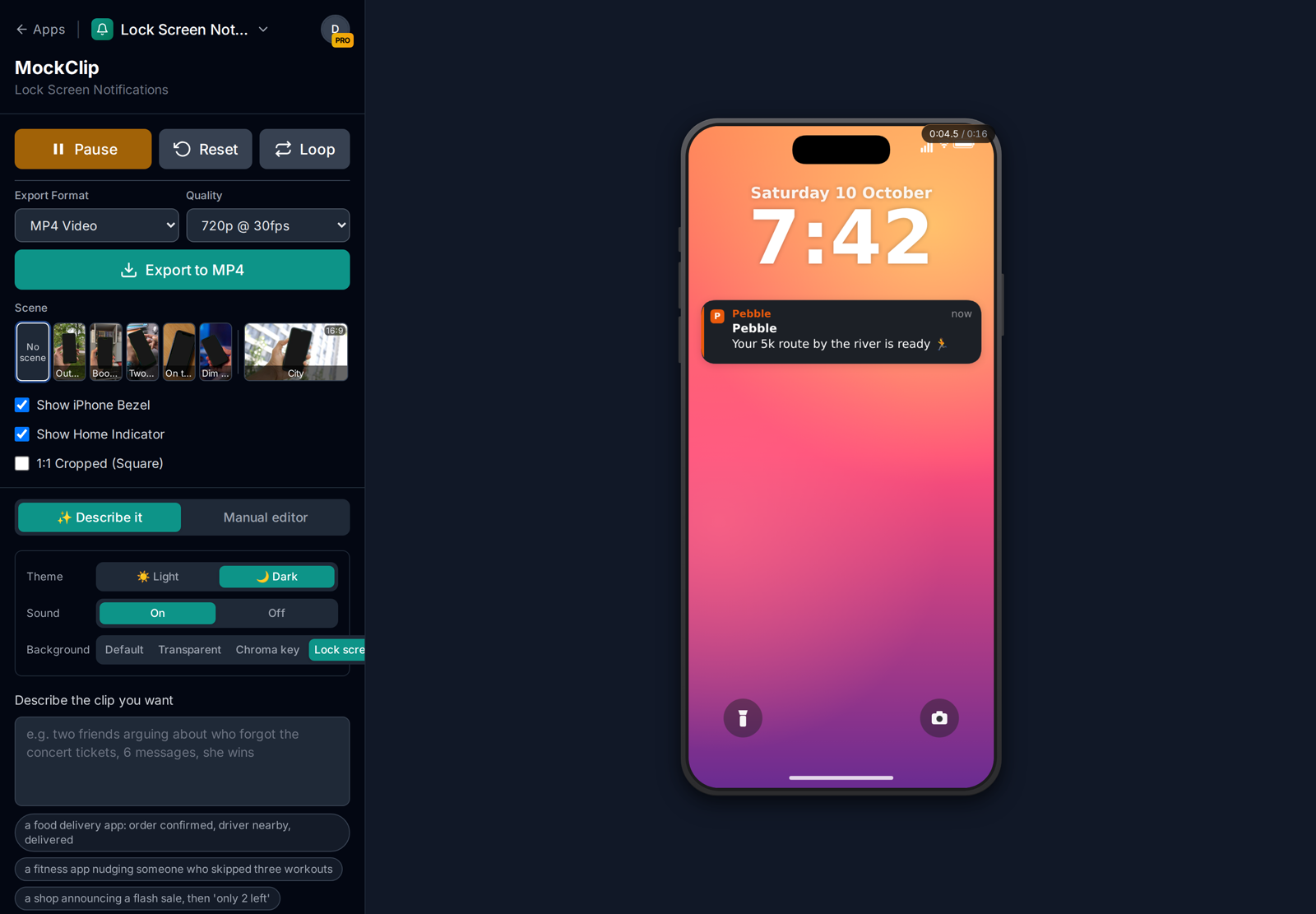
Lock Screen Notifications draws notification banners from your own app on a lock screen with a wallpaper, the date and a large clock. The app name you set appears on every banner as the app the notification comes from, its first letter becomes the app icon in your accent colour, and an accent edge runs down the side of each banner. Each banner then has its own title and message. Use it for product moments such as "your order is on its way", "new personal best", or "only 2 left" without showing anyone else's messaging app.
AI Assistant Chat
AI Assistant Chat is an AI assistant interface under your product's name. The name appears in the header and the composer, and your accent colours the logo, the bubbles and the send button. Replies stream in with formatting, action steps ("searching", "reasoning") and images. It is the right choice for AI product launches and feature demos where showing a well-known chatbot would advertise the wrong company.
Dating Swipe
Dating Swipe is a swipe app with your wordmark: profile cards, left and right swipes, and a mutual-match screen, with your accent on the buttons and badges. Use it for dating-adjacent products, events and playful "swipe through the options" product comparisons.
How to make a brand-free mockup
- Open one of the four apps: Text Chat, Lock Screen Notifications, AI Assistant Chat or Dating Swipe.
- In the Your brand panel, type your App name and pick an Accent colour. Each app starts with a made-up name ("Wavelet", "Nimbus", "Kindred") and a default colour until you set your own.
- Build the content as in any MockClip template: messages and timing for the chat apps, banners for the notifications, profiles for the dating app.
- Or use Describe it: type what should happen and the AI writes it. On a brand-free app, the AI keeps the result free of third-party brands and uses the app's own example ideas.
- Choose the frame under Frame & export (bezel, 9:16, square, or a hand-held scene) and export.
The brand-free apps also have their own sounds, so the export does not use another app's familiar send and receive tones.
Scripts that suit brand-free apps
Product recommendation (Text Chat). A friend tells another about your product. The classic text message ad, minus the third-party interface. More structures are in the UGC ad scripts.
The moment of value (Lock Screen Notifications). A sequence of notifications that tells the product's story: "Order confirmed", "Your driver is 2 minutes away", "Delivered. Enjoy!". Three banners can carry a whole ad.
The feature demo (AI Assistant Chat). A user asks your AI product to do the thing it does best, and the reply streams in under your brand. For a launch, follow it with a second chat that shows a follow-up question.
The comparison (Dating Swipe). Swipe left on the competitors' weaknesses, right on your product, then "It's a match". The format works for any "which one should I choose" message.
The reaction (Text Chat + Lock Screen). Open on the lock screen notification from your app, then cut to the chat where the user tells a friend. The pair makes a strong 15-second ad.
Making a brand-free mockup look like your product
A brand-free app is a neutral starting point. A few choices make it read as your product rather than as a generic app:
- Use your real brand colour. Enter the exact hex value from the brand guidelines in Accent colour. In the Text Chat it colours your side of the conversation; in the AI Assistant Chat, the logo, bubbles and send button; in Dating Swipe, the buttons and badges; on the lock screen, the app icon and the edge of each banner.
- Use your product name, exactly as it is written. Capitalisation matters: "Pebble" and "PEBBLE" read as different brands. The name field takes up to 24 characters, so short product names work best.
- Write in your product's voice. Notification copy is the most direct expression of a product's personality. Use the same wording your app really sends, or the wording you plan to send.
- Match the theme to the campaign. Light and dark themes both carry the accent colour; pick the one that fits the rest of the ad.
- Keep the rest of the frame on brand. In your editor, the space around a bezel-less 9:16 or a 1:1 export is where the logo, the headline and the offer go.
A 15-second ad built from brand-free apps
Here is a complete paid social ad using two of the apps, for a made-up running app called Pebble:
- 0–4 s, Lock Screen Notifications. On a sunset wallpaper, a banner from Pebble: "Your 5k route by the river is ready 🏃". A second banner: "New personal best: 24:12. Nice one!"
- 4–13 s, Text Chat. Cut to a chat. "did you see the new running app everyone's using?" — "the one that plans your route for you?" — "yes!! it found a 5k loop by the river I never knew about" — "ok downloading it tonight", with a thumbs-up reaction.
- 13–15 s, end card in your editor. The Pebble logo, the app store badges and the offer.
Every frame shows Pebble's name and orange, and nothing on screen belongs to another company. The two clips are exported separately as 9:16 Full HD MP4s and joined in any editor; the same pair, exported as 1:1, covers the feed placements.
Brand-free apps with scenes, AI and MCP
- Hand-held scenes. Put your branded chat on real footage of a hand holding a phone. On a scene, Lock Screen Notifications draw over the lock screen in the footage. See phone screen replacement without After Effects.
- Every export option. Each brand-free app has the export options of the app it is built on: MP4 and GIF, square, bezel-less, and transparent MOV or WebM for the notifications.
- MCP. The four apps are tools in MockClip's MCP connection, so Claude or ChatGPT can make a brand-free clip from a description. See connecting MockClip to Claude and ChatGPT.
Who uses brand-free apps
Performance marketing teams running many chat-ad variants for one product. A brand-free chat keeps every variant on brand and clear of third-party interfaces, so creative review is about the copy, not the app on screen.
Agencies and freelancers delivering ads for clients whose brand books are strict. The client's app name and colour go on the mockup, and the deliverable can sit in a campaign for as long as the client wants.
App and SaaS founders making launch videos. A product that sends notifications or has an AI assistant can show those moments under its own name before the real app's screens are final.
Event and community organisers announcing dates, drops and reminders as lock-screen notifications from "their" app, which reads as more official than a text from a friend.
Educators and trainers who want a realistic but neutral messaging app for scenarios such as online safety or customer service training, without tying the lesson to one real product.
Real-app templates or brand-free apps?
| Real-app templates (iMessage, WhatsApp…) | Brand-free apps | |
|---|---|---|
| Recognition | Instant: viewers know the app | A modern app look, unfamiliar name |
| Your branding | Only in the content | App name and accent colour |
| Third-party interfaces in the frame | Yes | No |
| Best for | Organic content, entertainment, stories | Paid ads, client work, product launches |
| Plan for watermark-free export | Pro, Creator or Studio | Studio |
| Client work and paid ads | Not covered: no rights in those brands on any plan | Studio |
Many teams use both: real-app templates for organic posts on their own channels where familiarity matters, and brand-free apps for paid campaigns and client deliverables. The guide to chat mockups for client videos covers how to decide per brief.
What "brand-free" does and does not mean
The brand-free apps are original designs: their layouts, colours, icons, names and sounds do not copy a specific real product. Each was reviewed for resemblance to existing apps before release. That makes them a safer choice for commercial work than a recreation of a real app.
It does not remove your normal responsibilities as an advertiser. The words in the bubbles are still advertising claims, testimonials still need to be genuine, and the people and names in the chat should be made up or used with permission. If you put another company's name or logo into a brand-free chat yourself, it is no longer brand-free.
Which plan you need
The brand-free apps are free to try with a watermark, like every MockClip app. On Free, Pro and Creator, MockClip videos are for your own content, monetised posts on your own channels included. Studio adds the licence for work for clients and paid ads, exports the brand-free apps without a watermark, and includes everything in Creator: transparent MOV and WebM, 60 fps and hand-held scenes. The pricing page has the current prices and the terms the exact wording.
Put your own app name and colour on an original chat design and build an ad-ready clip in minutes.
Try the brand-free Text ChatRelated guides
To plan the ad itself, start with text message ad creatives for Meta and TikTok. For more mockup formats across platforms, see the app mockup videos guide.
Frequently Asked Questions
What is a brand-free app mockup?
It is an animated phone interface that looks like a modern, real app but resembles no specific product: no third-party logos, names or recognisable designs. MockClip's brand-free apps are original designs that you put your own app name and accent colour on, for ads and client videos.
Which brand-free apps does MockClip have?
Four: Text Chat (a messaging app with typing indicators, reactions and read receipts), Lock Screen Notifications (banners from your own app on an iOS-style lock screen), AI Assistant Chat (an AI assistant with your product's name, streamed replies and action steps), and Dating Swipe (a swipe app with your wordmark and a match screen).
Why not just use the iMessage or WhatsApp template in an ad?
MockClip's iMessage, WhatsApp and other real-app templates recreate designs that are their owners' trademarks. MockClip is not affiliated with those companies and its licence grants no rights in their brands on any plan, so its terms say to use a brand-free app for ads and client work. The brand-free apps tell the same story without looking like anyone else's product.
Which plan do I need?
The brand-free apps are free to try with a watermark. Using MockClip videos in client work or paid ads needs the Studio plan, which also exports the brand-free apps without a watermark. On Free, Pro and Creator, videos are for your own content, monetised posts on your own channels included.
Can I use the brand-free apps with hand-held scenes and AI?
Yes. Each brand-free app works with the Describe it AI mode, with every export option of the app it is built on, and with hand-held scenes, so you can put your own branded chat on real footage of a hand holding a phone. They are also available as tools in MockClip's MCP connection for Claude and ChatGPT.
Related Articles
Text Message Ad Creatives for Meta and TikTok Ads (2026)
How to make text message ad creatives for Meta and TikTok ads: hook formats, script structure, specs and placements, and how to build the chat video in minutes.
Chat Mockups for Client Videos: An Agency Workflow Guide
How agencies, freelance editors and small businesses make chat mockups for client videos: briefs, copy sign-off, app choice, revisions, brand safety, delivery.
UGC Text Message Ad Scripts: 30 Chat Hooks for Paid Social
30 UGC-style text message ad scripts and chat hooks for Facebook, Instagram and TikTok ads, sorted by product type, with timing notes and how to build each one.
Phone Screen Replacement Without After Effects (2026 Guide)
Put your chat or app animation on real footage of a hand holding a phone without After Effects, Mocha or keyframed corner pins: hand-held scenes in the browser.
App Mockup Videos for Social Media: A Complete Guide
How to make app mockup videos for TikTok, Reels and Shorts: every MockClip template, the editor steps, export settings per platform and the mistakes to avoid.