Gemini AI Chat Skits for TikTok and Shorts: Skit Guide
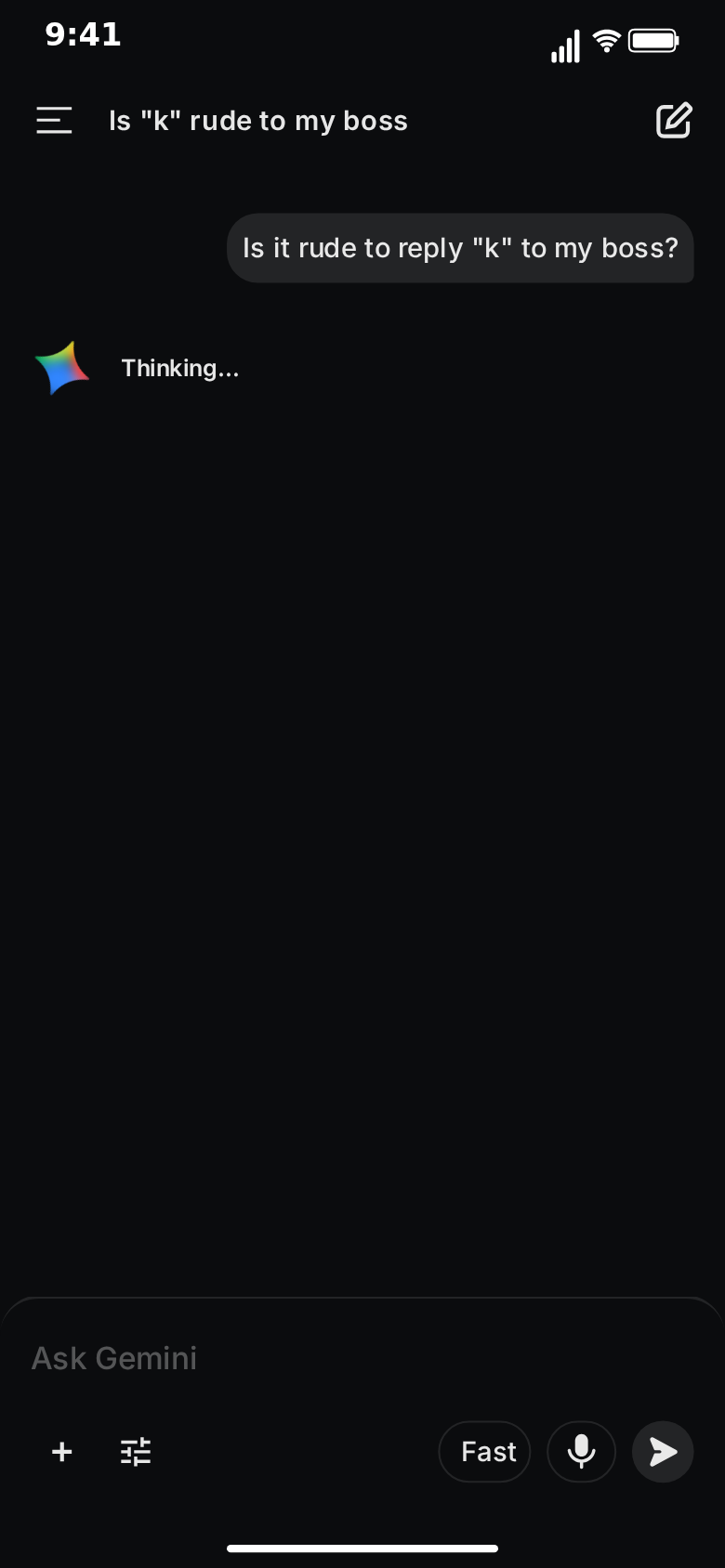
AI assistants have become a comedy setting in their own right. Everyone has asked one a question they would not ask a person, and everyone has received an answer that was far too thorough, far too formal or slightly beside the point. That gap between a casual question and an earnest, well-structured reply is a reliable source of jokes, and a fake Gemini chat is a fast way to stage it.
This guide covers how to turn those moments into short-form videos with MockClip's Gemini template: the hooks, the pacing, five ready-to-build skits, and the export settings for TikTok, Reels and Shorts. Every line in these skits is written by you. Nothing is sent to Google and no AI answers anything; the template only draws the conversation you script.
Why AI chat skits perform
Three things make the format work.
Instant recognition. The grey question bubble on the right, the multicoloured sparkle, the plain full-width answer underneath: viewers know what they are looking at before they read a word. That saves the first second, which is the one that matters most.
A built-in pause. Before every reply, the Gemini sparkle spins and pulses for as long as you choose. That is a timing tool most chat formats do not have. You control exactly how long the audience waits for the answer, and waiting is where anticipation builds.
A voice everyone knows. Assistants answer in a recognisable register: a direct first sentence, a tidy list, a polite offer at the end. Put a silly question into that register and the contrast does the work.
The hook: the first two seconds
The question is the hook. A new chat opens on the "Hello" home screen and viewers read the question while it types into the "Ask Gemini" bar, so it has to land as text in about two seconds.
Hooks that work:
- A relatable dilemma. "Is it rude to reply 'k' to my boss?"
- A question nobody would ask a person. "How many days can I wear the same hoodie before people notice?"
- An oddly specific request. "Write a breakup text for my gym membership"
- A petty argument. "Is a hot dog a sandwich? My flatmate says no. Settle this."
Keep the question under about twelve words. The conversation title appears in the top bar halfway through the first thinking pause, so it can add a second line of context, or a second joke, while the viewer waits for the answer.
For short-form, get to the question fast. Lower the Wait on the first message so typing starts almost at once, or untick Typed on the keyboard on it so the question appears straight away and the home screen gives way to the chat immediately. Keep the typed opening when watching someone hesitate over the question is part of the joke. If the home screen's "New!" banner distracts from the hook, untick Show Banner in the Home tab.
Pacing: where the pauses go
A Gemini skit has three timing controls that matter:
- Typing speed for the question (Chars/s). Fourteen characters per second is the default. Slower typing makes the question feel hesitant, which suits embarrassing questions.
- Thinking time for the reply. The default is 1.2 seconds. This is the main comedic lever.
- Reply speed (Stream chars/s). The default is 100 characters per second, and the reply takes its length divided by that speed. The whole reply is revealed from top to bottom as one block, behind a soft edge that slides down.
The rules of thumb for skits:
- Short question, long pause. A two-second question followed by three or four seconds of spinning sparkle tells the audience the answer is going to be a lot.
- Add a thinking label for extra drama. Type "Thinking…" into the While thinking label and it sits beside the sparkle during the pause.
- Reveal the reply slower than the default. 45 to 60 characters per second lets viewers read along as the reply appears, which they need to do for the joke to land.
- Hold the end. The action row and the disclaimer fade in when the reply finishes. Leave a second or two on that final frame so the punchline can sink in.
Five Gemini skits, ready to build
Each skit below lists the question, the reply and the settings. Swap in your own wording; keep the structure.
1. The over-serious answer
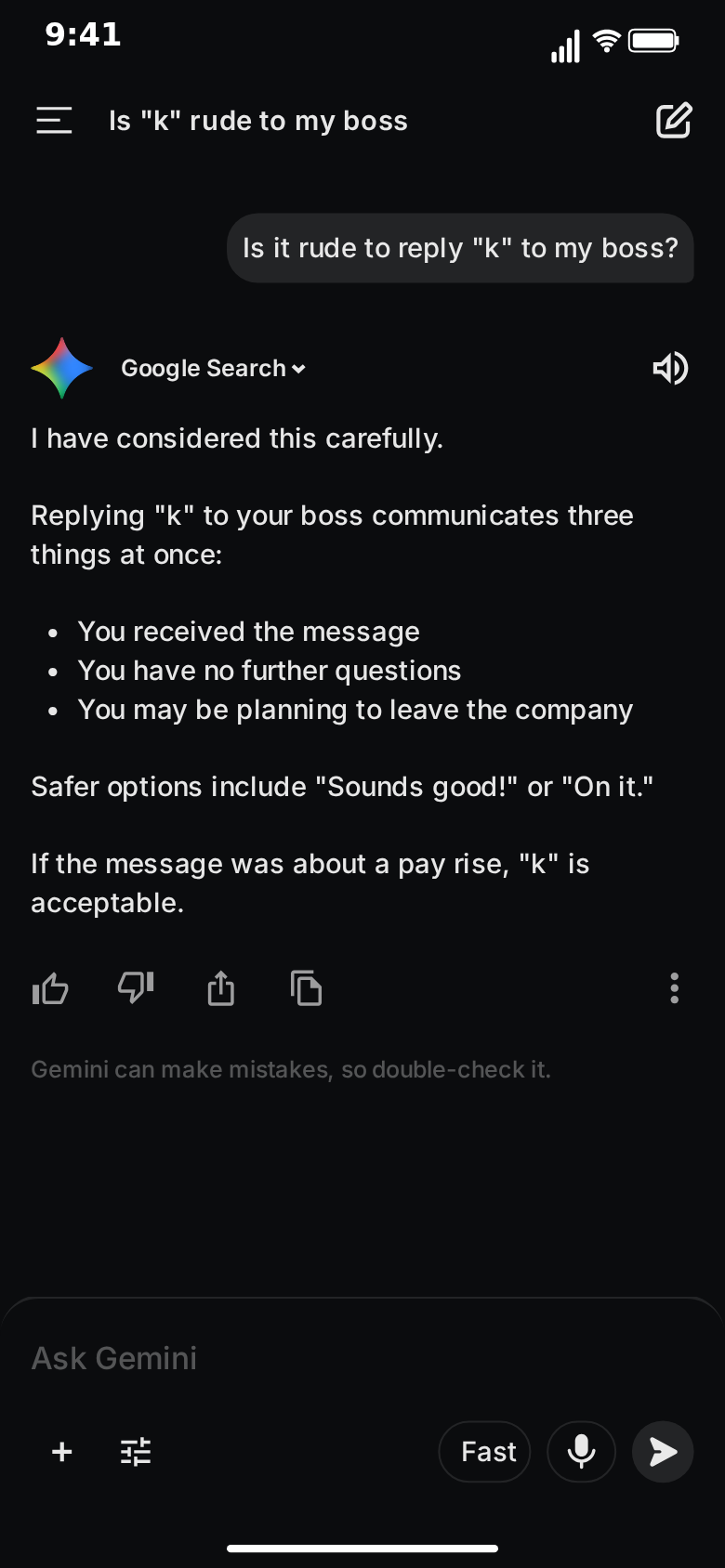
A casual question gets a careful, structured, completely deadpan answer.
- Title: Is "k" rude to my boss
- You: Is it rude to reply "k" to my boss?
- Gemini: "I have considered this carefully." (blank line) "Replying "k" to your boss communicates three things at once:" (blank line) "* You received the message" / "* You have no further questions" / "* You may be planning to leave the company" (blank line) "Safer options include "Sounds good!" or "On it."" (blank line) "If the message was about a pay rise, "k" is acceptable."
- Settings: thinking 3 s with the label "Thinking…", 45 chars/s, action row on.
Why it works: the long pause promises a serious answer, the bullets deliver it, and the third bullet turns it. The last line is a second punchline for people who read to the end.
2. The literal answer
The assistant answers exactly what was asked, not what was meant.
- Title: Quick dinner idea
- You: what can I make for dinner in 5 minutes
- Gemini: "In five minutes you can make:" (blank line) "* A reservation" / "* A bowl of cereal" / "* Peace with the fact that it's toast again" (blank line) "Would you like a recipe for toast?"
- Settings: thinking 1.5 s, 55 chars/s.
Why it works: the list format sets up an expectation of recipes. The first bullet subverts it, and the last line keeps the deadpan going.
3. The settle-this argument
Two people use the assistant as a referee, and the referee refuses to pick a side.
- Title: Is a hot dog a sandwich
- You: Is a hot dog a sandwich? My flatmate says no. Settle this.
- Gemini: "This is a common debate, and both sides have strong arguments." (blank line) "* Structurally, it is bread around a filling" / "* Culturally, nobody orders a "sandwich" at a hot dog stand" (blank line) "The real answer is that you should not let this end the friendship."
- You (second message, typed): so I'm right
- Gemini: "Yes."
- Settings: thinking 2 s on the first reply, 4 s on the second; the second reply's long pause is the joke.
Why it works: a balanced answer, then a follow-up that forces a verdict. The longest pause in the clip goes in front of the shortest reply.
4. The error at the worst moment
The assistant fails right when the answer matters.
- Title: Wedding speech help
- You: My best man speech is in 10 minutes. Write me an opening line.
- Gemini: use the reply's Error field instead of an answer, with your own error wording, such as a short line saying something went wrong.
- Settings: thinking 4 s with "Thinking…" as the label, so the audience waits for an answer that never comes.
Why it works: the build-up is all pause. The error line is the punchline, and the stakes in the question make it hurt.
5. The chats list reveal
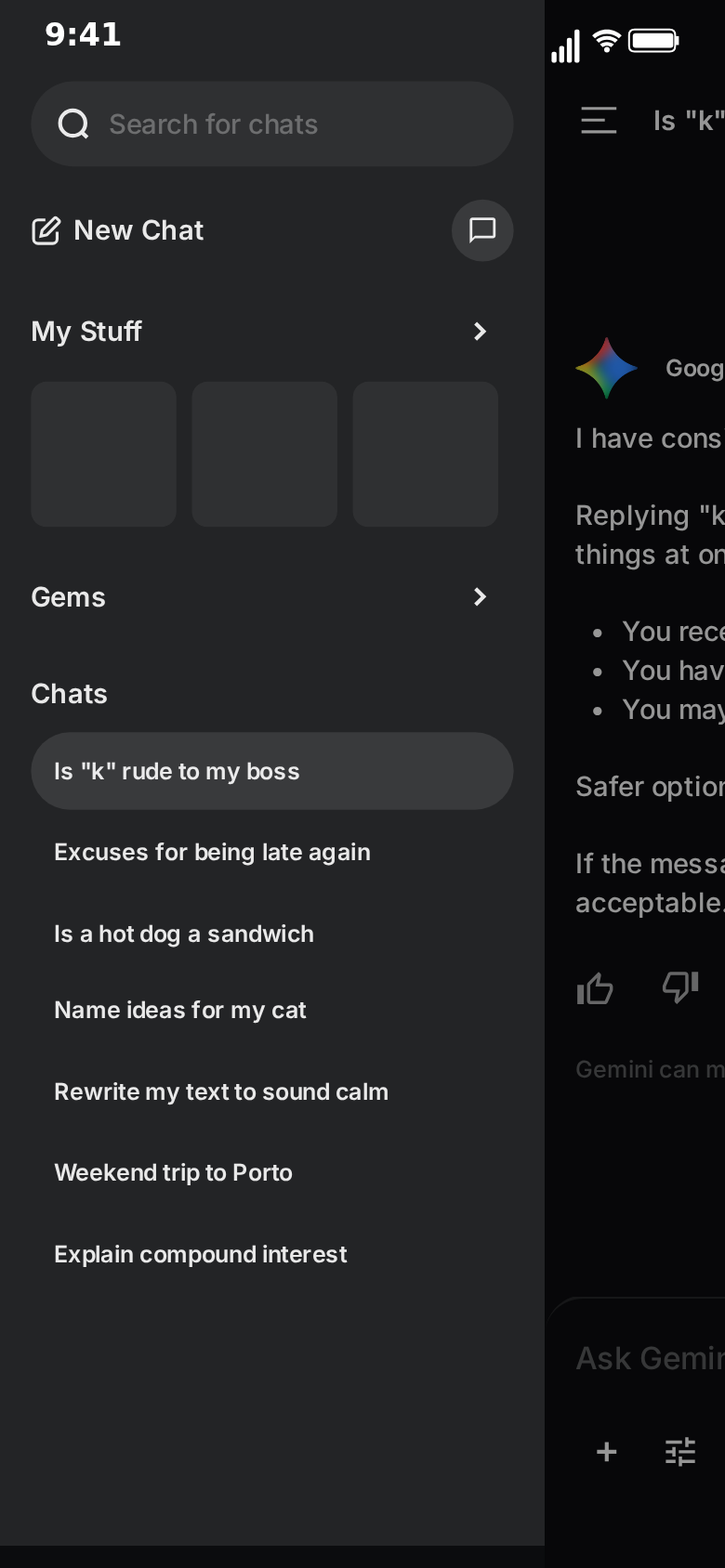
The conversation is the setup; the chat history is the punchline.
- Conversation: any of the skits above.
- Drawer: in the Drawer tab, fill the Chats rows with titles that tell a story: "Excuses for being late again", "Rewrite my text to sound calm", "Is it normal to talk to my plants", "How to apologise to a cat".
- Video flow: keep the default ending, where the side drawer slides in over the chat, holds, and slides away. Lengthen the drawer step's hold to 2 or 3 seconds so viewers can read the list.
Why it works: viewers think the skit is over, then the drawer opens and reveals the character's whole week. It rewards people who watch to the end, and it rewards rewatches.
Scripting tips for AI chat skits
Write the question like a real prompt. Lowercase, a little rushed, sometimes missing punctuation. "what can I make for dinner in 5 minutes" reads as real; "What are some quick dinner ideas?" reads as an advert.
Write the answer like an assistant. A direct first sentence, short paragraphs, a list of three, a polite offer at the end. The more faithfully you copy the register, the funnier the content inside it becomes.
Use the list. Lines that start with "* " or "- " are drawn as bullet points, and the third bullet of a list is the classic place for the turn.
Keep it plain. Apart from bullet points, replies are plain text: no bold, headings, code or images. The humour has to be in the words, which is usually where it is strongest anyway.
One joke per clip. A skit with one clear turn beats a skit with four small ones. Save the others for the next video in the series.
Invented details only. Keep real names, real workplaces and real people out of the questions and answers.
Formats for each platform
- TikTok, Reels and Shorts: 9:16 vertical MP4. Start on the chat, keep the clip under 25 seconds, and make sure the reply does not sit under the platform's caption area at the bottom of the screen.
- Feeds and X: the 1:1 square crop keeps the conversation in the visible part of the screen.
- Group chats, newsletters and slides: export a GIF of the reply being revealed.
All exports are 720p or Full HD at 15 to 60 fps, with or without the iPhone bezel. The export settings guide and the square video guide cover the details. Free exports carry a small watermark; Pro removes it.
Dark or light
The Gemini template defaults to the dark theme, which follows the original design and reads like a late-night phone screen. That suits most skits, especially ones about questions people ask at 2 am. The light theme, derived from the dark design, reads like daytime, which suits office and school jokes. Export one skit in both and test which works better for your audience.
Titles, covers and captions
Title the post with the question, not the answer. "Asked Gemini if 'k' is rude to my boss" gets the curiosity; the clip delivers the answer.
Pick a cover frame with the question visible. The frame where the sparkle is spinning, with the question bubble above it, is usually the best thumbnail: it shows the setup and promises a payoff.
Use the caption for context, not the punchline. "my manager texts at 9pm" adds a second layer without spoiling the answer.
Building a series
AI chat skits lend themselves to series, because the setting never changes and only the question does.
- "Asking Gemini things I'm too embarrassed to ask a person" — one question per episode.
- "Gemini settles our arguments" — each episode is a different petty debate.
- "My chat history, explained" — each episode opens one of the titles from a chats list reveal.
Keep the theme, the title style and the timing consistent across episodes so returning viewers recognise the format instantly.
Sound, captions and editing
The exported MP4 is a clean screen clip. Add a voiceover reading the question aloud, a reaction cam in the corner, music or captions in your editor of choice or in the platform's own editor. A short pause in your edit before the reply starts streaming doubles the effect of the thinking sparkle.
Mistakes to avoid
Answers that are too long. If the reply scrolls past the screen, viewers lose the punchline. Keep it to about ten lines.
A thinking pause that is the same length every time. Vary it. A short pause for the setup reply and a long one for the punchline is what creates rhythm.
Markdown in the reply. Bold or heading syntax shows as raw characters. Keep replies plain.
Claiming it is real. A fake Gemini chat presented as something the real assistant said, especially about a real person, product or event, is misleading. Frame skits as skits.
Making it with AI
If you would rather start from a draft, switch to Describe it and type one sentence, such as "someone asks Gemini whether they should text their ex, and the answer is a polite but devastating list". MockClip's own AI drafts the questions, replies and timing for you to adjust; it needs a Google or GitHub sign-in. The Describe it guide explains how it works, and the AI chat video prompt ideas list has more starting sentences.
Next steps
For the full walkthrough of every field, read how to make a fake Gemini chat video. To decide between AI templates for a given idea, see Gemini vs ChatGPT chat video templates. For more formats beyond AI chats, browse the app picker.
Free to use. No sign-up. Browser-based.
Make a Gemini skitFrequently Asked Questions
What makes a Gemini chat skit work on TikTok?
A question people recognise from their own life, a thinking pause sized to the payoff, and an answer that is funny because of its tone: too formal, too literal or too thorough. The Gemini layout tells viewers what they are watching in the first second.
What format should I export for TikTok, Reels and Shorts?
Vertical 9:16 MP4. MockClip's Gemini template exports 9:16 directly, at 720p or Full HD and 15 to 60 fps, and also offers a 1:1 square crop for feeds.
How long should a Gemini skit be?
Between 10 and 25 seconds for most skits: one or two questions, one or two short replies, and a thinking pause before the punchline. Longer stories work better as a numbered series.
Is the answer generated by Gemini?
No. Every word of the question and the reply is written by you; nothing is sent to Google or any AI model. That is what makes the skit work: you control the punchline.
Can I add voiceover or music?
Yes. Export the MP4 and add voiceover, music or captions in your editor of choice or in the platform's own editor.
Is it allowed to post fake Gemini chats?
Fictional skits and clearly framed reenactments are common content. Write every line yourself, keep real people out of it, and do not present a fabricated chat as something Gemini really said about a real person, product or event.
Related Articles
How to Make a Fake Gemini Chat Video (Free, in Browser)
Step-by-step: write, time and export a fake Gemini chat video in your browser, with the typed question, the thinking sparkle and a fading-in reply. Free.
Gemini vs ChatGPT Chat Video Templates: Which to Use
MockClip's Gemini and ChatGPT templates compared: reply animation, thinking, formatting, screens and timing. Pick the right AI chat video template for you.
AI Chat Video Prompt Ideas for TikTok, Reels and Shorts
30+ ready-to-paste prompts for MockClip's Describe it mode: WhatsApp, iMessage, Telegram, ChatGPT, Reddit, Tinder and more. One sentence in, a chat video out.
50 AI Conversation Video Ideas That Actually Go Viral
Proven content ideas for fake ChatGPT conversation videos. Prompts, formats, and hooks that drive millions of views on TikTok and Reels.