AI Chat Video Prompt Ideas for TikTok, Reels and Shorts
Every MockClip template now opens on a text box instead of a form. Type what should happen, press Generate, and the AI writes the whole clip: the names, every message, who types when, which messages get read and when the reaction lands. The mode is called Describe it, and the hardest part of using it is deciding what to type.
This guide is a bank of prompts you can paste straight into that box. They are grouped by template, each with a note on why the idea works on short-form video and a refine line you can send afterwards to sharpen the moment that matters. If you want the full walkthrough of the mode first, read the AI fake chat video generator guide; this post assumes you have seen the box and want ideas.
How to use these prompts
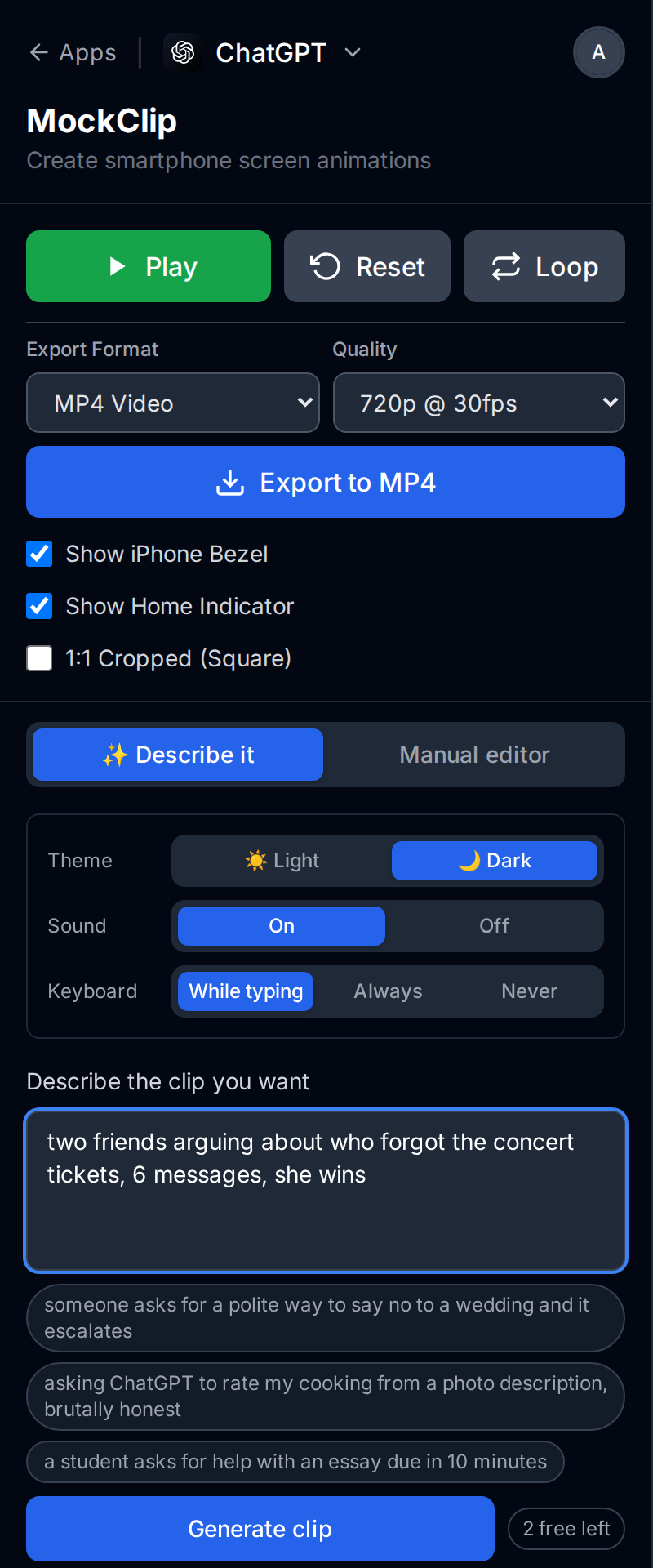
Open any template from the app picker, for example the WhatsApp template. The editor column starts on Describe it; the segmented control above it switches to the manual editor if you need it. Paste a prompt into the box labelled Describe the clip you want and press Generate clip. Under the box sit three example chips for that template. Tapping one fills the box, so you can also use them as a starting point and edit.
Generating needs a sign-in with Google or GitHub. Free accounts get 2 generations, Pro accounts get 5 a month, and a €5 pack of 50 credits covers everything beyond that; the pricing page lists the current numbers. The preview plays as soon as the clip is ready.
A prompt that works well names four things: who is talking, what it is about, roughly how many messages, and how it ends. "Two friends arguing about who forgot the concert tickets, 6 messages, she wins" is the template's own placeholder and it hits all four. You do not need to write the messages; that is the AI's job.
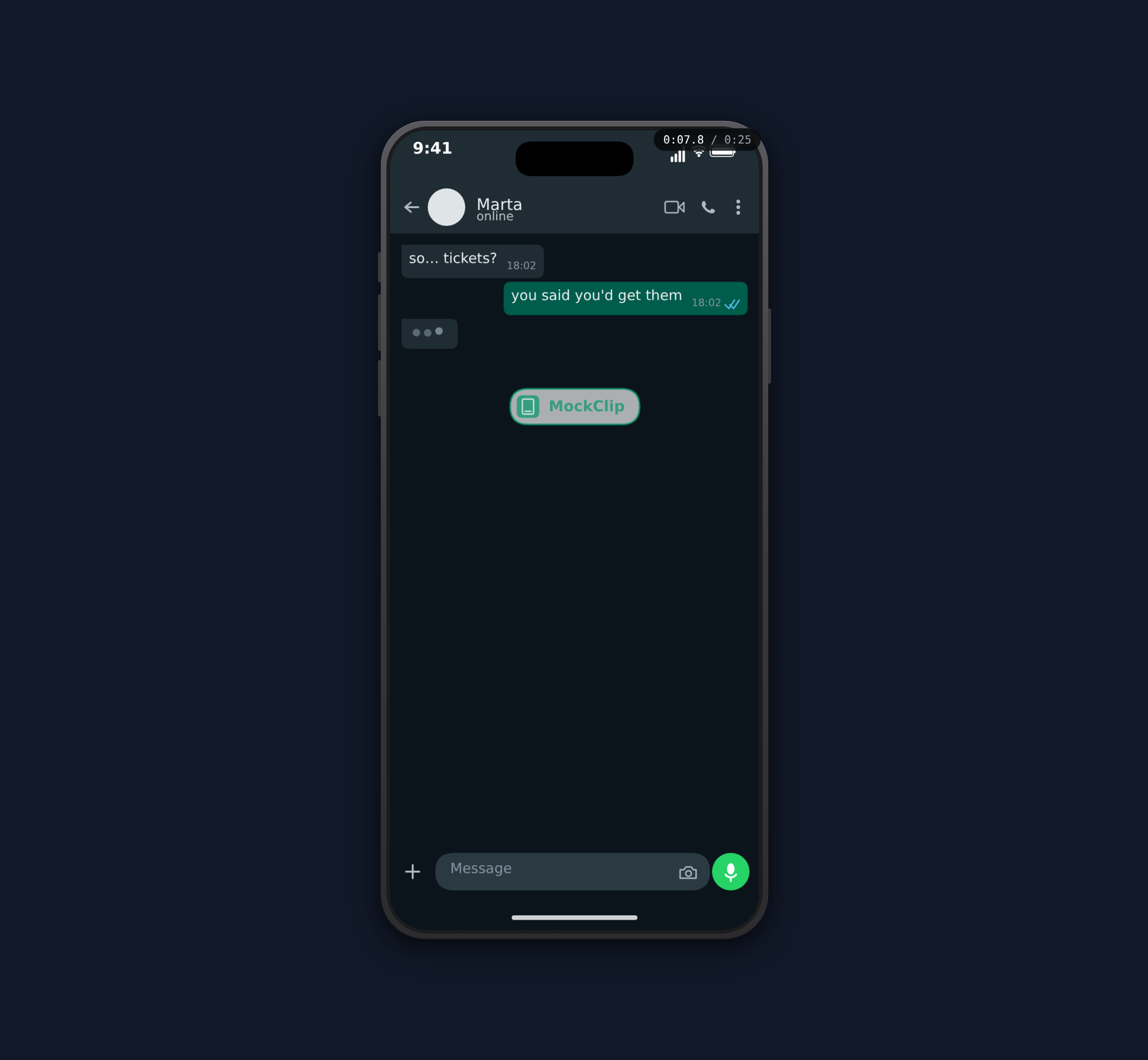
After the first result, a second box appears: Change something — say the second. The time badge over the phone shows the current second while the preview plays, so you can write "at 0:09 make her reply angrier" or "add a message after 0:14" and the AI changes only that beat. Every prompt below has a suggested refine.
WhatsApp prompts
The WhatsApp template renders typing in the header, ✓✓ read marks, reactions and timestamps, so prompts about someone being left on read or reacting badly land well here.
"two friends arguing about who forgot to buy the concert tickets" Why it works: two people, one mistake, a clear loser. The AI writes it as a short escalation. Refine: "at 0:09 make her reply angrier".
"a delivery driver who cannot find my house, five messages of directions" Why it works: everyone has lived this. The comedy is in the directions getting more desperate. Refine: "make the last message from the driver just a thumbs up reaction".
"a coworker asking me to cover their shift on my birthday" Why it works: the ask is unreasonable and the viewer wants to see the refusal. Refine: "leave the coworker's last message on ✓✓ with no reply".
"my landlord announcing a rent increase with three exclamation marks and a smiley" Why it works: tone mismatch. The cheerful punctuation against bad news is the joke. Refine: "add a 4 second pause before my reply".
iMessage prompts
The iMessage template has Delivered and Read receipts and tapback reactions, which makes it the natural home for family and friendship dynamics.
"my mom texting me the same question three times with more emojis each time" Why it works: repetition with escalation is a reliable short-form structure. Refine: "make my only reply 'yes' after the third message".
"a friend cancels plans last minute with an obviously fake excuse" Why it works: the viewer spots the lie before the character does. Refine: "at 0:12 add a heart tapback from me on the excuse".
"someone confesses they ate my leftovers, I respond with only ellipses" Why it works: the silence is the punchline. The AI keeps my side to "…". Refine: "make the confession three separate messages".
"a group of siblings deciding who calls dad about the dent in his car" Why it works: passing the blame in a chat is a story with a natural end. Refine: "make the youngest sibling win".
Telegram prompts
The Telegram template adds reply quotes, image attachments with a file name and size, and a chats-list flow that opens the conversation from the list. Prompts that mention a quote or a file use those features.
"a group of friends deciding where to eat, nobody agrees, one person just books" Why it works: a decision that never gets made, then does. Note the AI writes this as a one-to-one chat, so name the two friends in the room. Refine: "make the booking confirmation a reply quote to the first suggestion".
"a friend sends a blurry concert photo and gets teased for it" Why it works: the attachment card with a file name like blurry.jpg does the visual joke without a real image. Refine: "make the file size 12 MB".
"landlord says 'quick question' and it's not quick" Why it works: the first message is the hook; the rest is dread. Refine: "start the clip on the chats list with an unread badge on the landlord".
"a coworker forwarding me their own to-do list as a spreadsheet attachment" Why it works: the attachment name carries the joke. Refine: "quote the spreadsheet message in my reply".
Instagram DM prompts
The Instagram DM template shows Seen status and reactions, so the classic slide-into-the-DMs format lives here.
"someone slides in with a terrible pickup line and gets roasted" Why it works: setup, punchline, exit. The AI keeps the roast short. Refine: "make the pickup line worse".
"a brand asks me to promote them for 'exposure', I reply with an invoice" Why it works: creators recognise it instantly, and the invoice reply is a satisfying turn. Refine: "leave the brand's last message on Seen".
"an old friend resurfaces only to ask for a favour" Why it works: the slow reveal of the ask is a two-act story in six messages. Refine: "add a 3 second typing pause before the favour".
"a follower asks what camera I use, I answer, they ask if I can send them one" Why it works: the escalation is small and believable. Refine: "make my last reply just a laugh reaction".
ChatGPT prompts
The ChatGPT template streams the assistant's reply character by character and can show a thinking step, so prompts where the answer surprises the person asking work best.
"someone asks for a polite way to say no to a wedding and it escalates" Why it works: each rewrite gets less polite. The streaming text sells the escalation. Refine: "make the third request from the user ask for a rude version".
"asking ChatGPT to rate my cooking from a photo description, brutally honest" Why it works: a described photo, not a real one, so the AI can write the roast. Refine: "add a thinking step before the rating".
"a student asks for help with an essay due in 10 minutes" Why it works: the time pressure makes the assistant's calm reply funnier. Refine: "make the last user message just 'nevermind, submitted'".
"someone asks ChatGPT to settle a bet about whether a hot dog is a sandwich" Why it works: a shared argument the audience already has an opinion on. Refine: "make the answer one sentence".
Reddit prompts
The Reddit template renders a post with nested comments and vote counts, so prompts should describe the post and how the thread turns.
"an AITA post about eating a roommate's leftovers, top comment flips the story" Why it works: the comment that reverses the verdict is the reveal every AITA video needs. Refine: "give the top comment 4,000 upvotes and a reply from the poster".
"someone asks for a life hack and the replies get increasingly unhinged" Why it works: a list where each item outdoes the last. Refine: "make the last reply a single word".
"a 'what's a purchase that changed your life' thread with a twist reply" Why it works: wholesome setup, sideways punchline. Refine: "collapse the second comment so the twist is the last thing shown".
"a landlord posts asking why tenants keep leaving, the replies explain" Why it works: the post is oblivious and the thread is the audience. Refine: "mark the poster's reply with the OP badge".
Tinder prompts
The Tinder template swipes through profiles with names, ages and bios, and can end on a match. Describe the sequence of profiles and where the swipe goes.
"three profiles, the middle one is obviously a catfish, match with the last" Why it works: three beats, one obvious trap, a payoff. Refine: "make the catfish bio mention a yacht".
"every profile bio is a red flag, swipe left on all of them" Why it works: the bios are the jokes; the swipes are the rhythm. Refine: "add a fourth profile that is just 'ask me about crypto'".
"a 'CEO' profile, a dog-lover profile, then a match with someone normal" Why it works: two types the audience recognises, then relief. Refine: "make the match happen after a 2 second pause".
The Tinder video ideas guide has more formats if you want to build a series on this template.
Phone call and notification prompts
The phone call template animates a full-screen incoming call through ringing, accept or decline, connected and ended. The phone call notification and iMessage notification templates render banners over a home screen, so the prompt describes who the banner is from and what it says.
"an incoming call from 'Mom' accepted after a few rings" Why it works: the caller name is the whole setup. Refine: "let it ring for 6 seconds before the answer".
"a call from 'Do Not Answer' that gets declined" Why it works: the contact name tells the story before anything happens. Refine: "make it ring twice as long".
"three texts in a row from a group chat planning a surprise party" Why it works: stacked banners build pace on their own. Refine: "make the third banner from the person the party is for".
"a friend sending 'you up?' at 3am, then 'sorry wrong person'" Why it works: two banners, one regret. Refine: "add a 5 second gap between the two".
"notifications from a delivery app that keep changing the arrival time" Why it works: the numbers in each banner do the comedy. Refine: "make the last one say 'delivered' while the others are still visible".
Free to start. Sign in with Google or GitHub. Two generations included.
Describe a ChatGPT clipTurning one prompt into a series
The prompts above are single clips. Accounts that grow on TikTok and Reels usually post variations on one situation, and Describe it makes that cheap.
Keep the same two characters and raise the stakes each time. "Two friends arguing about concert tickets" becomes "the same two friends arguing about who booked the wrong flight", then "who told the group chat". Naming the characters in the prompt keeps the voices consistent across clips.
Use the refine box to make the variation rather than writing a new prompt. Once a clip exists, "at 0:15 make her reply a single emoji" costs one generation and keeps everything else identical, so the series feels like one conversation continued. Undo brings back the previous version if the change misses.
Keep every clip in the 12 to 35 second range. The AI targets that by default; if it drifts long, "make it 5 seconds shorter" is a valid refine. The AI conversation video content ideas guide has more series structures built around AI chats.
Hook formats that travel
The first two seconds decide whether a viewer stays. Four openings work on nearly every template:
- The unread badge. On Telegram, ask for the clip to start on the chats list with an unread count on the row that is about to open.
- Typing first. Ask for the other person to type for two seconds before the first message. The header indicator is a promise that something is coming.
- Left on read. End on a message with ✓✓ and no reply. The silence is the ending.
- The reply-quote turn. On Telegram, have the last message quote the first one. The callback closes the loop.
The viral conversation video guide covers these hooks in depth, and the YouTube Shorts text conversation guide explains how the same clip should be trimmed for Shorts versus TikTok.
Prompts that will not work
Describe it writes conversations. A few requests fall outside what it can do:
- A photo in the chat. The AI never invents image URLs, so "she sends a photo of the dog" becomes a text message about the dog. Add real images in the manual editor if you need them.
- Voice notes, stickers, group chats or channels. None of the templates render them. Write the story as one-to-one text.
- A three-minute clip. The templates cap messages at twenty and the AI aims for under 35 seconds. Split long stories into parts.
- Real people in a defamatory setup. A prompt that puts words in a named real person's mouth may be refused, and the clip would be a problem to post anyway. Use invented names.
- Vague prompts. "Something funny" produces something generic. Name the situation.
If a request is refused, the panel says "That request can't be generated. Try rephrasing it." Rephrasing with invented characters and a concrete situation almost always clears it.
Quick start checklist
- Open a template from the app picker.
- Paste a prompt from this guide into Describe the clip you want, or tap an example chip.
- Sign in with Google or GitHub when prompted; the prompt is kept.
- Watch the preview and read the What happens when list under the box.
- Send one refine that names a second, such as "at 0:09 make her reply angrier".
- Switch to the manual editor if one detail needs a hand edit.
- Export MP4 or GIF. Pro exports have no watermark; see pricing.
Related MockClip templates and guides
- AI fake chat video generator: Describe it, get the clip — the full guide to the mode, allowances and refining by the second
- How to make a fake text conversation video with AI prompts — the step-by-step tutorial from prompt to export
- AI conversation video content ideas — series structures for AI chat clips
- Tinder swipe video ideas for TikTok and Reels — profile sequences that hold attention
- Instagram DM video ideas for Reels — DM formats for Reels
- WhatsApp chat video for YouTube Shorts — trimming and posting WhatsApp clips
- WhatsApp template, iMessage template, Telegram template, Reddit template — the templates used in this guide
- Pricing — free generations, Pro and credit packs
Frequently Asked Questions
What is a good prompt for an AI chat video?
A good prompt names who is talking, what the argument or joke is about, roughly how many messages it should take, and how it ends. 'Two friends arguing about who forgot the concert tickets, 6 messages, she wins' covers all four in one sentence. The AI fills in the wording, the names and the timing.
Do these prompts work on every MockClip template?
Yes. Describe it is the default mode on all twelve templates: ChatGPT, iMessage, iMessage notification, WhatsApp, Telegram, Messenger, Discord, Instagram DM, Tinder, Reddit, phone call and phone call notification. Each section of this guide is written for the template it is listed under, but most chat prompts can be pasted into any chat template.
How many AI generations do I get?
Free accounts get 2 generations. Pro accounts get 5 every month. Beyond that, a €5 pack of 50 credits covers extra generations and never expires. Each refine also counts as one generation. The pricing page has the current details.
Can I change the clip after the AI writes it?
Yes, in two ways. Type a follow-up that points at a second, such as 'at 0:09 make her reply angrier', and the AI changes only that moment. Or switch to the manual editor and edit any message, delay or read mark by hand.
Can the AI add photos or voice notes to the chat?
No. The AI never invents image URLs, and the templates do not render voice notes, stickers or group chats. Prompts that depend on a photo or a voice message will come back as text-only conversations. If you have a real image, add it in the manual editor.
How long should an AI-generated chat video be?
The AI aims for clips between roughly 12 and 35 seconds with four to ten messages unless you ask for something else. That range fits TikTok, Reels and Shorts without trimming. Ask for 'make it 5 seconds shorter' if a clip drags.
Do I need to sign in to use these prompts?
Yes. Generating a clip needs a Google or GitHub sign-in so the free allowance can be tracked. The description you typed is kept through the sign-in step, so you do not lose your prompt.
Related Articles
AI Fake Chat Video Generator: Describe It, Get the Clip
Type what the clip should be and MockClip's Describe it mode writes the messages and timing for WhatsApp, iMessage, ChatGPT, Tinder and more. Refine by second.
How to Make a Fake Text Conversation Video With AI Prompts
Type one sentence and get a fake text conversation video. MockClip's Describe it mode writes the messages and timing; you edit by the second and export MP4.
How to Go Viral With Fake Conversation Videos in 2026
Data-driven strategies for going viral with fake conversation videos on TikTok, Reels, and Shorts. Hooks, timing, and growth tactics.
50 AI Conversation Video Ideas That Actually Go Viral
Proven content ideas for fake ChatGPT conversation videos. Prompts, formats, and hooks that drive millions of views on TikTok and Reels.
Tinder Swipe Video Ideas for TikTok, Reels, Shorts
Tinder swipe animation ideas for TikTok and Reels. Create fake Tinder profile cards, swipe videos, and match reveals with MockClip's free template.