12 Etsy Message Video Ideas for Sellers and Small Shops
If you run a small shop, a lot of your working day happens in a message thread. A buyer asks whether something can be made in another colour. Someone needs a gift by a date you cannot meet. A stranger sends a note that makes your week. Those threads are good material for videos, because other sellers have the same ones and buyers are curious about what happens on the other side.
This post collects twelve Etsy message video ideas you can build with MockClip's Etsy Messages template. They are grouped into shop tutorials, customer-service training, order stories and scam awareness. Each idea has the setup, a script and a timing note. If you have not used the template yet, the step-by-step guide walks through the editor first.
Every conversation here is staged. Keep the people and the shops fictional or your own, say that a clip is a re-creation, and never present a made-up exchange as a real one. MockClip is not affiliated with Etsy, and Etsy is a trademark of Etsy, Inc.
What the template gives you to work with
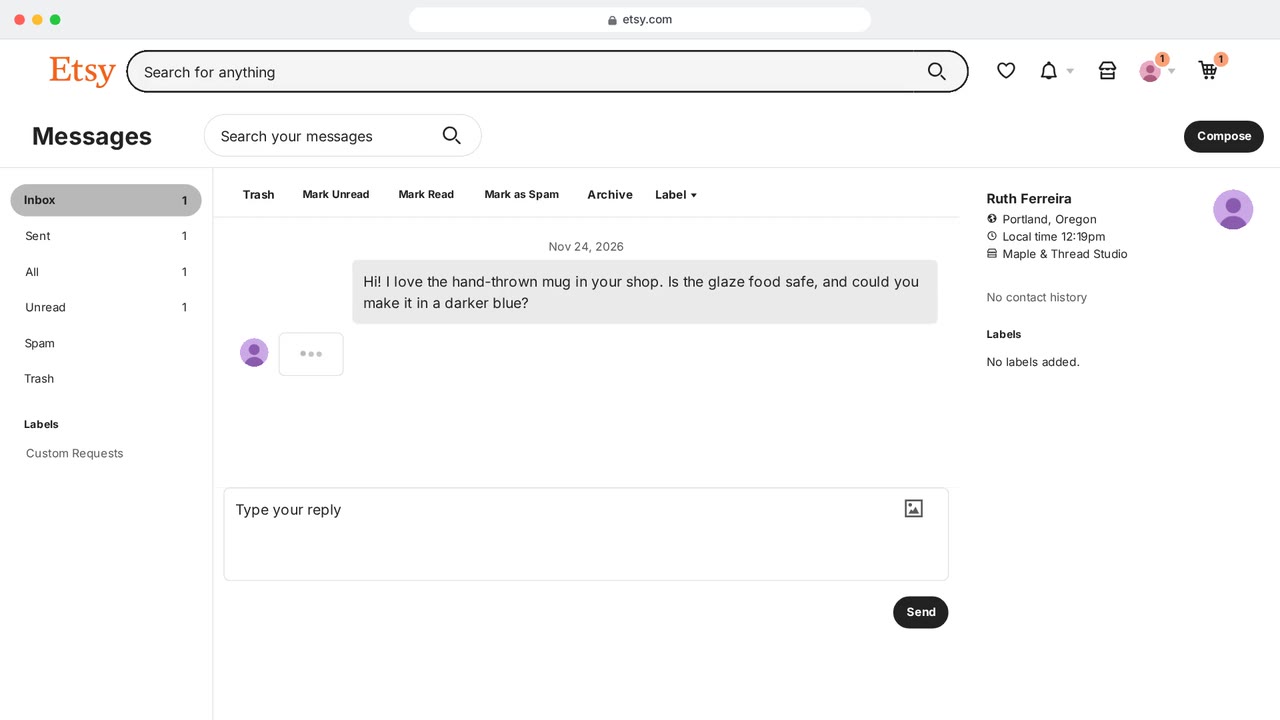
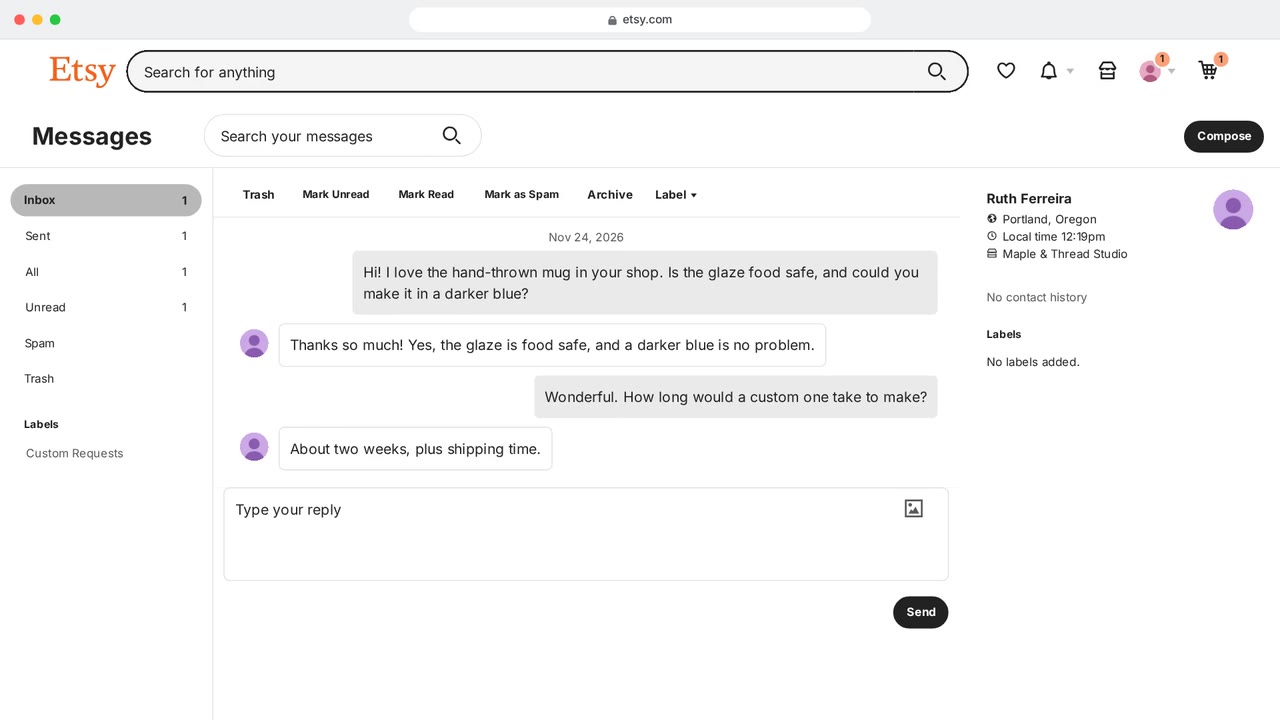
The template recreates the Messages page as it looks on a computer and plays the conversation in it. The clip shows the whole page inside a browser window: the folders on the left, the thread in the middle and the other person's details on the right. It is always 16:9.
Four tools do the storytelling:
- The reply box. Your own messages are typed into it character by character, and the text wraps onto new lines. Viewers watch the reply being written, which is what a tutorial needs.
- The typing bubble. A three-dot bubble shows before each of the other person's messages, for the time you set.
- Date lines. A date can sit above the first message and above any later one, so a thread can run over several days.
- The details panel. The other person's name, avatar, location, local time and shop name are all editable.
The folder list and the rest of the page are fixed scenery. The thread is text only: no photos, files, reactions or links that open.
Free to use. No sign-up. Browser-based.
Open the Etsy Messages editorHow the ideas are written
Each idea follows the same shape:
- The page. Whose Messages page the clip is shot from. That person is "Me": their lines are typed into the reply box and land on the right. The other person is named in the details panel and replies on the left.
- The panel. What to put in Business, Location and Local Time. All three are plain text fields that describe the other person. When the other person is a buyer, write lines that suit a buyer, or tell the story from the buyer's page instead so the panel describes the shop.
- The script. Four to six messages, marked Me and Them.
- The timing. Which delays, typing durations and date lines carry the idea.
For seller tutorials and training, shoot from the seller's page. The lesson is the reply, and the reply box is where the viewer watches it being written.
Shop tutorials
These show new sellers how to handle the requests every shop gets. Record a voiceover that explains why the reply is written the way it is.
1. The custom request, answered in one reply
The page: the seller's. The panel: the buyer's name, Leeds, England, Local time 7:42pm.
- Them:
Hi! Could the oak serving board be made a little longer, and can you engrave a name on it? - Me:
Hi Dana, thanks for asking. Yes to both. A longer board adds four days to the making time, and I can engrave up to 12 letters. What name would you like? - Them:
Perfect. The name is Marguerite. - Me:
Lovely, that fits. I'll send you the details today.
The timing: give the first buyer message a typing duration of 2 seconds. Type the seller's long reply at 25 characters per second so the viewer can read along without waiting. The lesson for the voiceover: answer every question, give the cost in time and end with one question back.
2. The date you cannot meet
The page: the seller's. The panel: the buyer's city and an evening local time.
- Them:
Hello, I'd love the blue quilt for my sister. Can it arrive before December 18? - Me:
Hi Tom. I make each quilt to order, which takes about ten days, and shipping comes after that. I can't promise the 18th, and I'd rather tell you now than let you down later. - Them:
Thank you for being straight with me. Could it be here in January instead? - Me:
Yes, easily. Early January is no problem.
The timing: put a 1.5 second delay before the seller's reply. That pause is the seller deciding to be honest. Put Dec 2, 2026 in the date line above the first message so the viewer can count the days to the 18th.
3. The polite no
The page: the seller's. The panel: the buyer's details.
- Them:
Hi, can you put a famous cartoon mouse on the baby blanket? - Me:
Hi! Thanks for thinking of my shop. I can't make designs with characters I don't own the rights to. - Me:
I can stitch a little field mouse in the same colours, though. Would that work? - Them:
Oh, that sounds even sweeter. Yes please!
The timing: send the two seller messages 0.8 seconds apart. Splitting the no from the offer puts the offer in a bubble of its own, which is the point of the lesson: say no once, then say what you can do.
Customer-service training
These work in a course, a workshop or a team handbook. The format is strongest when you build two clips from the same buyer message and compare them.
4. The same complaint, two replies
The page: the seller's, in both clips. The panel: identical in both.
Clip A:
- Them:
Hi, my candle arrived with the lid cracked. Can you help? - Me:
That will have happened in the post. There's not much I can do.
Clip B:
- Them:
Hi, my candle arrived with the lid cracked. Can you help? - Me:
I'm so sorry about that, and thank you for telling me. Can you tell me where the crack is, so I can fix how I pack them? - Them:
It runs across the top, near the edge. - Me:
Thank you. I'll make this right. I'm sending you a new lid this week.
The timing: keep every setting the same in both clips so the only difference is the words. Place the two exports side by side in your slide or your video editor. The thread has no photos, so the good reply asks the buyer to describe the damage in words.
5. The delay message you send first
The page: the seller's. The seller writes first, so the clip opens with typing in the reply box.
- Me:
Hi Priya, a quick update on your blanket. The yarn for it arrived late, so I'm running four days behind. I'm sorry for the wait. - Them:
Thanks for letting me know! No rush on my side. - Me:
That's kind of you. I'll message again the day it's finished. - Me:
It's finished and it looks lovely. It goes in the post tomorrow.
The timing: put Dec 2, 2026 above the first message and Dec 6, 2026 above the fourth. The second date line is the proof that the seller kept the promise. The training point: bad news lands better when the seller brings it before the buyer has to ask.
6. The vague question
The page: the seller's. The panel: a buyer in another country, which sets up the last line.
- Them:
Hi, is this available? - Me:
Hi! Yes, it is. Are you looking at the small or the large planter? - Them:
The large one. Do you send to Canada? - Me:
I do. The large planter takes about a week to make, and I can send it to Canada after that.
The timing: keep the buyer's typing durations short, around 1 second, because the lines are short. The training point is in message 2: answer the question you were asked, then ask one clear question back instead of guessing.
Order stories
These are for videos about running a shop: a channel update, a "how I started" story, a behind-the-scenes clip. Rewrite real exchanges instead of copying them. Change the names, the item and the wording, and say in the video that the conversation is re-created.
7. The first message your shop ever got
The page: the seller's. The panel: any buyer, far away. A distant city makes the moment bigger.
- Them:
Hello! I found your shop last night and I keep coming back to the green scarf. Do you ever make it longer? - Me:
Hi! You're the first person to ever message my shop, so thank you. Yes, I can make it longer. - Them:
Then I'm honoured. I'd love one. - Me:
I'll start on it tonight.
The timing: type the seller's reply slowly, at 12 characters per second, with a 2 second delay before it. The slow typing reads as nerves. Use this as the cold open of a longer video about your first year.
8. The gift that almost missed the date
The page: the buyer's. The panel: the shop's name, location and local time.
- Me:
Hi! Is there any chance the name necklace could be ready before the 20th? It's for my mum's birthday. - Them:
Hi Sam. It will be tight, but I'll try my best. - Them:
Good news. I finished it this morning, a day early. - Me:
You are wonderful. Thank you so much!
The timing: three date lines carry this one. Put Dec 10, 2026 above message 1, Dec 11, 2026 above message 2 and Dec 16, 2026 above message 3. The viewer counts the days without being told.
9. The kind note
The page: the seller's. One long message from a buyer and one short reply.
- Them:
I wanted to tell you that the mug arrived today. My dad used to have one in exactly this blue, and my mum cried when she opened it. Thank you for making it. - Me:
I don't know what to say. Thank you for telling me. This is why I do it.
The timing: give the buyer's message a typing duration of 3 seconds, then let the seller's reply wait 2 seconds before the typing starts. Two messages are enough. Use the clip to close a video, and stay quiet in the voiceover while it plays.
Scam awareness
A staged thread is a safe way to show other sellers what a suspicious message looks like, because no real account is involved. Use invented names, say clearly that the conversation is a re-creation for education, and never name a real person or shop as the scammer.
This is general safety education, not legal or financial advice. For the rules that apply to a marketplace and for reporting a real case, use that marketplace's own help pages and reporting tools.
10. "Let's finish this somewhere else"
The page: the seller's. The panel: a buyer with a new-looking name and a location that does not match the story.
- Them:
Hi, I want to buy 3 of your prints today. - Them:
Messages here are slow for me. Send me your email and phone number and we'll finish there. - Me:
Thanks for your interest! I keep all my orders and messages on this site. - Them:
It's faster my way. I'll pay extra. - Me:
I'm not able to do that. The prints are in my shop if you'd like to order there.
The tell for the voiceover: the rush, the request to leave the site and the offer of extra money. The seller's reply is the lesson: polite, short, no personal details.
11. The "urgent notice"
The page: the seller's. The panel: set Contact Name to something official-sounding, such as Shop Support Desk, with a city and a local time under it.
- Them:
URGENT: your shop will be closed in 24 hours. Reply with your login email and password to confirm you are the owner. - Me:
I don't share my password with anyone. - Them:
This is your final warning.
The tell for the voiceover: point at the panel. The message claims to be official, but the panel shows an ordinary account with a city and a local time. Add the pressure of a deadline and a request for a password, and you have three warning signs in one screen. End the clip on the third message with no reply from the seller.
12. The order that is too big and too fast
The page: the seller's. The panel: a buyer whose Business line is a company name you invented.
- Them:
Hello. I need 200 candles by Friday for a company event. Price is no problem. - Me:
Hi, thank you! I make everything by hand, so 200 by Friday isn't possible. What date is the event? - Them:
No time to explain. Send me your full name, home address and bank details and I'll arrange everything. - Me:
I can't share those. If you'd like to order, my shop page has everything you need.
The tell for the voiceover: no questions about the product, no interest in the answer and a jump straight to personal details. For the phone version of this kind of lesson, see the Marketplace scam awareness guide.
A timing cheat sheet
- Delay before a message: 0.5 seconds for a normal exchange, 1.5 to 2 seconds when the pause means something.
- Typing duration for the other person: about 1 second for a short line, 2 seconds for a full sentence, 3 for a long message.
- Typing speed for your own lines: the editor's default is 15 characters per second. A 90-character reply takes 6 seconds at that speed, about 4 seconds at 22 and 3 seconds at 30. Speed up long replies so the clip does not stall.
- Date lines: one above the first message for a single sitting. Add one above any message where a new day starts, and keep one date format for the whole clip.
- Length: four to six messages. If a lesson needs more, split it into two clips.
Using the clips in landscape and vertical videos
The clip is 16:9 and has no vertical or square version. That suits a YouTube video, a webinar, an online course or a slide deck, where it drops in without cropping. Keep the browser window on when the clip stands alone, and turn it off when your slide or edit already has a frame.
For TikTok, Reels and Shorts, place the landscape clip inside a vertical edit in your own video editor. Two layouts work: the clip as the top half of a split screen with you talking underneath, or the clip zoomed in on the thread so the bubbles are readable on a phone. If the story does not need this exact page, a phone template gives you a native vertical chat. The Facebook Marketplace template is a buyer and seller chat about one listing, and the iMessage template suits a customer who texts you directly.
Exports are MP4 or GIF at 720p with a small watermark on the free plan. Full HD and watermark-free export start with the Pro plan. The pricing page has the details.
Drafting scripts with Describe it
You do not have to type every script by hand. On the template's page, Describe it takes one sentence and drafts the messages and their timing. a buyer asks an Etsy seller whether a ceramic mug can be made in another colour is enough to get a first version. You can then point at a second in the timeline and ask for a change, or open the result in the manual editor and rewrite lines yourself.
Describe it needs a Google or GitHub sign-in. It writes the script only: the page is drawn the same way whichever way the messages were written. The Describe it guide has more prompts and refining tips.
If you work in Claude or ChatGPT, MockClip's MCP server has a create_etsy_message_conversation tool. It takes the contact name, the theme, up to twenty messages with their delays, typing settings and date lines, and the page details, and returns a link that opens the finished animation in MockClip.
What to leave out of your scripts
- Photos and files. The thread is text only. Do not write
see the photo. - Order, payment and review screens. The template draws the Messages page and nothing else, so tell those parts in your voiceover.
- Anything that could pass as proof. Do not build a thread that reads as a receipt, an order confirmation or a real customer's praise. A staged clip is an illustration, not evidence.
- Real names. No real shops, no real buyers, no real photos of people without their agreement.
- Ads and client work with this template. The page recreates a real company's design, and MockClip's terms say to use a brand-free app for paid ads and for videos you make for a client. The brand-free text chat is built for that, and the guide to brand-free mockups for ads explains the difference.
Turning the ideas into a series
One clip is a post. Four clips are a series, and a series gives viewers a reason to come back.
- Week 1: a tutorial. The custom request or the date you cannot meet, with your voiceover explaining each reply.
- Week 2: a comparison. The same complaint with two replies, side by side.
- Week 3: a story. The first message your shop ever got, or the kind note, as the opening of a longer video.
- Week 4: a warning. One scam-awareness clip, clearly labelled as a re-creation.
Keep the same theme, the same date format and the same shop name in the panel across the series, so the clips look like one shop's inbox.
Quick start
- Open the Etsy Messages template.
- Pick an idea and decide whose page it is.
- Set the contact name and avatar, then Business, Location and Local Time.
- Add the script with + My Message and + Their Message.
- Put a date line above the first message, and above any message where a new day starts.
- Set delays and typing durations, and tick Show typing in input field on your own lines.
- Choose the theme and whether to show the browser window.
- Export MP4 or GIF and drop the 16:9 clip into your video or slides.
Related templates and guides
- Etsy Messages maker — the template used for every idea here
- How to make a fake Etsy message video — the step-by-step editor guide
- Facebook Marketplace scam awareness video — the same kind of lesson on a phone screen
- Shopify notification sales video ideas — order-banner ideas for shop owners
- Vinted reseller video ideas — ideas for second-hand sellers
- Pricing — plans, Full HD and watermark-free export
Frequently Asked Questions
What kind of Etsy message videos can a seller make?
Four kinds work well: shop tutorials that show how to answer a request, customer-service training with a good and a bad reply, order stories told across several days, and scam-awareness clips that stage a suspicious message. All of them are scripted, staged conversations.
How long should an Etsy message video be?
Four to six messages is a good length and plays in roughly 14 to 30 seconds, depending on how long the lines are and how fast they are typed. Longer lessons work better as two or three short clips.
Can I show the conversation from the seller's side?
Yes. The clip is shot from one person's Messages page. Make the seller Me and the seller's replies are typed into the reply box, while the buyer's name, location and local time fill the details panel on the right.
Can I post these clips on TikTok, Reels or Shorts?
The clip is always 16:9, so there is no vertical export. Place it inside a vertical edit in your own video editor, for example as the top half of a split screen or zoomed in on the thread, or use a MockClip phone template for a native vertical chat.
Can I use a real customer's messages?
Rewrite them instead. Change the names, the shop, the item and the wording, and say that the clip is a re-creation. Do not show a real person's name or photo without their agreement and do not present a staged exchange as real.
Can I show photos, an order page or a review?
No. The template is a text conversation on the Messages page. There are no photos, files or links that open in the thread, and no order, checkout or review screens.
Do I need an account to make these clips?
No. The manual editor works without an account and exports with a small watermark. Describe it, which drafts a clip from one sentence, needs a Google or GitHub sign-in. Plans are listed on the pricing page.
Related Articles
How to Make a Fake Etsy Message Video (Step by Step)
Step-by-step guide to a fake Etsy message video: the desktop Messages page in a browser window, typed replies, a typing bubble, date lines and a 16:9 export.
How to Make a Marketplace Scam Awareness Video (Free)
Make short safety videos that show common Facebook Marketplace scam red flags as fictional chats, each ending on the safe reply. Free, exports MP4.