How to Make a Marketplace Scam Awareness Video (Free)
Most second-hand scams don't start with something obviously wrong. They start with a normal question, "Is this still available?", and turn one or two messages later: a deposit to hold the item, a code sent to your phone, a link to a delivery service. A short video that shows the exact moment a chat turns is one of the clearest ways to teach people what to look for, because the viewer recognises the pattern the next time it happens to them.
This guide shows how to build that kind of video with MockClip's Facebook Marketplace template: a fictional chat that reaches a red flag, followed by the safe reply. It covers seven common patterns, how to write each one so it teaches rather than instructs, and how to label the finished clip. If you haven't used the template yet, the step-by-step guide explains the editor first.
A note before you start
Everything in these clips must be fictional. Use made-up names, made-up listings and the template's neutral photos or photos of your own items. Never include a working link, a real phone number, a real account name, a real company's logo or a copy of a real person's messages. Label each clip as a dramatization, for example with "Fictional example" in the caption or on screen.
MockClip is not affiliated with, endorsed by or sponsored by Meta Platforms, Inc., and nothing is read from or posted to Facebook. The screens follow a community design kit of the app, not every detail of the current release. This post is general safety education, not legal or financial advice. For the platform's own guidance and to report a real scam, use the official help and reporting tools inside the app.
How the videos are built
Each video in this guide has the same three parts:
- The setup. The listing page with a fair-looking price, then the chat opening with a normal first message.
- The turn. One or two messages from the other side that contain the red flag. A typing bubble before the turn gives the viewer a moment of suspense.
- The safe reply. The buyer's answer that shows what to do instead, typing into the input bar while the keyboard is up.
Keep each video to one pattern. A clip that tries to show three scams at once is hard to follow; a series of short clips, one per pattern, teaches more. Between 12 and 20 seconds is enough for each.
In the template, start from the Category picker's closest example (Electronics, Vehicles, Clothes or Furniture), then rewrite the seller's name, the listing and the messages on the Chat tab. For a short clip, set the Video flow to the listing and the chat only.
1. The deposit to "hold" the item
The pattern. The seller says many people want the item and asks for a deposit before you've seen it, often by gift card or an instant payment to a stranger.
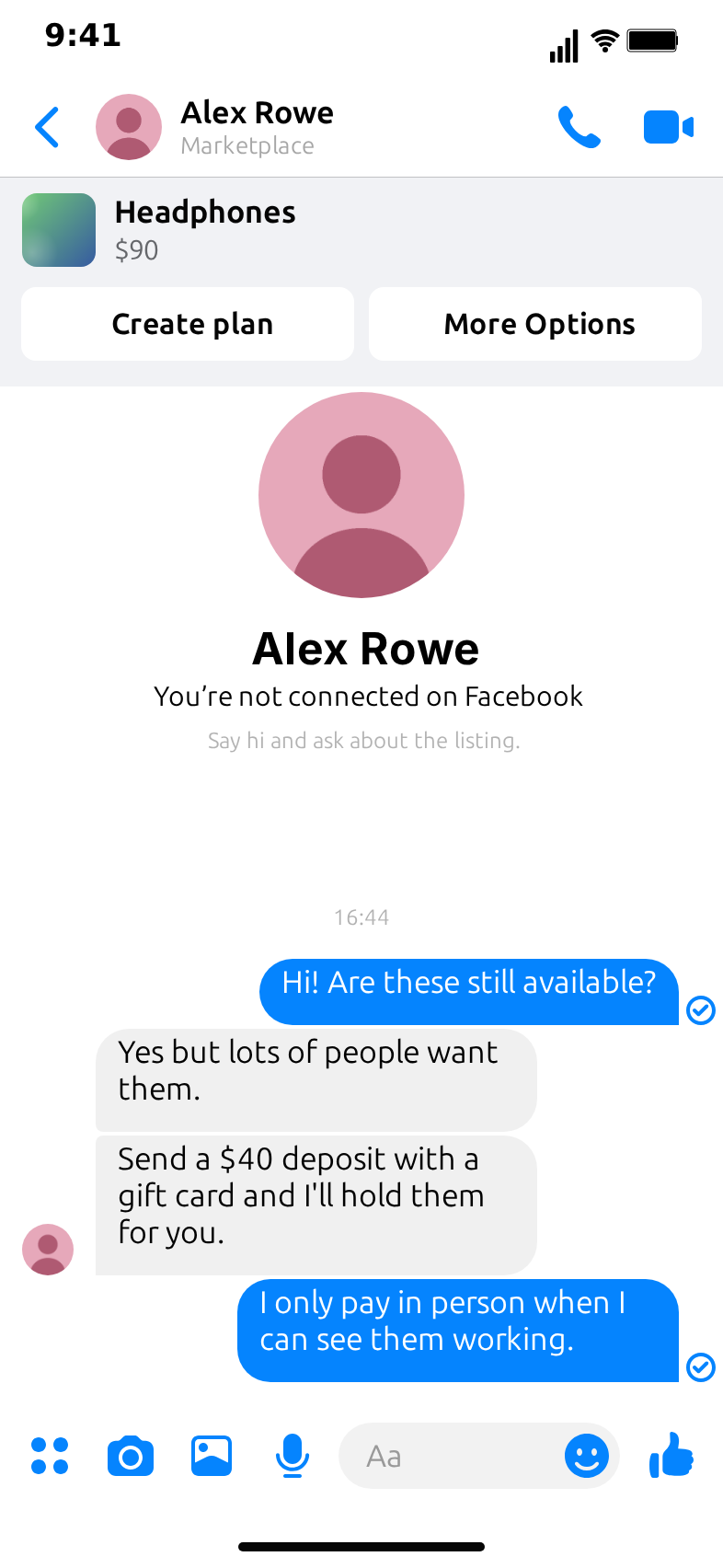
The fictional chat. The buyer: "Hi! Are these still available?" The seller: "Yes but lots of people want them." Then: "Send a $40 deposit with a gift card and I'll hold them for you."
The red flag. Pressure plus payment before you can see the item, in a form that can't be reversed.
The safe reply. "I only pay in person when I can see them working."
This is the clip at the top of this post. Put the safe reply on screen long enough to read, and end on it.
2. The verification code
The pattern. The other person says they need to "make sure you're real" and asks you to read back a code that has just been texted to your phone. The code is usually for one of your own accounts.
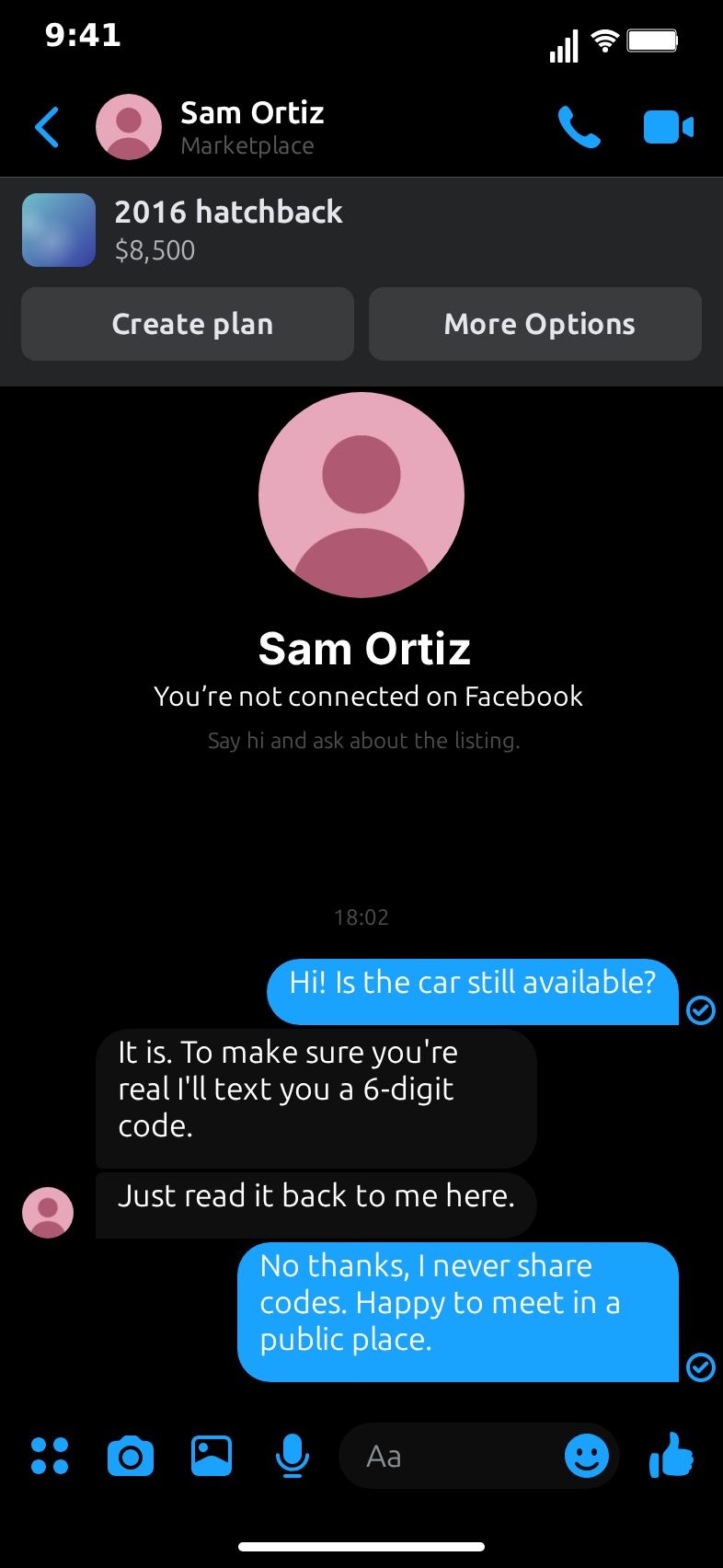
The fictional chat. The buyer: "Hi! Is the car still available?" The seller: "It is. To make sure you're real I'll text you a 6-digit code." Then: "Just read it back to me here."
The red flag. Nobody who is selling a car needs a code from your phone. A code sent to you is for you.
The safe reply. "No thanks, I never share codes. Happy to meet in a public place."
3. The overpayment
The pattern. When you are the seller, a "buyer" says they have paid more than the price by mistake and asks you to send back the difference. The original payment later turns out not to be real.
How to show it. In the template "me" is the buyer, so for this pattern write the story from the buyer's side of a second clip: the buyer warns a friend in a regular chat. Or keep the Marketplace chat and switch the roles in the captions ("You are the seller here"). The message that turns it: "I sent $300 instead of $30 by mistake, can you send back the $270?"
The red flag. Refunds of "extra" money, especially to a different account or method than the one used.
The safe reply. "I'll wait until the full payment clears in my account, then we can sort it out through the platform."
For the friend version, the WhatsApp template or the Messenger template works well for the second chat.
4. The delivery-service link
The pattern. The seller offers to ship the item and asks you to pay through a "courier" or "insurance" page they send you, which collects your card details.
The fictional chat. The buyer: "Can you ship it?" The seller: "Sure, I use a delivery service with insurance, I'll send you their payment page." Then: "Just enter your card there and they handle it."
The red flag. A payment page sent in a chat, from a service you didn't choose.
The safe reply. "I'd rather pick it up and pay in person."
Never show a real or realistic-looking link in the clip. Describe it in words, as above, so nobody can copy it.
5. "Let's talk somewhere else"
The pattern. Early in the chat, the other person asks to move to another app, a text message or an email, often with a reason that sounds friendly.
The fictional chat. The seller: "I'm not on here much, text me on my number instead." Then a second nudge: "It's easier, I reply faster there."
The red flag. Moving away from the platform's messages removes a record of the conversation and the platform's own protections.
The safe reply. "I'll keep it here, thanks. When can I see it?"
6. The price that's too good, and the hurry
The pattern. A high-value item at a fraction of its usual price, and a seller who needs the deal done today.
How to show it. Use the listing page for the setup: a recent games console or a newer car at a very low price, with an old price struck through. Then the seller: "I'm moving abroad tomorrow so it has to go today. First to pay gets it."
The red flag. A price far below everything else plus urgency. Both are designed to stop you thinking it through.
The safe reply. "No rush on my side. I can come and see it this week."
7. The seller who can never meet
The pattern. The item is always somewhere else: at a relative's house, in storage, already "with the courier". The seller wants payment first and promises to send it.
The fictional chat. The buyer: "Can I come and see it?" The seller: "It's at my brother's place in another city." Then: "Pay now and he'll post it to you."
The red flag. Payment for something nobody can show you.
The safe reply. "I only buy things I can see first. Good luck with the sale."
Making the videos clear and responsible
- Label every clip. "Fictional example" in the caption or on screen, every time.
- End on the safe reply. The last thing viewers see should be the behaviour you want them to copy, not the scam message.
- Keep the scam message vague. Describe links and payment pages in words. Never show a working link, a real-looking address or a real phone number.
- No real names or brands. Use fictional people, and avoid real bank, courier or payment company names and logos.
- Use the typing bubble for tension. A 1.5 to 2-second typing bubble before the turn lets viewers sense that something is coming.
- Add one tip in the caption. For example: "Never share a code sent to your phone, whoever asks."
- Point to official help. Remind viewers to use the platform's reporting tools for real cases.
What to tell viewers after the red flag
A clip that only shows the scam leaves viewers worried; a clip that also shows the next step leaves them prepared. After the safe reply, add one or two of these as captions or as a short follow-up clip:
- Stop and don't pay. Nothing is lost by pausing a conversation. A real seller will still be there tomorrow.
- Keep the conversation where it started. The platform's messages keep a record, and the platform's tools can only help with what happened there.
- Meet in a public place and pay in person. Many towns have well-lit, busy spots where people meet to swap items. Bring someone along for larger purchases.
- Check the item before any money moves. Switch it on, try it on, look under it. For a vehicle, see the papers and take the test drive first.
- Never share codes or passwords. A code sent to your phone is for you, whoever asks for it and whatever reason they give.
- Report it. Use the platform's reporting tools for the listing and the account and, where it applies, contact your bank or the authorities where you live.
Keep the advice general and positive. The aim is a viewer who recognises the pattern and knows what to do, not a viewer who is afraid of every buyer and seller. Most Marketplace conversations are ordinary, and the clips work best when they make that clear too.
Building a series
Seven patterns make a good weekly or daily series. Keep the same buyer voice across the clips so the series feels connected, and change the seller and the item each time. A short format that works:
- A title card in the caption: "Marketplace red flag #3: the delivery link".
- The clip itself: the listing, the chat, the turn, the safe reply.
- One line of advice in the caption, and the "Fictional example" label.
The template's Electronics, Vehicles, Clothes and Furniture examples give each clip a different look without extra work: pick one, then rewrite the listing and the messages.
Drafting with Describe it
Describe it, the AI option in the editor, can draft a clip from one sentence; it needs a Google or GitHub sign-in. Describe the safe outcome as well as the red flag, for example: "a fictional seller asks for a gift card deposit to hold headphones and the buyer refuses and offers to pay in person". Then check every message by hand before you export, and remove anything that looks like a real link, name or number. The Describe it guide explains how the drafting works.
Exporting
Export as MP4 for TikTok, Reels and Shorts in vertical 9:16, or use the 1:1 crop for feeds and presentations. A GIF of the turn and the safe reply works well in a newsletter or a slide. Exports on the free plan carry a small watermark; the pricing page explains what the paid plans add and how the templates may be used.
Related posts
For paid campaigns, client work or anything that needs a neutral interface, read the guide to brand-free app mockups for ads: this template recreates a real app, so it is meant for organic posts, explainers and storytelling. The Facebook Marketplace skit ideas collect lighter clips built on the same template, and the step-by-step guide covers every field in the editor.
Free to use. No sign-up. Browser-based.
Make a Marketplace scam awareness videoFrequently Asked Questions
Why use a fake chat for a scam awareness video?
A short animated chat shows the moment a conversation turns, which is easier to recognise than a list of rules. Viewers see the red flag in context and the safe reply right after it, without anyone sharing a real conversation or a real person's details.
Is it okay to recreate a real scam message I received?
Rewrite it as a fictional example instead. Remove names, phone numbers, links, account details and anything that identifies a real person or company, and label the clip as a dramatization. Never include a working link or contact detail.
Can I use this for a bank, a school or a community group?
For an organic post or a workshop slide, yes, with fictional people and a clear dramatization label. This template recreates a real app's interface, so it is not for paid ads or client work on any plan; for those, use one of MockClip's brand-free app templates. The pricing page explains the plans.
Does the template connect to Facebook or report scams?
No. It only draws the screens and messages you write. Nothing is read from or posted to Facebook, and MockClip is not affiliated with Meta Platforms, Inc. Report a real scam through the platform's own reporting tools and, where it applies, to the authorities where you live.
Do I need an account to make the video?
No. The manual editor works without signing up and exports with a small watermark. Describe it, which drafts a clip from one sentence, needs a Google or GitHub sign-in.
Related Articles
How to Make a Fake Facebook Marketplace Chat Video (Free)
Step-by-step: build a fake Facebook Marketplace chat video in your browser, from the home screen and category grid to the listing, the offer and the haggle.
12 Facebook Marketplace Skit Ideas for TikTok and Reels
Twelve Facebook Marketplace skit ideas, from the lowballer to the test-drive no-show, with timing notes and the clip settings to build each one in your browser.
AI Fake Chat Video Generator: Describe It, Get the Clip
Type what the clip should be and MockClip's Describe it mode writes the messages and timing for WhatsApp, iMessage, ChatGPT, Tinder and more. Refine by second.