How to Make a Fake Reddit Chat Video (Step-by-Step Guide)
A Reddit chat is a quieter scene than a Reddit thread. There are no votes and no audience, only two usernames and what they say once the conversation leaves the comments. That makes it a useful shot for story videos, tutorials and explainers: the private follow-up to a public post.
This guide shows how to make a fake Reddit chat video in MockClip, from the first username to the exported file. It uses the Reddit Chat template and only features that template has. One thing to know before you start: the clip is a desktop page in a browser window, so it is always 16:9. There is no vertical version.
What you are making
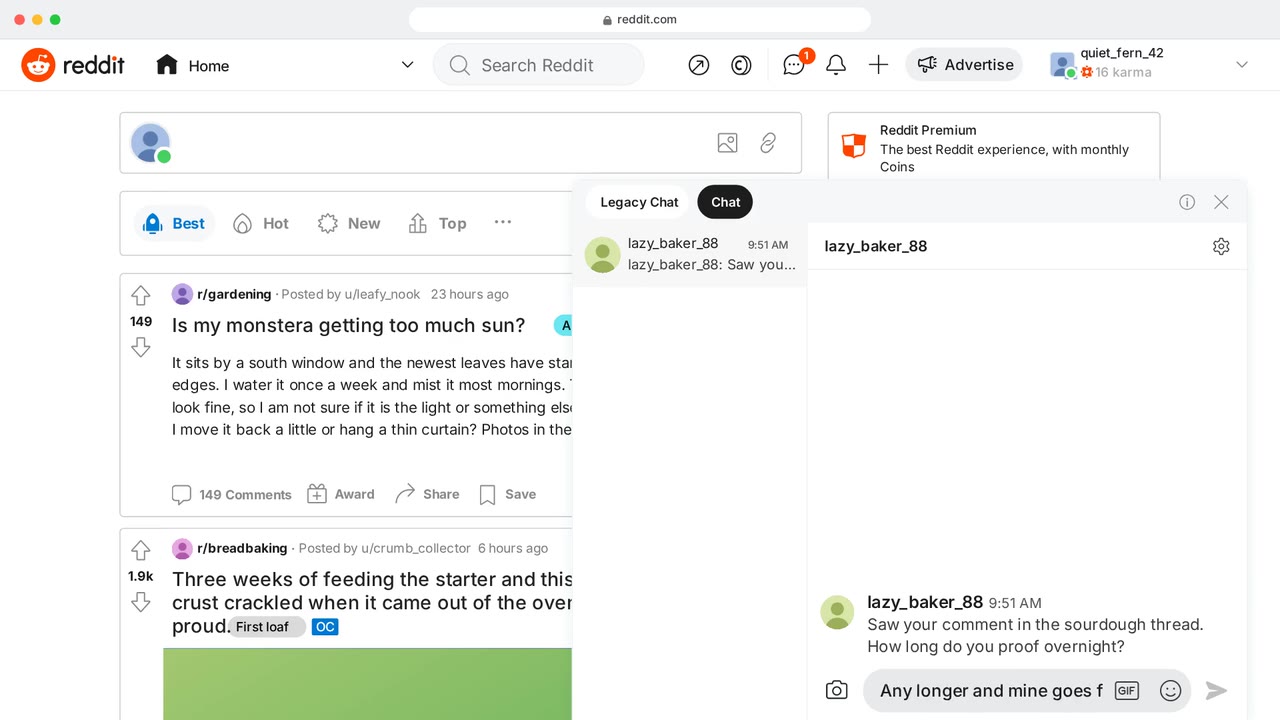
The Reddit Chat template recreates Reddit's chat as it looks on a computer. The clip shows the home feed inside a plain browser window, with three coloured dots and an address pill at the top. The chat popup sits at the bottom right of the page, with its channel list on one side and the thread on the other.
Messages are not bubbles. Each one is a row with the sender's avatar, username and time, followed by the text, the way the popup lays them out. Your own messages are typed into the Message field before they are sent. While the other redditor writes, a line above the field shows their name and "is typing" with animated dots.
The open channel's row in the list follows the clip. When a new message lands in the thread, the row's preview and time change to match it, so the two halves of the popup never disagree.
The demo above runs 12 seconds and has four messages. That is a good size for a first clip, and it is the one this guide rebuilds.
Reddit Chat or Reddit thread: pick the right template
MockClip has two Reddit templates, and they are easy to confuse by name. They show different parts of Reddit and produce different shapes of video.
- Reddit Chat (
/app/reddit-chat) is a private conversation between two people. It is drawn on the desktop site, in a browser window, as a 16:9 clip. It has usernames, times, typed replies and an is-typing line. It has no votes, no comments and no post of its own. - Reddit thread (
/app/reddit) is a post with its comment section, drawn on a phone. Comments appear one at a time, replies nest under their parents, and vote arrows can change mid-clip. It is the template for storytime and AITA videos.
If your scene is "what the internet said about the post", you want the thread, and the Reddit thread guide covers it. If your scene is "what two people said to each other afterwards", you want the chat. A story video can use both: the thread sets up the post, and the chat shows the private exchange that followed it.
How the template works
You describe the conversation in the editor, and the preview redraws the page from that description. The export uses the same renderer, so what you preview is what you download.
Because the clip is a description and not a screen recording, nothing from your own Reddit account ends up in the frame. The usernames are the ones you type. The feed behind the popup is fixed scenery with invented posts: a question about a monstera in a gardening community and a first sourdough loaf in a bread community. You cannot edit those posts, and you do not need to. They are there so the chat looks like it is happening on a real page.
Three things follow from the desktop layout, and it is better to plan for them now than to find out at export:
- The clip is 16:9, 1280x720, with Full HD available from the Pro plan. There is no 9:16 or 1:1 version.
- There is no phone frame, no on-screen keyboard and no camera scene behind the browser window.
- The popup is the only part that moves. The page does not scroll and nothing on it can be clicked.
Step-by-step: building the conversation
Open the Reddit Chat template. The page opens with an AI panel called Describe it; this guide uses the manual editor, which needs no account. We will rebuild the demo: two redditors who met in a sourdough thread compare notes on proofing a loaf overnight.
Step 1: Set the two usernames
Type the other redditor's username into Contact Name. In the demo this is lazy_baker_88. The name appears as the thread's title, on the channel row in the list and on every message that person sends.
Open Chat settings and fill in Your name. The demo uses quiet_fern_42. This is the username shown on your own messages, and it also appears in the page's top bar, where the signed-in account is shown.
Add an avatar for each side with Contact Avatar (Optional) and Your avatar if you have images for them. The demo leaves both as plain placeholder avatars in two different colours, which is enough to tell the speakers apart.
Write usernames the way Reddit handles look: lower case, with underscores and digits, and without the u/ in front. Invent them. Do not use a real person's username.
Step 2: Write the messages
Add lines with + My Message and + Their Message. The sender toggle on each row switches a line between Me and Other if you add one on the wrong side. The demo has four lines:
- Them:
Saw your comment in the sourdough thread. How long do you proof overnight? - You:
About 12 hours in the fridge. Any longer and mine goes flat. - Them:
That explains my pancake loaf, I left it for 20. - You:
Ha, been there. Try 12 and post a crumb shot!
Notice what the first line does. It says where the two people met ("the sourdough thread") and asks one clear question. A viewer who has never seen the thread still understands why these two strangers are talking.
Step 3: Give each message a time
Every row has a Timestamp field. The text you type is shown next to the username, so write it the way you want it read. The demo uses 9:51 AM, 9:53 AM, 9:54 AM and 9:55 AM.
Those four times tell a small story on their own. Two minutes pass before the first reply, then the answers come a minute apart. The viewer reads that as a relaxed chat between people who are both online. A gap of several hours would read as someone who took their time, or who nearly did not answer.
The time on the channel row in the list follows the newest message, so you only set times in one place.
Step 4: Time the typing
Each message has a Delay Before (s), the pause after the previous line. The demo uses half a second everywhere, which keeps a short exchange moving.
For the other redditor's lines, set Typing Duration (s). While it runs, their name and "is typing" with animated dots show above the Message field. The demo uses 1.2 seconds. Give a long or difficult reply more time, because a pause before a hard answer is part of the acting.
For your own lines, tick Show typing in input field and set Typing Speed (chars/sec). The text types into the Message field and is then sent. The demo uses 22 characters per second, which is quick but still readable. A 60-character line at that speed takes a little under three seconds to type, so long replies add up fast.
Free to use. No account needed for the manual editor. Browser-based.
Open the Reddit Chat editorStep 5: Continue a run without repeating the name
When one person sends two messages in a row, they form a run. The first message carries the avatar, username and time, and the next one sits underneath as text only, without repeating them. You do not have to set anything for this to happen.
Each row also has a checkbox labelled Avatar + name line (off = continues the previous message). Untick it to remove the header line from a message, so that it reads as a continuation of the line above.
Use a run when a person has two short thoughts. A second line under the same header reads as "and another thing", and it is a good place for a reveal. The demo alternates speakers on every line, so each message carries its own header.
Step 6: Add date lines where a day changes
Date line above puts a centred date line over a message. The field takes any short text, such as Today or a time. Put one where a new day starts, for example before a follow-up that arrives the next morning.
In the chat settings, Date line above the first message stamps the top of the conversation with a date line. The demo clip does not show one. Leave it on when the day matters to the story, and turn it off when the chat should feel like it could be any day.
Step 7: Set the zoom and the browser window
Open the Scene & look tab. Two controls there belong to the computer layout.
Zoom enlarges the whole page the way a browser's zoom does, and the video keeps its size. This template opens at 120 %, which is also its maximum, so the popup text reads well at 720p. Lower it to 100 % when you want more of the feed in view. The popup stays in the frame at every setting.
Show Browser Window turns the window frame on or off. With it on, the clip has the three dots and the address pill. With it off, you get the bare page, which is useful when your video editor adds its own frame or when the clip is going into a slide.
Step 8: Pick the theme, preview and export
Choose the light or dark theme. The demo is light. Dark suits late-night stories and dark-themed videos. Pick one and keep it for every chat clip in the same video.
Play the preview from the start and read every line at viewing speed. If you cannot finish a line before the next one lands, raise the delay on the following message. Then export the clip as an MP4 or a GIF.
Exports are 720p on the free plan, between 15 and 30 fps, with a small watermark. Pro removes the watermark and adds Full HD, and 60 fps is on the Creator plan. The pricing page has the current details.
What the finished clip shows
It helps to watch the demo once with the sound of your own narration in mind, and note what happens in each of its 12 seconds.
The clip opens on the home feed with the chat popup already open. The is-typing line appears for lazy_baker_88, and the first message lands: avatar, username, 9:51 AM, then two lines of text. The channel row in the list changes to show the start of that message.
Next, the reply is typed into the Message field letter by letter and sent. It appears as a row for quiet_fern_42 at 9:53 AM. The same two beats repeat: the is-typing line, then the "pancake loaf" message, then the typed answer about trying 12 hours.
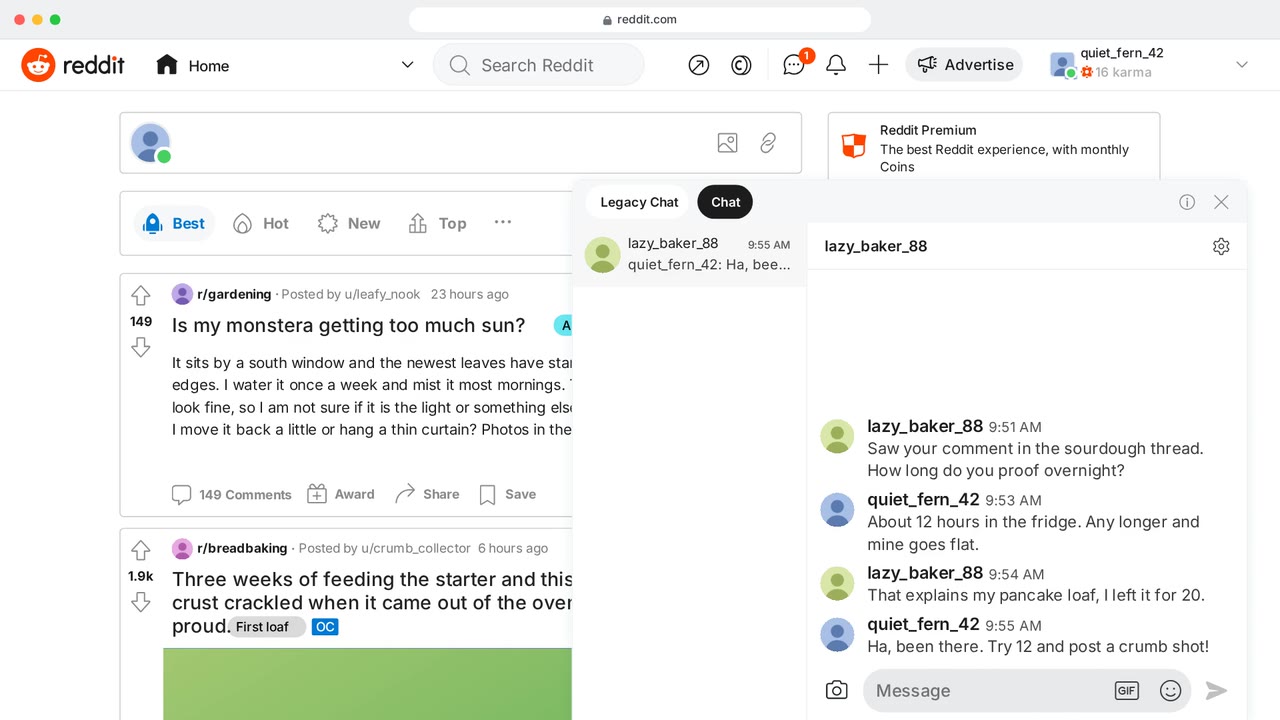
At the end, all four messages are stacked in the thread, the newest just above the Message field. The channel row shows the last line, prefixed with the sender's username, and the last time, 9:55 AM. That final frame is a good place to hold for a second in your edit, because it shows the whole exchange at once.
Writing dialogue that sounds like Reddit chat
Reddit chat sits somewhere between a comment and a text message. People are polite to strangers, they refer to the thread they came from, and they write in full sentences more often than they do on a phone messenger.
- Open with the thread. "Saw your comment in the sourdough thread" tells the viewer how these two people know each other. Without that, a message from a stranger reads as spam.
- One question or one fact per message. The demo's lines each do one job: ask, answer, react, encourage. Lines that do two jobs are harder to read at video speed.
- Keep lines under two rows where you can. The thread column is narrow, and text wraps early. A message that wraps to four rows pushes earlier lines up and takes longer to read than its delay allows.
- Let usernames carry character.
lazy_baker_88andquiet_fern_42already suggest two hobbyists. A username is the only costume your characters get. - Use the vocabulary of the community. "Proof", "crumb shot" and "starter" are the words bakers use. Two or three real terms make a staged chat feel like it belongs to a real corner of the site.
- End on a line that closes the scene. "Try 12 and post a crumb shot!" finishes the exchange and points back to the public thread. The viewer knows the conversation is over.
Keep the subject matter everyday. Hobbies, advice, games, recipes and tech questions all work. Leave out personal data, and do not put words in the mouth of a real account.
Pacing: delays, typing times and length
The demo fits four messages into 12 seconds with half-second delays, 1.2 seconds of typing for incoming lines and 22 characters per second for typed replies. Use it as a baseline and change one thing at a time.
- Slower for narration. If a voiceover reads each line aloud, raise the delay before the next message until the narration fits. Read the script out loud with a timer before you set the numbers.
- Faster for background. If the chat plays behind a talking head or under music, turn off Show typing in input field on your own lines so they appear at once, and shorten the typing durations. The viewer is not reading every word.
- Longer before the turn. Give the most important reply a longer typing duration than the rest. Uneven timing looks more human than identical pauses.
- Shorter overall. Six to eight messages is plenty for one scene. If the conversation needs twenty lines, split it into two clips with a cut between them, and use a date line at the start of the second to show that time passed.
Play the preview after each change to see the real length of the clip. Trust the preview more than arithmetic.
Using the 16:9 clip in YouTube videos, slides and vertical edits
The landscape shape is the natural fit for long-form video. A 16:9 clip fills a YouTube frame without cropping, and it drops into a webinar or a presentation the same way. For a Reddit story video, cut from the thread scene to the chat scene at the moment the story moves from public to private.
For slides, export a GIF, or use the MP4 if your presentation tool plays video. Turning off Show Browser Window gives you the bare page, which sits more cleanly inside a slide that already has its own frame.
For TikTok, Reels and Shorts, be realistic: this template does not export vertical video. You have two honest options.
- Place the landscape clip inside a vertical edit. In your own video editor, put the 16:9 clip in the top half of a split screen with gameplay or a talking head below it, or zoom in on the popup so the conversation fills the width. In the demo, the popup takes up roughly the right half of the frame, so a crop on that area keeps every message. Cropping in costs resolution, which is a reason to export in Full HD if you plan to do it.
- Use a phone template for a native vertical chat. MockClip's phone templates export vertical video directly. The Discord template draws direct messages as flat rows with avatar, name and time, which is the closest look to Reddit chat. The Reddit thread template is the vertical option when the scene can be a post with comments. Export settings for chat videos explains the formats in detail.
Drafting the chat with Describe it
If you would rather start from a sentence than from an empty editor, use Describe it, the AI panel at the top of the template page. Type a description of the exchange, for example "two redditors chat about overnight proofing after a sourdough thread", and the AI writes the messages, usernames and timing for this template. The result opens in the manual editor, where you can change any line.
Describe it requires signing in with Google or GitHub. The manual editor does not. The rendering is the same either way: the AI writes the script, and the template draws it. The Describe it guide walks through refining a draft.
Generating the same video from Claude or ChatGPT
MockClip's MCP server has a create_reddit_chat_conversation tool. It takes the other redditor's username, your own username, the theme and up to twenty messages, each with an optional time, delay, typing settings and date line. It returns a link that opens the finished animation in MockClip.
This is the quickest route when the script already exists in a chat with an assistant. Ask for the conversation, read it, correct it, and then ask for the clip.
What the template does not do
Knowing the limits saves a rewrite. The Reddit Chat template is a one-to-one text conversation, and that is all it is.
- No photos, files, voice notes, reactions or stickers in the thread.
- No links that open, and no group channels.
- No editable feed. The posts behind the popup are fixed.
- No scrolling page, no working tabs or buttons. The camera, GIF and emoji icons next to the Message field are drawn as part of the design and do nothing.
- No vertical or square export, no phone layout, no on-screen keyboard.
If your story depends on a photo being sent, describe it in the dialogue instead ("just sent it to you in the thread") or cut to a separate shot of the image in your video editor.
Common mistakes to avoid
- Opening with no context. A first message that does not mention the thread, the post or the reason for writing makes the scene confusing.
- Identical timing on every line. The same delay and the same typing duration throughout make the chat feel mechanical. Vary at least the important reply.
- Times that contradict the story. If the narration says "she answered the next morning", the time and the date line have to say so too.
- Real usernames. Even a well-meant parody of a real account can be mistaken for the real thing. Invent every name.
- Planning for vertical. Decide before you write the script whether the scene is a landscape clip or a phone chat. Converting afterwards means rebuilding it in another template.
- Leaving the zoom at 100 % for a small player. If the video will be watched in a small window, keep the 120 % zoom so the text stays readable.
Keep it honest
A staged chat is a storytelling tool. Use it for skits, tutorials, explainers, training and stories, and say so. Do not impersonate real people or real accounts, and do not present a staged exchange as something that happened. A "dramatised" or "re-enactment" note in the caption or on screen is enough.
MockClip is not affiliated with Reddit, and Reddit is a trademark of Reddit, Inc. The template recreates the interface for video mockups. Videos made with it are for your own content. For paid ads or client work, MockClip's terms point you to a brand-free template instead; see brand-free app mockups for ads.
Quick start
- Open the Reddit Chat template.
- Enter the other redditor's username and your own.
- Add four to eight messages with + My Message and + Their Message.
- Give each message a time.
- Set delays, typing durations and typing speed.
- Add a date line where a new day starts.
- Check the zoom and the browser window in Scene & look, then pick a theme.
- Preview, then export an MP4 or a GIF.
Related MockClip templates and guides
- Reddit Chat maker: the template used in this guide
- Reddit chat video ideas for story channels: scripts for story channels, moderators and marketers
- Reddit thread maker: a post with comments on a phone
- How to make a fake Reddit thread video: the thread version of this tutorial
- The Reddit story video format explained: hook, post, voiceover and comment payoff
- How to make a fake Discord conversation video: flat-row direct messages on a phone
- Connect MockClip to Claude or ChatGPT: MCP setup
- Pricing: watermark-free and Full HD exports
Frequently Asked Questions
What is the easiest way to make a fake Reddit chat video?
Open MockClip's Reddit Chat template in the browser, enter the two usernames, write the messages for both sides, set the delays and typing times, then preview the clip and export it as an MP4 or a GIF. The manual editor needs no account.
Can I export the Reddit chat as a vertical video?
No. The template draws Reddit's desktop page in a browser window, so the clip is always 16:9. For TikTok, Reels or Shorts, place the landscape clip inside a vertical edit in your own video editor, or use one of MockClip's phone templates for a native vertical chat.
Can I change the posts in the feed behind the chat?
No. The home feed is fixed scenery with invented posts. Only the chat popup follows your settings: the usernames, avatars, messages, times and date lines.
How is this different from the Reddit thread template?
The Reddit thread template plays a post and its comments on a phone, with votes and nested replies. The Reddit Chat template plays a private chat between two people on the desktop site, in a browser window.
Can the chat show images, reactions or a group chat?
No. The template is a one-to-one text conversation. Photos, files, voice notes, reactions, stickers, links that open and group channels are not supported.
Is it okay to make a fake Reddit chat video?
A staged chat for a skit, a tutorial, an explainer or a story is ordinary creative work. Use invented usernames, do not impersonate real people, do not present a staged exchange as real, and add a 'dramatised' note to your caption. MockClip is not affiliated with Reddit.
Can I make it from Claude or ChatGPT instead of the editor?
Yes. MockClip's MCP server has a create_reddit_chat_conversation tool that accepts the two usernames, the theme and up to twenty messages with their times and typing settings, and returns a link to the finished animation.
Related Articles
Reddit Chat Video Ideas for Story Channels and Mods (2026)
Reddit chat video ideas with ready scripts for story channels, moderators and marketers: ten script ideas for a 16:9 desktop clip, plus pacing and layout tips.
How to Make a Fake Reddit Thread Video (AITA, Storytime)
Make a fake Reddit thread video free in the browser: post, upvotes, comments that slide in one by one, nested replies and vote animations, exported as MP4.
The Reddit Story Video Format Explained (2026 Guide)
How the Reddit story video format works on TikTok and YouTube Shorts — hook, post screenshot, voiceover, B-roll, and comment payoff broken down step by step.
How to Make a Fake Discord Conversation Video (Free)
Step-by-step: script, time and export a fake Discord DM video in the browser, with call cards, date dividers, typing and the DM list. Free, no sign-up needed.
Fake Chat Video Export Settings: MP4, GIF, MOV, WebM, 1:1
Every MockClip export setting explained: MP4, GIF, transparent MOV and WebM, 720p and Full HD, 1:1 square, bezel-less frames, watermark, mobile and links.