Reddit Chat Video Ideas for Story Channels and Mods (2026)
Reddit videos usually show the public part of Reddit: a post, a comment section, votes going up and down. The private part gets less screen time, even though a good story often turns on it. Someone reads a post, opens chat, and says the thing they did not want to say in the comments.
This post is a list of Reddit chat video ideas with scripts you can copy: four for Reddit-story channels, three for community managers and moderators, and three for marketers who teach outreach that is not spam. Every idea is written for MockClip's Reddit Chat template and uses only what that template can draw.
What the Reddit Chat template gives you
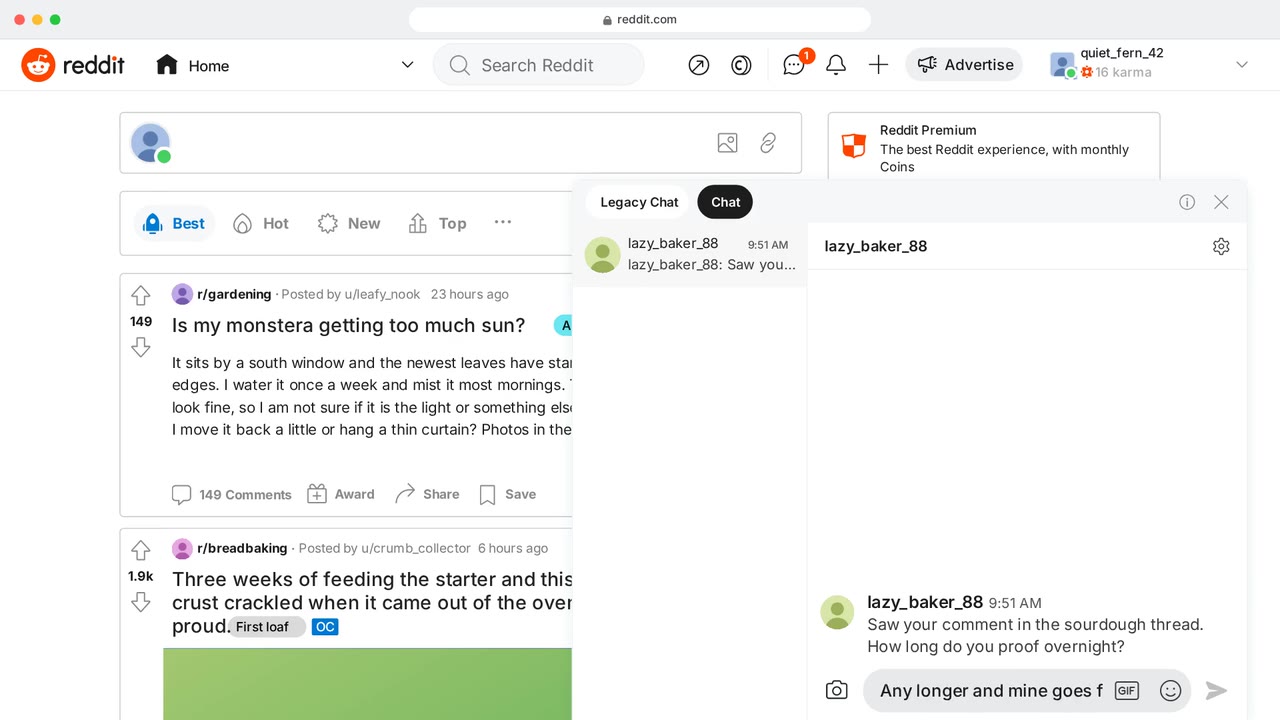
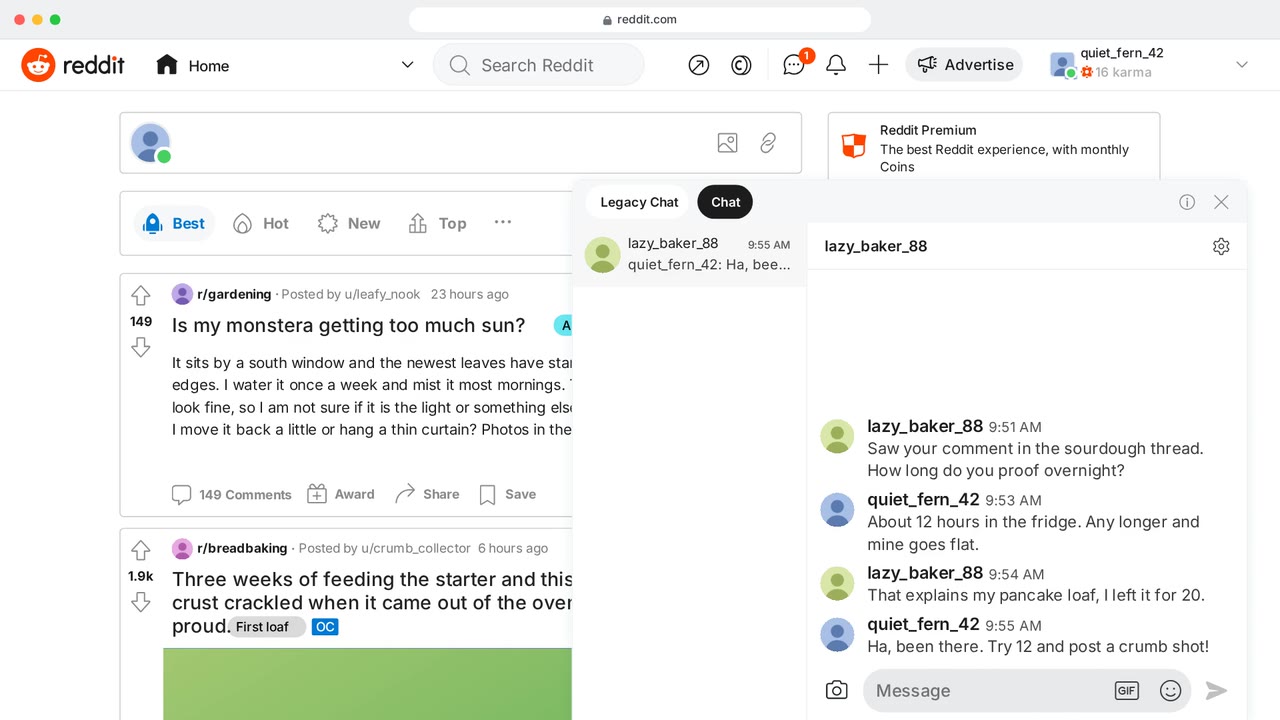
The template recreates Reddit's chat as it looks on a computer. The clip is the home feed in a plain browser window, with the chat popup at the bottom right: the channel list on one side and the thread on the other. It is always a 16:9 clip.
Inside the popup, each message is a row with the sender's avatar, username and time. Your own lines are typed into the Message field before they are sent. While the other person writes, their name and "is typing" with animated dots show above the field. The open channel's row in the list updates to the latest message as the clip plays.
You control the two usernames and avatars, every line, every time, the delay before each message, how long the other person types, how fast your own lines are typed, and where date lines go. You can zoom the page up to 120 %, turn the browser window off, and pick a light or dark theme.
The feed behind the popup is fixed scenery with invented posts, and it cannot be edited. The step-by-step guide covers every field in the editor. This post is about what to put in them.
Reddit Chat or Reddit thread?
MockClip has two Reddit templates, and a story video often needs both.
The Reddit thread template plays a post and its comments on a phone. Comments arrive one at a time, replies nest, and votes can change. It is the public scene, and the Reddit story format guide explains how channels build videos around it.
The Reddit Chat template plays a private conversation between two people on the desktop site. It has no post, no comments and no votes. It is the scene that comes after: the direct message, the apology, the confession, the offer of help.
A simple way to choose: if more than two people need to speak, use the thread. If the scene is two people and nobody else is meant to see it, use the chat.
How to read the scripts
Each script lists the two usernames, then the lines in order. "Them" is the other redditor, added with + Their Message. "You" is the account whose screen the viewer is looking at, added with + My Message. Times are suggestions for the Timestamp field.
When one person sends two lines in a row, the second continues the first as text only, without repeating the avatar, username and time. Its time is listed here for completeness, but it does not appear in the thread.
All usernames here are invented, and yours should be too. Reddit handles are lower case with underscores and digits, written without the u/.
Ideas for Reddit-story channels
A story video usually opens on a post. The chat scene works best in the second half, as the turn or the ending. In a landscape video you can cut straight from narration over the thread to the chat clip, because the clip is already 16:9.
1. The chat that followed the post
The narrator has just read a post about a neighbour's tree and a broken fence. Then a message arrives from someone who recognises the street.
- Usernames:
maple_and_rust_17(them),fence_post_op(you) - Them, 8:14 PM:
Hey. I read your post about the fence. I think I live two doors down. - You, 8:15 PM:
Seriously? Which side? - Them, 8:15 PM:
The blue gate. I saw the branch come down on Tuesday. - Them, 8:16 PM:
It was not the storm. He was up a ladder with a saw that morning. - You, 8:17 PM:
Would you be willing to say that to the landlord? - Them, 8:19 PM:
Yes. I should have said something sooner.
The fourth message continues the third without repeating the avatar and name, because both come from the same person. Two lines in a row, with the second one carrying the reveal, is the strongest beat this template has.
2. The update the thread never got
Story viewers want to know what happened next. Stage the original poster telling one helpful commenter, days later.
- Usernames:
second_shift_owl(them),late_rent_question(you) - Date line above on the first message:
Monday - You, 7:02 AM:
You told me to ask for the repair in writing. I did. - Them, 7:40 AM:
And? I have been wondering about this all week. - You, 7:41 AM:
They fixed the heating on Friday. No argument at all. - Them, 7:42 AM:
That is the best outcome. Keep the email somewhere safe. - You, 7:43 AM:
Already printed it. Thank you for answering a stranger.
The 38-minute gap between the first two times tells the viewer this is a real morning, not a scripted rally. Set a longer Delay Before (s) on the second message to match it.
3. The stranger with the missing piece
A post asks the internet to identify something: a tool, a song, a part. One person knows, and explains in chat because the answer is long.
- Usernames:
old_lathe_hand(them),garage_find_22(you) - Them, 3:30 PM:
That thing in your photo is a saw set. It bends the teeth on a hand saw. - You, 3:31 PM:
I have had it in a drawer for ten years thinking it was a hole punch. - Them, 3:32 PM:
Common mistake. Is there a number stamped on the handle? - You, 3:33 PM:
There is. 42. - Them, 3:35 PM:
Then it is the common model. Clean it up and it will still work.
The chat cannot show a photo, so the dialogue points back to the one in the thread. Show the image itself as a separate shot in your edit.
4. The wholesome one
Not every story needs a villain. Two hobbyists helping each other is a calm closer for a compilation, and it is the pattern of the template's own demo. The fixed feed behind the popup shows a monstera question and a first sourdough loaf, so a chat about plants or bread matches the page it sits on.
- Usernames:
leaf_drop_panic(them),window_sill_jungle(you) - Them, 10:05 AM:
Your reply about curling leaves saved my monstera. Thank you. - You, 10:07 AM:
That is great news. Did you move it back from the window? - Them, 10:08 AM:
About a metre. Two new leaves this month. - You, 10:09 AM:
Post a photo in the thread. People love an update.
Paste a script, set the timing, export a 16:9 clip. The manual editor needs no account.
Open the Reddit Chat templateIdeas for community managers and moderators
Written guidelines tell a moderator what the rules are. They rarely show what a good reply looks like when a member is upset. A staged chat does, and it can be reused in onboarding without exposing a real member's messages.
The template draws the chat popup, not moderation tools, and it is a one-to-one conversation. Use it for the exchange itself: one moderator, one member.
5. Answering "why was my post removed?"
- Usernames:
first_post_nerves(them),mod_breadbox(you) - Them, 2:11 PM:
Why was my post removed? I spent an hour on it. - You, 2:13 PM:
Thanks for asking here. It was removed under rule 3: recipe posts need the full recipe in the text. - You, 2:13 PM:
Your photos were great. Add the ingredients and steps and post it again. - Them, 2:15 PM:
Oh. I linked the recipe in a comment, is that not enough? - You, 2:16 PM:
Not on its own, because comments get buried. Put it in the post and you are fine. - Them, 2:17 PM:
Okay, that makes sense. Reposting tonight.
Use it in training to point at three things: the moderator names the rule, says something true and kind about the post, and gives the member a next step.
6. Handling a report
- Usernames:
quiet_reader_301(them),mod_breadbox(you) - Them, 9:48 PM:
Someone in the weekly thread keeps replying to me with insults. I do not want to argue with them in public. - You, 9:50 PM:
Thank you for reporting it and for not replying. That makes it easier for us. - You, 9:51 PM:
Which thread is it, and roughly when did it start? - Them, 9:52 PM:
The Sunday bake thread, since this afternoon. - You, 9:53 PM:
Got it. We will review the comments tonight. You do not need to do anything else.
Give the moderator's first reply a longer typing time. A pause before a careful answer shows a new moderator that the answer does not have to be instant.
7. The same complaint, answered badly and answered well
Make two clips with the same opening message and different replies, and play them one after the other.
The opening message in both: Your mods are power tripping. My comment was fine. from hot_take_harold_9.
Clip A, the reply to avoid:
- You, 6:30 PM:
Read the rules. - Them, 6:31 PM:
Wow. Great community you have here.
Clip B, the reply to copy:
- You, 6:32 PM:
I can see why that is frustrating. The comment was removed for the name-calling in the last line, not for the opinion. - You, 6:33 PM:
You are welcome to post it again without that line. - Them, 6:35 PM:
Fine. I will edit it.
Export the first clip, then change the lines and export the second in the same session. Keep the usernames, theme and zoom identical so the only difference the viewer sees is the wording.
Ideas for marketers teaching non-spammy outreach
Advice about promoting a product on Reddit is easier to follow when the audience can see the message. A staged chat lets you show a bad first message without quoting a real person, and a good one without making a claim about real results.
These ideas are for lessons on your own channel, course or webinar. If the video is a paid ad or a client project, do not use a real-app template for it; MockClip's terms point you to a brand-free one such as Text Chat, and the brand-free mockups guide explains why.
8. The cold pitch and the earned message
Two clips again. The viewer's screen is the person receiving the message, so the marketer is "Them".
Clip A, the message people ignore:
- Usernames:
growth_hacker_4411(them),small_shop_sara(you) - Them, 11:02 AM:
Hi! I saw you run a shop. Our tool boosts sales fast. Here is a link for a free trial! - No reply. Hold on the unanswered message for two seconds, then cut.
Clip B, the message that gets an answer:
- Usernames:
inventory_tool_dev(them),small_shop_sara(you) - Them, 11:02 AM:
Hi. You asked in the small business thread how people track stock across two stalls. - Them, 11:03 AM:
I build a tool for that, so I am biased. Happy to explain how I would do it in a spreadsheet first. - You, 11:10 AM:
Honest of you to say. Yes please, the spreadsheet version.
The lesson is on screen: the second sender refers to something the person wrote, says who they are, and offers help that does not need a purchase.
9. Ask the moderators before you post
- Usernames:
mod_small_biz(them),inventory_tool_dev(you) - You, 4:20 PM:
Hi. I make an inventory tool and I am active in the community. Is a post about it allowed, or should it go in the weekly promo thread? - Them, 4:41 PM:
Thanks for asking first. The weekly thread, please. Say that you are the maker. - You, 4:42 PM:
Will do. Thanks for the quick answer.
Three lines, and they show a habit most self-promotion advice only describes. Many communities have their own rules about promotion, so the point of the clip is the asking, not this particular answer.
10. The follow-up that accepts a no
- Usernames:
inventory_tool_dev(them),two_stall_tom(you) - Date line above on the first message:
Last week - Them, 1:15 PM:
Did the spreadsheet layout work for your second stall? - Date line above on the next message:
Today - You, 9:30 AM:
It did, thanks. I am going to stick with the spreadsheet for now. - Them, 9:34 AM:
Good choice if it works. Good luck with the market season.
No second pitch, no "just checking in" a third time. The two date lines carry the passage of time, which is what makes the patience visible.
Pacing for each kind of video
The same script needs different timing depending on what plays over it.
- Narrated story. The narrator reads each line aloud, so the chat has to wait. Raise Delay Before (s) on each message until the voiceover fits, and keep Show typing in input field on for the lines that matter so the viewer watches them form.
- Training clip. People pause and re-read training material. Use moderate delays and keep the clip short, then hold on the final frame in your edit while you talk through what the moderator did.
- Lesson with a talking head. If you are on camera explaining the message, the chat is evidence, not drama. Turn typing off on your own lines so they appear at once, and shorten the typing durations.
As a reference point, the demo clip uses half-second delays, 1.2 seconds of typing for incoming lines and 22 characters per second for typed replies, and its four messages run 12 seconds. Play the preview after every change. It is the only reliable measure of length.
Where a 16:9 chat clip fits
The clip is 1280x720, with Full HD from the Pro plan, and there is no vertical or square version. That shape decides where it works without extra effort.
- Long-form YouTube stories. The clip fills the frame. Cut to it from the thread or from b-roll.
- Webinars and courses. Drop the MP4 into the recording, or export a GIF for a slide. Turning off Show Browser Window gives the bare page, which sits well inside a slide that has its own frame.
- Moderator onboarding. A GIF in a team document or a short MP4 in a training deck.
For TikTok, Reels and Shorts, place the landscape clip inside a vertical edit in your own video editor. The usual layouts are the chat in the top half with gameplay or your camera below, or a zoom on the popup so the conversation fills the width. Zooming in costs resolution, so a Full HD export helps.
If the chat is the whole video and it must be vertical, a phone template is the better tool. The Discord template draws direct messages as flat rows with avatar, name and time on a phone, and the Reddit thread template covers the post-and-comments scene. The Reddit comment thread guide for YouTube creators covers that template for long-form video.
Drafting scripts faster
You do not have to type every line by hand.
Describe it is the AI panel on the template page. Type a sentence such as "a redditor asks me in chat how I fixed the yellow leaves on my monstera" and the AI writes the messages, usernames and timing, then opens the result in the manual editor for you to change. Describe it requires signing in with Google or GitHub; the manual editor does not. The words are written by the AI, and the drawing is done by the same template either way.
If you work in Claude or ChatGPT, MockClip's MCP server has a create_reddit_chat_conversation tool. It takes the two usernames, the theme and up to twenty messages with their times, delays, typing settings and date lines, and it returns a link that opens the finished animation in MockClip. Paste one of the scripts above into your assistant and ask it to build the clip.
Limits to plan around
Write the script for the template you have.
- It is a text conversation between two people. No photos, files, voice notes, reactions, stickers, links that open or group channels.
- The feed behind the popup is fixed. You cannot put your own post, subreddit or product in it.
- Nothing on the page scrolls or clicks. The popup is the only part that changes.
- There is no phone layout, no on-screen keyboard and no camera scene behind the browser window.
When a script needs something from that list, move it out of the chat. Mention the photo in dialogue, show the post in a thread scene, or cut to another shot.
Keep it honest
Every script in this post is invented, and that is the right way to use the format. Staged chats are for skits, stories, tutorials, explainers and training.
- Do not impersonate real people or real accounts. Invent every username.
- Do not present a staged exchange as something that happened. Add a "dramatised" or "re-enactment" note to the caption or the screen.
- Do not use a staged reply as proof that an outreach method works. Show it as an example of wording, not as a result.
- Leave personal data out of scripts, even made-up data that looks real.
MockClip is not affiliated with Reddit, and Reddit is a trademark of Reddit, Inc. Videos made with the template are for your own content; for plans and licence terms, see the pricing page.
Quick start
- Pick one idea above and copy its script.
- Open the Reddit Chat template.
- Enter the two usernames.
- Add the lines with + My Message and + Their Message, with a time on each.
- Set delays and typing to match your narration.
- Add date lines where the story skips time.
- Preview, then export an MP4 or a GIF.
- Place the 16:9 clip in your edit with a "dramatised" note.
Related MockClip templates and guides
- Reddit Chat maker: the template these scripts are written for
- How to make a fake Reddit chat video: every editor field, step by step
- Reddit thread maker: a post with comments on a phone
- How to make a fake Reddit thread video: the thread tutorial
- The Reddit story video format explained: hook, post, voiceover and comment payoff
- Brand-free app mockups for ads: what to use for ads and client work
- Connect MockClip to Claude or ChatGPT: MCP setup
- Pricing: watermark-free and Full HD exports
Frequently Asked Questions
What kinds of videos suit a Reddit chat clip?
Scenes where two people talk privately after something public: the chat that followed a post in a story video, a moderator answering a member, or a good and a bad first message in a lesson about outreach. The clip is a 16:9 desktop page, so it fits long-form video and slides best.
How long should a Reddit chat scene be?
Four to eight messages is enough for one scene. MockClip's demo clip plays four messages in 12 seconds. If a story needs more, split it into two clips and use a date line to show that time passed.
Can I post a Reddit chat clip on TikTok, Reels or Shorts?
The template does not export vertical video. Place the 16:9 clip inside a vertical edit in your own video editor, for example as the top half of a split screen or zoomed on the conversation, or use one of MockClip's phone templates for a native vertical chat.
Can I use a Reddit chat clip in a paid ad or a client video?
No. Real-app templates are for your own content. MockClip's terms say to use a brand-free template for ads and client work, and the licence for that is on the Studio plan. Check the pricing page for the current wording.
Can the template show a moderator team chat or a group chat?
No. It is a one-to-one text conversation between two usernames. Group channels, photos, files, reactions and links that open are not supported.
Do I have to write the script myself?
No. Describe it, the AI panel on the template page, drafts the messages and timing from a sentence and opens the result in the manual editor. It requires signing in. Assistants connected to MockClip's MCP server can also build the clip with the create_reddit_chat_conversation tool.
Is it okay to stage a Reddit chat for a video?
Yes, for skits, stories, tutorials and training, as long as you are open about it. Use invented usernames, do not impersonate real people, and do not present a staged exchange as real. A 'dramatised' or 're-enactment' note removes doubt.
Related Articles
How to Make a Fake Reddit Chat Video (Step-by-Step Guide)
Step-by-step guide to a fake Reddit chat video: the desktop chat popup over the home feed, usernames, typed replies, an is-typing line, zoom and 16:9 export.
The Reddit Story Video Format Explained (2026 Guide)
How the Reddit story video format works on TikTok and YouTube Shorts — hook, post screenshot, voiceover, B-roll, and comment payoff broken down step by step.
How to Make a Fake Reddit Thread Video (AITA, Storytime)
Make a fake Reddit thread video free in the browser: post, upvotes, comments that slide in one by one, nested replies and vote animations, exported as MP4.
Reddit Comment Thread Video Maker for YouTube Creators
Build animated Reddit threads for YouTube with MockClip's free template: comments, nested replies, vote and collapse animations, then export to MP4.
Brand-Free App Mockups for Ads: Chat, Notification & AI UIs
Original, unbranded app mockups for ads and client videos: a text chat, lock screen notifications, an AI assistant and a dating app, in your own name and colour