Best AI Content Creation Tools for Short-Form Video in 2026
AI content is the fastest-growing category on TikTok, Instagram Reels, and YouTube Shorts. Creators posting ChatGPT conversation videos, AI-generated content reactions, and AI-themed skits are building massive audiences. Here are the tools that make this content possible.
The AI Content Creator's Toolkit
Creating AI-themed short-form video involves three steps: scripting (writing the conversation), visualizing (creating the animated video), and distributing (posting with the right optimization). Different tools handle each step.
Conversation Animation Tools
MockClip — Best for ChatGPT Conversation Videos
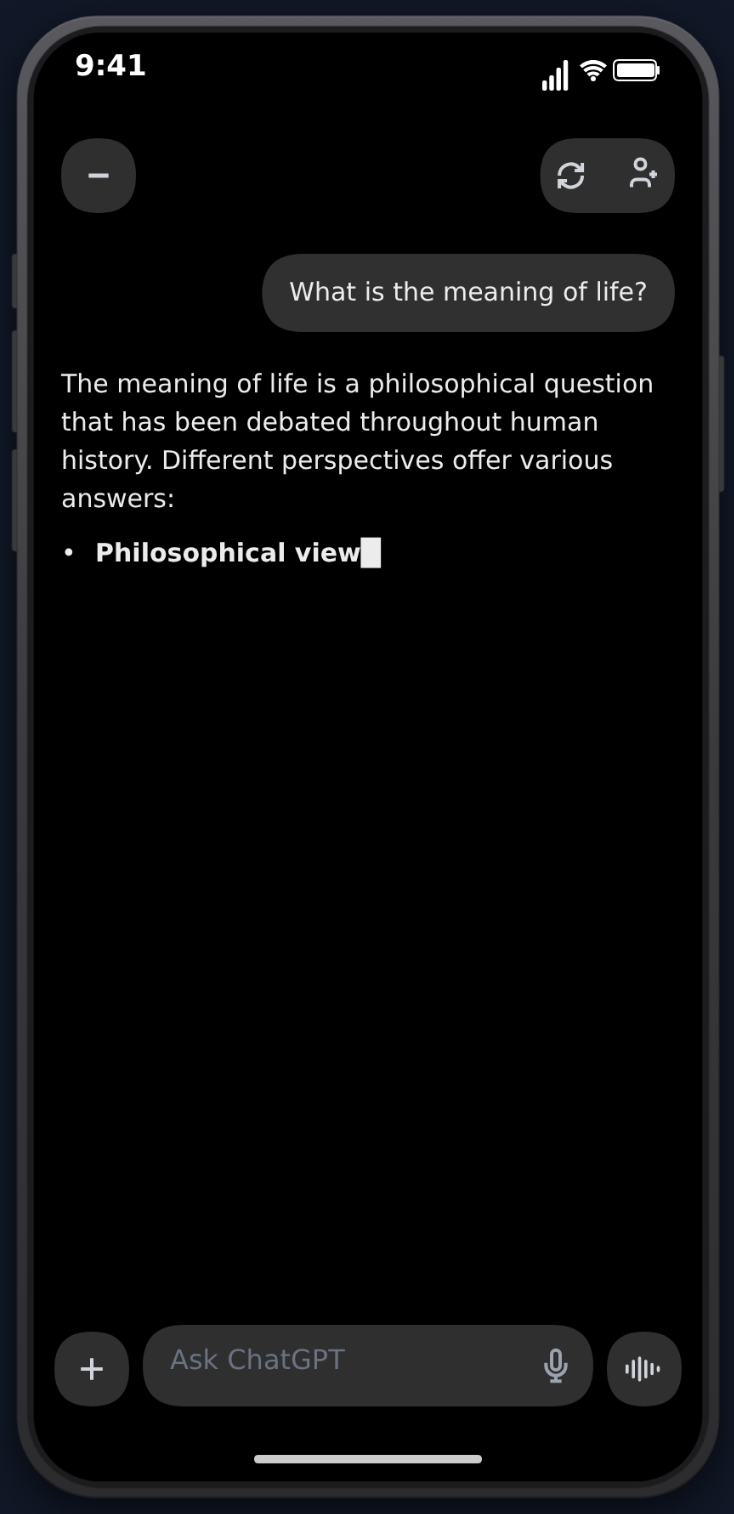
MockClip is a browser-based tool that creates animated phone mockup videos. Its ChatGPT template is specifically designed for AI conversation content:
- Streaming text animation — the iconic word-by-word reveal with blinking cursor
- Thinking indicators — the pulsing dot that appears while ChatGPT "thinks"
- Action labels — "Searching the web...", "Analyzing image..." indicators
- Markdown rendering — bold, headings, lists, and code blocks in responses
- Image generation animation — blur-to-clear reveal for DALL-E style content
- MP4 export — ready for TikTok, Reels, and Shorts
MockClip also offers iMessage, WhatsApp, Instagram DM, Tinder, and Reddit templates — useful for cross-format AI content like "I sent ChatGPT's response to my friend" follow-up videos.
Price: Free with watermark, Pro for watermark-free exports.
Free, no account needed. Realistic streaming text animation.
Try MockClip's ChatGPT TemplateScreen Recording + Real ChatGPT
The DIY approach: actually use ChatGPT and screen record. Works but has limitations:
- Can't control what ChatGPT says (requires careful prompting)
- Screen recording quality varies
- Notifications and distractions interrupt takes
- No timing control over the animation
Best for: Authentic "reaction" content where the real response matters.
AI Writing Assistants for Script Ideas
ChatGPT / Claude
Use AI to brainstorm video ideas and write scripts. Ask for:
- "Give me 10 funny ChatGPT prompts about [topic]"
- "Write a fake ChatGPT response that roasts [thing]"
- "Generate a conversation script about [scenario]"
Then paste the script into MockClip to create the animated video.
Specialized Prompt Libraries
Websites like PromptHero and FlowGPT curate viral prompts. Browse trending prompts for content inspiration, then adapt them for your niche.
Audio and Voice Tools
Text-to-Speech (ElevenLabs, Play.ht)
Add AI voiceover to your MockClip videos for platforms where audio matters (YouTube Shorts especially). TTS reads the conversation aloud while the text animates on screen.
Trending Audio Libraries
TikTok's built-in audio library has trending sounds. Layer these over your MockClip export for algorithmic boost. AI content paired with trending audio consistently outperforms silent videos.
Editing and Distribution
CapCut
Free video editor from TikTok's parent company. Use it to:
- Add captions/subtitles to your MockClip exports
- Layer trending audio
- Add intro hooks or end screens
- Batch-create variations of the same video
Platform-Native Editors
TikTok, Instagram, and YouTube all have built-in editors. For simple additions (audio, text overlay, stickers), these are faster than dedicated editing software.
The Optimal AI Content Workflow
Here's the most efficient workflow for producing AI conversation videos at scale:
- Brainstorm — use AI to generate 10-20 prompt ideas (5 minutes)
- Script — pick the best 5 and write full conversations (10 minutes)
- Create — build all 5 videos in MockClip back-to-back (15 minutes)
- Polish — add audio and captions in CapCut (10 minutes)
- Schedule — queue posts across TikTok, Reels, and Shorts (5 minutes)
Total: ~45 minutes for 5 videos across 3 platforms. That's a week of daily content produced in under an hour.
What's Working Right Now (2026)
The AI content space evolves fast. Formats that are performing well right now:
"I asked ChatGPT to be honest about..." — vulnerability + AI = massive engagement. Topics like career choices, relationships, and life decisions.
AI vs. Human comparisons — show a ChatGPT response alongside a human's response to the same question. The comparison format drives debate in comments.
AI reaction chains — create a ChatGPT conversation, then show it to a friend via iMessage and film their reaction. Multi-format content using multiple MockClip templates.
Niche AI advice — "ChatGPT gives dating advice to engineers" or "AI plans a bodybuilding meal prep." Niche + AI = underserved audience + high engagement.
Series content — "Day 1 of letting ChatGPT run my life" creates anticipation and follow-through. Series formats build subscriber loyalty.
Start creating AI content at mockclip.com — the fastest path from idea to published video, with realistic ChatGPT animations and MP4 export.
Frequently Asked Questions
What's the best tool for making ChatGPT conversation videos?
MockClip is the best tool for creating animated ChatGPT conversation videos. It replicates the exact ChatGPT interface with streaming text, thinking indicators, and action labels — all exported as MP4 video ready for social media.
Do I need to use real ChatGPT to make AI content?
No. Tools like MockClip let you script the entire conversation, giving you full control over both the prompt and the response. This is faster and produces more entertaining content than screen recording real AI interactions.
Can AI tools help me create content faster?
Yes. Using MockClip for the visual conversation and AI writing tools for script ideas, you can produce 5-10 videos per hour. The combination of scripting and animation tools dramatically speeds up production.
What AI content formats perform best on TikTok?
The 'I asked ChatGPT to...' format with a surprising or provocative prompt consistently gets the highest views. Other strong formats include AI roasts, AI life advice, and AI vs. human comparisons.
Related Articles
How to Connect MockClip to Claude and ChatGPT (MCP Setup Guide)
Step-by-step guide to configure MockClip inside Claude Desktop and ChatGPT using the Model Context Protocol. Generate conversation mockup videos from plain-English prompts.
50 AI Conversation Video Ideas That Actually Go Viral
Proven content ideas for fake ChatGPT conversation videos. Prompts, formats, and hooks that drive millions of views on TikTok and Reels.
How to Create a Fake ChatGPT Conversation Video
The complete 2026 guide to creating realistic fake ChatGPT conversation videos for TikTok, YouTube Shorts, and Reels — no coding, no editing, free.