WhatsApp Chat Video for YouTube Shorts: Full Guide
WhatsApp is the world's most-used messaging app, and WhatsApp conversation videos are one of the fastest-growing content formats on YouTube Shorts. The green interface, the double-check read receipts, the typing indicators, the group chat chaos — the format is instantly recognizable to billions of people, and that recognition converts directly to watch time.
YouTube Shorts is where this format has a specific edge over other platforms. Shorts indexes titles for search. A video titled "WhatsApp group chat that ended a friendship" or "the WhatsApp text that changed everything" can surface in YouTube search results for weeks or months after posting — far longer than the typical 48-hour window of TikTok or Reels distribution. For creators who want compounding views rather than spike-and-fade, Shorts plus WhatsApp conversation videos is the strongest combination.
This guide covers why WhatsApp chat videos perform on Shorts, how to build one in MockClip's WhatsApp template, the content patterns that drive views, YouTube Shorts-specific posting strategy, and advanced features that make the animation look and feel like a real WhatsApp conversation.
Why WhatsApp chat videos work on YouTube Shorts
Four mechanics make the format effective.
Universal recognition. WhatsApp has over two billion active users. The green interface, the double-check marks, the "typing..." indicator, and the message bubble shapes are visual patterns that most of the world recognizes instantly. When a WhatsApp conversation appears in a YouTube Short, the viewer understands the format before they read a single word. That instant recognition buys free attention.
Read receipts create tension. The WhatsApp blue double-check mark means "read." When a message shows blue checks and the other person hasn't replied, the viewer feels the same anxiety they feel in their own chats. That emotional resonance is what keeps viewers watching — they're not just watching a conversation, they're reliving a feeling they know.
Group chat dynamics multiply engagement. WhatsApp group chats are inherently chaotic. Multiple people responding at different speeds, side conversations, someone typing while someone else sends — the dynamic creates natural comedy and drama that single-thread conversations can't match. Group chat videos drive comments because every viewer identifies with a different person in the group.
Timestamps anchor the narrative. WhatsApp shows timestamps on every message. A conversation that happens over 10 minutes reads differently than one that happens over 3 days. The timestamps add a time dimension that other chat formats don't naturally provide — "18:32... 18:33... 18:34" tells the viewer this is a rapid-fire exchange, while "Monday... Thursday... the following Monday" tells a different story.
Why YouTube Shorts specifically
YouTube Shorts has properties that make it the best platform for WhatsApp conversation videos.
Search indexing. YouTube indexes Short titles and descriptions for search. A Short titled "family group chat drama" can rank in YouTube search results and get discovered by viewers searching for entertainment weeks after posting. TikTok and Reels have weaker search discovery.
Longer shelf life. TikTok videos spike in the first 48 hours and then slow dramatically. YouTube Shorts can gain views gradually over weeks through search and suggested content. For a format like WhatsApp conversations — which stays relevant regardless of trends — the longer shelf life means more total views per video.
Comment-driven engagement. YouTube Shorts has a persistent comment section that viewers actively browse. WhatsApp group chat videos drive comments because viewers want to say which person in the group they relate to, or share their own group chat stories. High comment counts feed the YouTube recommendation algorithm.
Older demographic. YouTube's audience skews slightly older than TikTok's. WhatsApp usage also skews toward an older demographic compared to Instagram DMs. The audience overlap means WhatsApp conversation videos on YouTube Shorts reach viewers who actually use WhatsApp daily — which increases the recognition and emotional resonance.
For the complete YouTube Shorts format guide, see fake text conversation video for YouTube Shorts.
Step-by-step: creating a WhatsApp chat video for Shorts
Five minutes from blank editor to finished MP4.
Step 1: Open the WhatsApp editor
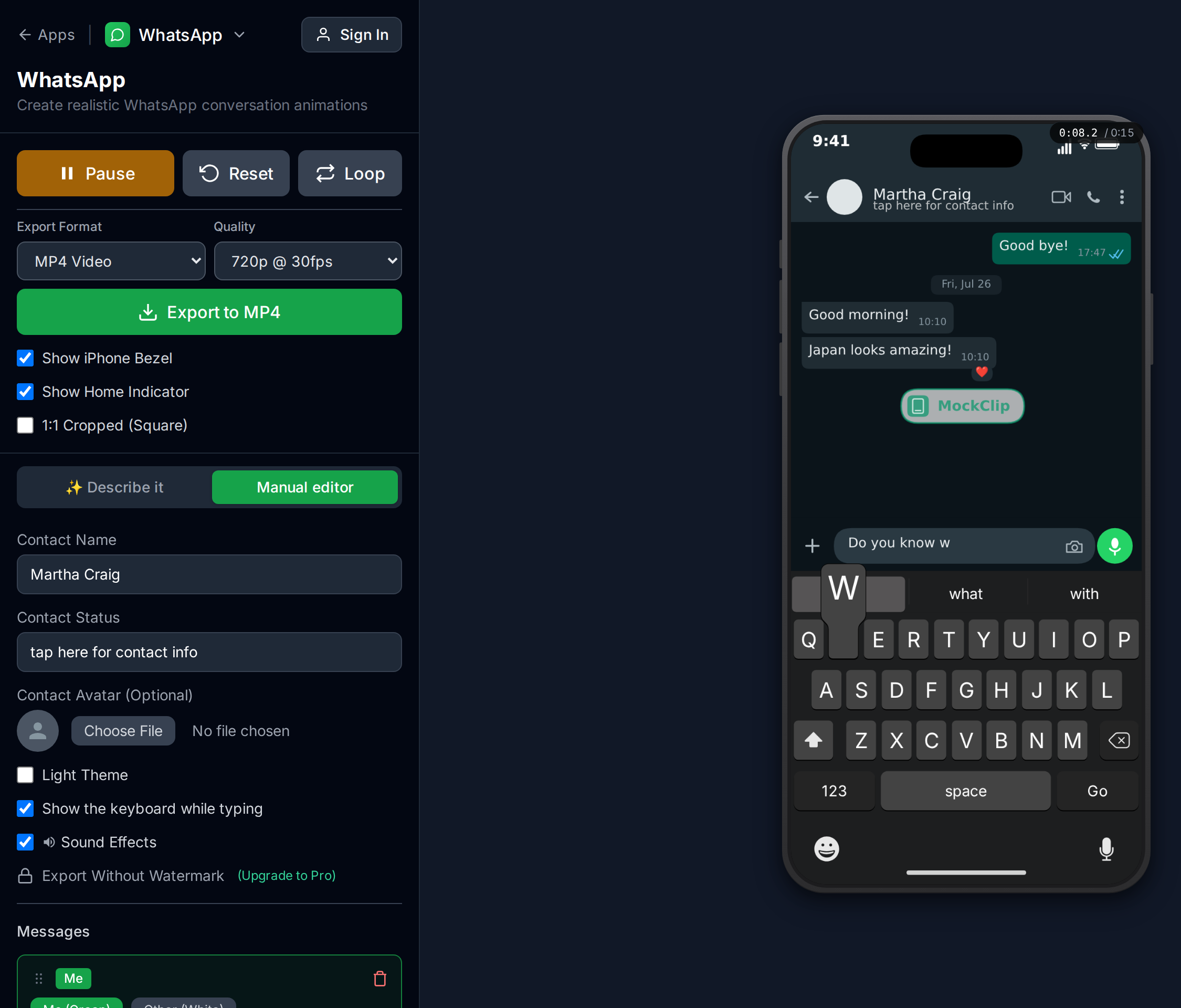
Go to mockclip.com/app/whatsapp. The editor loads with a sample conversation. Press Play to watch the full animation before editing — this gives you a feel for the pacing, the typing indicators, and the read receipt timing.
Step 2: Set the contact or group name
The contact name in the WhatsApp header establishes the context for the entire conversation.
For group chats (the strongest performing format on Shorts):
- Family groups: "Family Group", "The Fam", "Mom + Dad + Chaos" — universally relatable
- Friend groups: "The Group Chat", "Roommates", "Work Besties" — specific enough to imply dynamics
- Context-loaded names: "Wedding Planning", "New Year's Trip", "Move-In Day" — the name sets the narrative
For 1-on-1 conversations:
- A first name establishes the relationship: "Sarah", "Dad", "Boss"
- A label tells the story: "Landlord", "Ex", "New Match"
The group name is the first line of your script. Make it do work.
Step 3: Write the messages
WhatsApp messages are short, fast, and overlap. Real WhatsApp conversations have a specific rhythm — messages arrive in bursts, people type over each other, and the conversation moves in 2-5 word messages rather than paragraphs.
Key principles for WhatsApp video scripts:
- Keep messages to 2-10 words. Real WhatsApp messages are short. "Who ate the cake?" reads right. "I was wondering if perhaps someone consumed the remaining portion of the cake that was in the refrigerator" does not.
- Use timestamps strategically. Every message can have a timestamp. A conversation where messages arrive minute-by-minute (18:32, 18:33, 18:34) reads as rapid-fire. A conversation with gaps (14:00... 22:47... the next day) reads as simmering tension. Pick the pacing that fits your story.
- Build to a punchline or revelation. The last message in the conversation is the payoff. Every preceding message should escalate toward it. In a 5-message conversation, the first 4 messages are setup and the 5th is the punchline.
- Give each sender a distinct voice. In group chats, each person should type differently. One person uses short, direct messages. Another uses longer, explanatory messages. A third uses emoji-heavy reactions. This makes the group feel real.
Step 4: Enable typing indicators
MockClip's WhatsApp template supports typing indicators per message. When enabled, the "typing..." animation appears in the chat before the message shows.
When to use typing:
- Before a dramatic or surprising message — the typing delay builds anticipation
- Before the other person's messages — creates the "waiting for a reply" tension
- In group chats, before messages that change the direction of the conversation
Typing duration: 1.5-3 seconds is the sweet spot. Under 1 second doesn't register. Over 4 seconds feels like a bug.
Step 5: Configure read receipts
WhatsApp's check mark system is a storytelling tool:
- Single grey check: message sent
- Double grey check: message delivered
- Double blue check: message read
MockClip lets you enable each check state independently per message, with configurable delays.
Use read receipts for:
- The "read and ignored" punchline. Your message gets blue checks, but the other person never replies. The conversation ends on blue checks — the WhatsApp equivalent of being left on read.
- Delivery confirmation in time-sensitive stories. In a group chat about meeting up, the delivered and read checks show that everyone got the message. The person who read and didn't respond is the story.
- Pacing control. The delay between a message appearing and the checks appearing creates visual beats in the animation. These beats are micro-pauses that let the viewer process what was said.
Step 6: Add reactions (optional)
WhatsApp message reactions — like, heart, laugh, surprised, sad, pray — are visual punchlines. A laugh reaction on an embarrassing message is commentary. A pray reaction on a dramatic message is solidarity.
Available reactions: like, heart, laugh, surprised, sad, pray. Each can be from you or from someone else.
Best practice: one or two reactions per conversation, placed on the messages that deserve the strongest emotional response. A well-timed reaction can replace an entire reply message.
Step 7: Set the theme
MockClip supports light and dark WhatsApp themes. Dark mode matches the interface most users have enabled and performs better in Shorts feeds where viewers scroll in varied lighting conditions. Use dark mode unless your content specifically requires a light background.
Step 8: Preview and export
Press Play and watch the full animation. Check:
- Do the messages arrive at a natural pace?
- Do the timestamps tell the right time story?
- Do the typing indicators build suspense without dragging?
- Is the total length between 15-45 seconds?
Hit Export for a 1080x1920 vertical MP4. Ready for YouTube Shorts upload.
Free to use. No sign-up. Browser-based.
Open the WhatsApp conversation editorContent patterns for WhatsApp Shorts
These patterns consistently perform in the YouTube Shorts format.
The family group chat
The single strongest performing WhatsApp video category. Family group chat dynamics are universal — the overprotective parent, the sibling rivalry, the aunt who forwards everything, the cousin who only appears for holiday planning. Every viewer identifies with someone in the group.
Content examples:
- "Family group chat when Mom finds out you didn't eat" — the escalation from casual question to full investigation
- "Dad in the family group chat at 6 AM" — the early-morning message that wakes everyone up
- "When someone mentions money in the family group" — the sudden silence (blue checks, no replies)
The friend group planning disaster
A group chat where friends try to make plans. The conversation spirals from a simple "dinner this weekend?" into scheduling chaos, dietary restrictions, budget arguments, and the one person who says "I'm down for whatever" but vetoes everything.
This pattern works because every viewer has lived it. The comments section fills with "this is literally my group chat" — which drives algorithmic engagement.
The relationship conversation
A 1-on-1 WhatsApp conversation between two people in a relationship (or former relationship). The format excels at:
- Breakup conversations where the escalation is in the message pacing
- Late-night conversations (timestamps at 1:00 AM, 1:03 AM, 1:47 AM)
- The "we need to talk" opening that goes in an unexpected direction
- Misunderstandings that escalate through terse messages
The work group chat
Professional WhatsApp group conversations are universally relatable. The boss who sends messages at midnight, the colleague who replies "noted" to everything, the group chat that's 90% memes and 10% actual work communication.
Content examples:
- "When your boss says 'let's circle back' in the group chat"
- "The work group chat on a Friday afternoon vs Monday morning"
- "New hire's first message in the work group" — the overly formal message followed by the group's actual tone
The escalation pattern
Start with a mundane message and escalate to chaos in 5-7 messages. Each message raises the stakes, changes the direction, or adds a new person to the conversation. The escalation pattern works across any topic — the mechanic is the rising tension, not the specific subject.
For a wider library of WhatsApp conversation ideas, see how to make a fake WhatsApp chat video and how to make a fake WhatsApp conversation video.
YouTube Shorts posting strategy
The WhatsApp video is the content. How you package it for YouTube Shorts determines the reach.
Title optimization
YouTube Shorts indexes titles for search. Write your title as a phrase someone would type into YouTube:
- "the whatsapp text that ended everything"
- "family group chat when mom finds out"
- "whatsapp conversation at 3am"
- "when your friend sends this in the group chat"
Avoid generic titles like "funny whatsapp video" — be specific about the scenario. Specific titles rank for long-tail searches that generic titles miss.
Description and tags
YouTube reads the description for ranking. Include 2-3 relevant phrases:
- The platform: "whatsapp conversation", "whatsapp group chat"
- The format: "chat video", "text conversation video"
- The topic: "family group chat", "relationship text", "friend group planning"
Keep the description to 2-3 sentences. The title does the heavy lifting for Shorts.
Thumbnail
YouTube auto-generates thumbnails from Shorts. Since your video is a WhatsApp conversation, the thumbnail will naturally show the WhatsApp interface — which is recognizable and communicates the format at a glance. If you can set a custom thumbnail, choose a frame that shows the most dramatic or funny message in the conversation.
Posting frequency
YouTube Shorts rewards consistency. For WhatsApp conversation videos specifically, 2-3 Shorts per week is a sustainable pace that builds a library of searchable content. Each Short is a new search entry point, and the compounding effect of multiple videos ranking for different WhatsApp-related queries is the long-term growth lever.
Cross-posting to TikTok and Reels
The same WhatsApp MP4 works on all three platforms. Platform-specific adjustments:
TikTok: Add a trending sound in the TikTok editor. Write a short caption hook ("wait for the last message"). Post in early evening (7-10 PM).
Instagram Reels: Write a slightly longer caption that tells the story context. Use 3-5 hashtags including #whatsapp, #groupchat, and topic-specific tags.
For the full cross-platform playbook, see how to go viral with fake conversation videos.
Advanced WhatsApp features in MockClip
Date labels
WhatsApp shows date labels between message groups ("Today", "Yesterday", "Monday"). MockClip supports custom date labels per message. Use them to show conversations that span multiple days — the date jump between "Tuesday" and "The following Monday" tells a story without any messages.
Delivered and read check timing
MockClip gives independent control over sent, delivered, and read check delays. You can set:
- Sent check appears immediately (default)
- Delivered check appears after a 1-second delay
- Read (blue) check appears after a 3-second delay
The gap between "delivered" and "read" is a storytelling beat. A message that sits at "delivered" for 5 seconds before turning blue tells the viewer the recipient hesitated before opening it.
Typing speed per message
Each "me" message can have a custom typing speed. Fast typing (high speed value) suggests urgency or anger — the character is typing furiously. Slow typing suggests careful, deliberate word choice — the character is thinking about what to say. Match the typing speed to the emotional state.
Reaction delays
Each reaction has a configurable delay. A reaction that appears immediately after a message suggests an instinctive response. A reaction that appears 2-3 seconds later suggests the reader sat with the message before responding. The delay is a micro-narrative tool.
Light vs dark theme
Dark mode is the default and the right choice for most content. WhatsApp dark mode is what most users see in their own phones, and it performs better in feeds. Switch to light mode only when the content specifically calls for a bright, daytime, or professional tone.
Writing tips for WhatsApp Shorts
Message length matters more than message count. A 5-message conversation where each message is 3-5 words will always outperform a 3-message conversation where each message is 20 words. WhatsApp is a short-message platform. Write like people text.
Timestamps do narrative work. "18:32, 18:33, 18:34" is a rapid-fire argument. "14:00... 23:47" is a message that went unanswered for 10 hours. "Monday... Friday" is a week of silence. The timestamps are free storytelling — use them.
The last message is the punchline. Structure every conversation so the final message is the strongest. It's the last thing the viewer sees before the Short loops or ends. If your last message is a reaction rather than a text message, that can be even stronger — the visual reaction is the emotional payoff.
Read receipts are dialogue. Blue checks without a reply say "I saw your message and chose not to respond." That's a character action. A conversation that ends on blue checks tells a complete story.
Group chat names set expectations. A video titled "Family Group Chat" instantly tells the viewer the dynamics. A video titled "Wedding Planning Group" sets different expectations. The group name is your first line of script — write it accordingly.
Common mistakes to avoid
Messages are too long. Real WhatsApp messages are 2-10 words. A 30-word message looks fake regardless of how accurate the UI is. If you need to convey a long thought, break it into 3-4 short messages sent in rapid succession — that's how people actually type on WhatsApp.
No timestamps. WhatsApp always shows timestamps. A conversation without them looks incomplete. Always set timestamps, even if they're just sequential minutes (18:32, 18:33, 18:34).
Typing indicators on every message. Typing indicators build suspense, but they also add time. If every message has a 2-second typing indicator, a 6-message conversation takes 12 extra seconds. Use typing selectively on 2-3 key messages where the pause adds value.
No read receipts. The check marks are part of the WhatsApp visual language. Skipping them makes the conversation feel incomplete. Enable at least delivered checks on your messages.
Generic group name. "Group Chat" tells the viewer nothing. "Family Group", "The Roommates", "Project Alpha" — specific group names set the context instantly.
Title doesn't match the format. On YouTube Shorts, the title needs to describe the scenario. "Funny video" gets zero search traffic. "WhatsApp group chat when mom finds out about the party" gets search traffic for weeks.
How MockClip compares to other approaches
WhatsApp screenshot generators (static image tools). These produce a PNG, not a video. No typing indicators, no message-by-message reveal, no read receipt animations. Screenshots work for Instagram carousels but not for Shorts or TikTok.
Screen recording a real WhatsApp conversation. You cannot script the other person's replies. You capture your battery level, notifications, and real contact names. Privacy risk is high. Not practical for produced content.
Recreating WhatsApp UI in a video editor. CapCut, After Effects, or similar tools can approximate the WhatsApp interface, but every element — the bubble colors, the check marks, the typing indicator — needs to be animated manually. Hours of work per video. Not viable at the posting frequency YouTube Shorts rewards.
MockClip. Browser-based, purpose-built. Five minutes from blank editor to finished MP4. Typing indicators, read receipts, reactions, timestamps, date labels, and themes are all built in. For a broader tool comparison, see best fake text message video makers.
Quick start
- Open mockclip.com/app/whatsapp
- Set the contact or group name to establish context
- Write short messages (2-10 words each) with timestamps
- Enable typing indicators on 2-3 key messages
- Add read receipts for "left on read" storytelling
- Press Play to preview the full animation
- Export the vertical MP4 and upload to YouTube Shorts
No account, no install, no editing software. For watermark-free exports, see the Pro plan.
Related guides and templates
- WhatsApp conversation template — the editor used in this guide
- How to make a fake WhatsApp chat video — the format pillar guide
- How to make a fake WhatsApp conversation video — conversation-focused guide
- Fake text conversation video for YouTube Shorts — Shorts-specific cross-format guide
- How to go viral with fake conversation videos — cross-platform strategy
- AI conversation video content ideas — conversation script library
- Best fake text message video makers — tool comparison
- Phone mockup video for TikTok — TikTok-specific phone mockup guide
- App mockup videos social media guide — broader mockup format guide
- Pricing — Pro tier for watermark-free exports
Frequently Asked Questions
How do I make a fake WhatsApp chat video for YouTube Shorts?
Open MockClip's WhatsApp template at mockclip.com/app/whatsapp, type your conversation, configure typing indicators and read receipts, press Play to preview, and hit Export. You get a 1080x1920 vertical MP4 ready for YouTube Shorts — no video editor needed.
Is MockClip free for creating WhatsApp chat videos?
Yes. The WhatsApp template runs in the browser with no sign-up. Free exports include a small watermark; the Pro plan removes it and unlocks higher-resolution renders.
Can I create a WhatsApp group chat video?
Yes. MockClip's WhatsApp template supports group chat conversations with multiple senders. Set the group name as the contact name and assign each message to different senders.
Can I add typing indicators to the WhatsApp video?
Yes. MockClip supports WhatsApp-style typing indicators that show before each message. You can enable typing per message and control the typing duration to build suspense.
Does MockClip show WhatsApp read receipts (blue ticks)?
Yes. MockClip renders the WhatsApp sent, delivered, and read check marks. You can enable each independently per message and set delays for when each check state appears.
What video format does MockClip export for YouTube Shorts?
MP4 at 1080x1920 vertical — exactly the format YouTube Shorts, TikTok, and Instagram Reels expect. No conversion or cropping needed.
Can I add reactions to WhatsApp messages?
Yes. MockClip supports WhatsApp message reactions — like, heart, laugh, surprised, sad, and pray. Each reaction can be set as from you or from another person, with configurable delay timing.
How long should a WhatsApp chat video be for YouTube Shorts?
YouTube Shorts supports up to 60 seconds, but the strongest performing length is 15-45 seconds. A 5-message WhatsApp conversation with typing indicators typically runs 20-30 seconds — the ideal range for Shorts.
Related Articles
How to Make a Fake WhatsApp Chat Video (2026 Guide)
Complete 2026 guide to creating realistic fake WhatsApp chat videos for TikTok, Reels, and Shorts — typing dots, blue ticks, MP4 export, no install required.
How to Create Fake Text Conversation Videos for YouTube Shorts
Make animated fake text conversations optimized for YouTube Shorts — with templates, monetisation strategy, voiceover tips, and a full posting playbook.
How to Go Viral With Fake Conversation Videos in 2026
Data-driven strategies for going viral with fake conversation videos on TikTok, Reels, and Shorts. Hooks, timing, and growth tactics.
Best Fake Text Message Video Makers for Content Creators
Compare the best fake text message video makers for iMessage and WhatsApp. Find the right tool for animated conversation videos.