How to Create Fake Text Conversation Videos for YouTube Shorts
YouTube Shorts has quietly become one of the best platforms for text-conversation content. While TikTok gets most of the attention in creator circles, YouTube Shorts offers something TikTok structurally cannot: long-term discoverability and real, scalable monetisation. A well-made text-conversation Short can keep surfacing in search and suggested feeds months after publishing, and once the channel is monetised, every one of those views directly contributes to your earnings.
This guide is the complete playbook: why Shorts is the right platform for the format, how to use MockClip to produce the videos, the optimisation tweaks that matter for YouTube specifically, the monetisation path, and the content-strategy tactics that compound on YouTube in ways they don't on TikTok.
Why YouTube Shorts is the right platform for text-conversation videos
Before getting into the production workflow, it's worth being precise about why YouTube Shorts deserves the time. Most creators reflexively post to TikTok first; for this specific format, that's a strategic mistake.
Better monetisation and a more transparent payout
YouTube's Shorts revenue share — folded into the Partner Programme — is materially more generous and more predictable than TikTok's Creator Fund. Once you cross the monetisation threshold, every view contributes pro-rata to a revenue pool. This is a meaningful business model for creators publishing daily, and it pays out per view in a way the TikTok creator fund historically does not.
Longer content lifespan
TikTok videos typically peak in 24-48 hours and then go cold. YouTube Shorts behave differently: a video can be discovered, recommended, and surfaced in search results weeks or months after publishing. This isn't theoretical — it's a documented behaviour of the platform's recommendation engine, which weighs lifetime watch metrics heavily.
What that means for you: a single hit Short on YouTube earns over its full lifetime, not just a 48-hour window. The unit economics of "make 50 videos, hope one hits" change completely when the hit one keeps earning for a year.
Search discoverability
YouTube is the world's second-largest search engine. People actively search "funny fake text conversations," "fake text pranks," "iMessage story videos." Your Shorts appear in those results — TikTok results don't, because TikTok titles aren't indexed by Google search and TikTok's internal search has narrower reach.
This is the single biggest structural advantage of YouTube Shorts for this format. You're not just hoping the algorithm picks your video up — you're also showing up for direct intent searches.
Easier early growth for new channels
YouTube's algorithm is notably more forgiving for new channels in the Shorts surface than on long-form. A single Shorts hit can bootstrap a channel from zero subscribers to thousands in a way that's structurally harder on TikTok, where new accounts get capped distribution until they prove themselves.
If you're starting from zero, YouTube Shorts is the higher-leverage initial bet for the text-conversation format specifically.
Building the video in MockClip
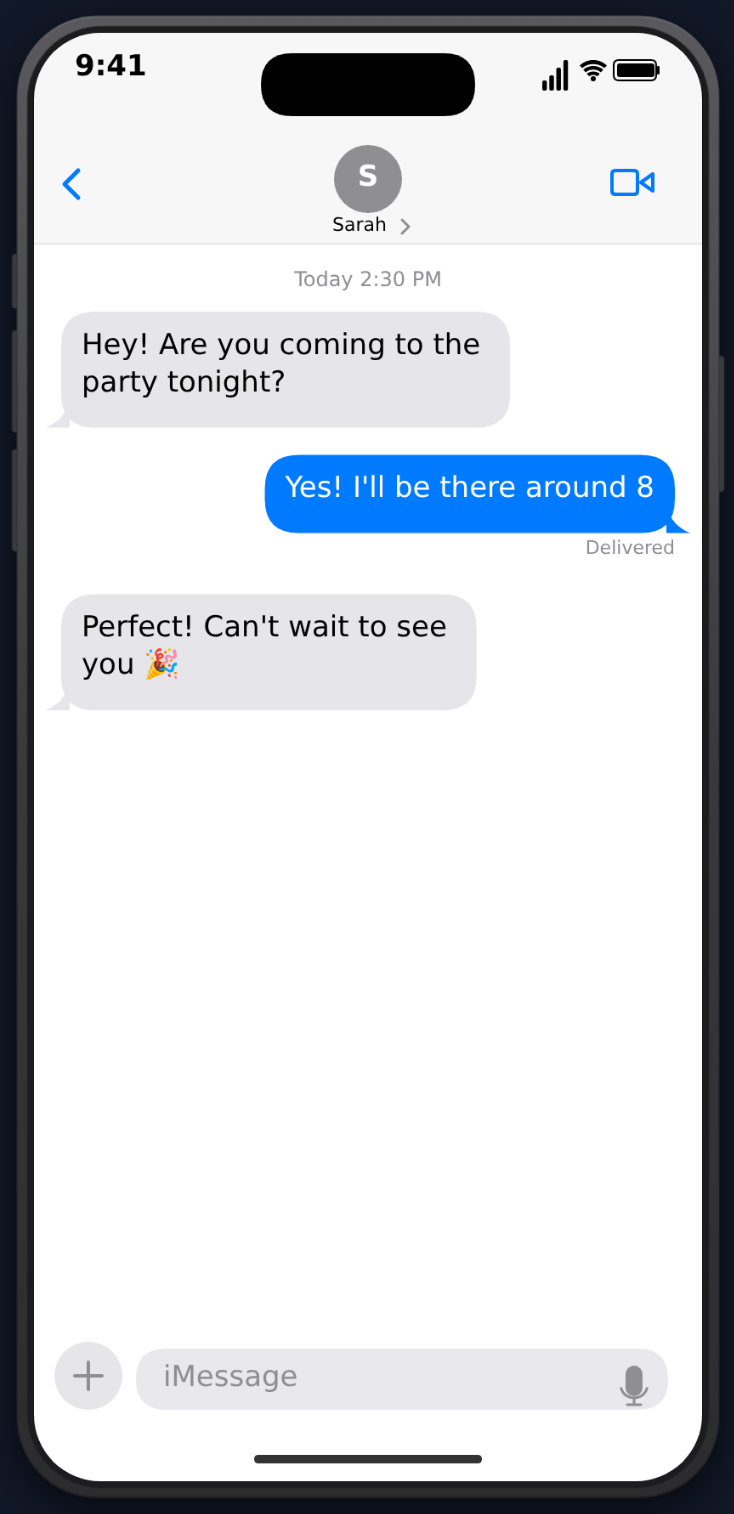
MockClip is a free, browser-based animator that produces phone-frame conversation videos with realistic UI, typing bubbles, tapbacks, and authentic iOS / Android styling. The output is a 1080×1920 MP4 — the exact aspect ratio YouTube Shorts expects.
Step 1: Pick the template that matches your story
Six templates work for text-conversation Shorts, each with a slightly different audience fit:
- iMessage — the broadest audience. iOS blue-and-gray bubbles read instantly to almost everyone. Ideal default for general text-conversation Shorts.
- WhatsApp — the largest international audience. If your channel skews UK / Europe / Asia / Latin America, WhatsApp converts better than iMessage.
- Instagram DM — younger demographic, social-drama framing, gradient bubbles.
- ChatGPT — AI-themed channels, storytelling where the "narrator" is an AI.
- Reddit — for story-style Shorts in the r/AmITheAsshole / r/relationships voice.
- Phone call notification — best as a cold-open hook ("Mom is calling…") that segues into the iMessage thread.
For Shorts, my default recommendation is iMessage. It's the most universally legible UI in the world right now, and the typing-bubble suspense plays particularly well in 30-45 second pacing.
Step 2: Set the conversation framing
Three details sell authenticity:
- Sender name — pick a name that fits the story, not "John Doe." If the joke is about your boss texting you, use a job-title style name like "Boss Mike 🤝" — not "Bob."
- Profile photo — upload one or skip and the template renders a default initial avatar. For prank-style videos, an emoji-based avatar reads as authentic.
- Time stamp / battery / signal — MockClip auto-renders the iOS status bar with realistic time. Don't try to fight it.
Step 3: Write the conversation
This is where 90% of Shorts succeed or fail. The writing rules:
- Open with the strongest line. The first message visible on screen at the moment the Short autoplays is your hook. If it's not interesting, viewers swipe in 0.8 seconds.
- Alternate sender / receiver fast. Long monologues from one side die. The visual rhythm of bubbles popping in from alternating sides is what holds attention.
- One climax. A 30-second Short can support exactly one twist or punchline. Two is too many — the second one undermines the first.
- End on the reply, not the explanation. The final bubble should be the punchline, not a description of why the punchline is funny.
Bad: [user] my boss just texted me. [user] this is wild. [boss] You're fired. Reason: lunch took too long.
Good: [boss] You're fired. [boss] Reason attached. [boss] [photo of half-eaten sandwich on desk]
Step 4: Tune the timing
MockClip exposes a delayBefore per message (the pause before that message animates in) and a typing-indicator toggle (the iOS three-dot bubble that appears while "the other person is typing"). Two heuristics:
- Typing indicator before the punchline. 1.5-2 seconds of typing dots before the climactic message. Manufactured suspense.
- Tighter pacing for everything else. 200-400ms
delayBeforeon non-climax messages keeps the video moving. Long pauses on every beat is what makes amateur Shorts feel slow.
For tapback reactions (the heart, thumbs-up, ha-ha overlay icons), there's a dedicated iMessage tapback animation guide that walks through the timing curve and which reactions land hardest in Shorts.
Step 5: Preview, iterate, export
Hit Play under the editor and watch the full animation. The first three plays are calibration:
- Does the first message read as a hook within the first 1.5 seconds?
- Are any pauses dragging?
- Does the punchline land before the 30-second mark?
When the rhythm is right, hit Export. MockClip renders to MP4 at 1080×1920. Free tier exports carry a small watermark; the Pro plan ships clean exports plus higher resolution and faster render queue.
For the canonical iMessage-prank-style format end-to-end — including a worked example with frame timings — see the iMessage prank text video guide.
Free, browser-based, no sign-up needed.
Open the iMessage editorYouTube Shorts-specific optimisation
The MockClip MP4 is the same file you'd post anywhere. The optimisation work is what you do around the file in YouTube's editor and metadata.
Titles are search bait
Unlike TikTok captions, YouTube Shorts titles are indexed for search. Treat them like search queries:
- ✅ "Fake Text Conversation With My Mom Goes Wrong"
- ✅ "I Sent This Text to the Wrong Person (Text Story)"
- ✅ "ChatGPT Writes My Apology Text"
- ❌ "wait until the end 🥲"
- ❌ "POV:" (TikTok-style framing — wasted on YouTube)
Specific phrasing matters. "I Sent This Text" is a real searchable phrase. "POV: my crush" is not.
Use the description for keywords
Write a 2-3 sentence description with the keywords your title hints at. YouTube indexes the description for search:
"What happens when you accidentally text your boss instead of your best friend? Watch this animated text conversation to find out. Created with MockClip — free fake text message video maker."
The description doesn't show prominently to viewers in the Shorts feed, so it's a near-pure SEO surface. Use it.
Add voiceover
This is the single biggest YouTube-specific lever. Voiceover does three things at once:
- Algorithm signal. YouTube parses audio for content matching. A voiceover gives the algorithm a richer signal than a silent video with on-screen text.
- Viewer experience. YouTube viewers are more likely to have sound on than TikTok viewers. Sound-on engagement metrics are higher.
- Accessibility and captions. YouTube auto-generates captions from audio. That caption track becomes searchable text — another SEO surface.
Record the voiceover in your phone's voice memos or in a tool like Riverside, then layer it in YouTube's Shorts editor or in a free editor like CapCut before uploading.
Add a strong thumbnail (within the first 1 second)
Shorts don't have separate thumbnails the way long-form videos do — the thumbnail is whatever the first frame of the video shows in the feed and on your channel page. So the first frame has to be a thumbnail. The strongest pattern: open with a single, hook-laden message visible on the iMessage screen. No fade-in. No title card.
In MockClip terms: set the first message's delayBefore to 0 and write the hook as that first message. The export then naturally opens with the hook visible.
Hashtags work, but sparingly
Three to five #shorts, plus one or two topic-specific hashtags (#fakeText, #chatGPT, #textStory) is the sweet spot. Over-hashtagging on YouTube does the same thing it does on TikTok — flags the video as low-quality content.
Content strategy: how to compound on YouTube
The biggest mistake creators make on YouTube Shorts is treating it like TikTok — single-video at a time, hoping for hits. YouTube rewards series, channel coherence, and binge-watch behaviour.
Build named series
YouTube's algorithm rewards channels that keep viewers on the platform. Named, themed series are how you signal that:
- "Text Pranks Gone Wrong" (Episode 1, Episode 2, …)
- "AI Conversations Daily"
- "Reddit Stories Animated"
- "Mom Texts" (one a week)
Once a viewer watches Episode 1, the algorithm aggressively pushes Episode 2 to them — and to lookalikes. This compounds in a way single-shot videos don't. Numbered titles, consistent thumbnails (or first-frame patterns), and uniform run-time all reinforce the series identity.
Evergreen over trendy
YouTube content has a long shelf life precisely because the algorithm keeps surfacing it. Optimise for that:
- Evergreen: "Texting my crush for the first time," "I asked ChatGPT to plan my budget," "Fake mom text story"
- Time-sensitive: "I asked ChatGPT about [specific election / movie release / news event]"
Time-sensitive content can pop hard initially, but stops earning the moment the topic is no longer searched. Evergreen content compounds.
Cross-platform without cross-watermarking
The MockClip MP4 is clean — no platform watermark. So the same file uploads to YouTube Shorts, TikTok, and Instagram Reels without flags. The standard cross-post workflow:
- Same MP4 base
- Slight pacing tweak: TikTok wants slightly faster pacing (15-30 sec), YouTube tolerates 30-45 sec, Reels sits in between
- Different titles: YouTube gets the search-style title, TikTok gets the swipe-bait caption, Reels gets the Instagram-conversational caption
- YouTube gets the voiceover version, TikTok often does better with a trending sound
For deeper coverage of the broader social-media format playbook — including platform-by-platform pacing, captions, and aspect-ratio nuances — see the social media mockup video guide and phone mockup videos for TikTok.
Pin a long-form companion video
Once your Shorts start driving subscribers, publish a long-form companion video and pin it on your channel. Convert your best-performing Short into a "full story" 8-12 minute video. The Shorts-to-long-form funnel is the biggest under-used growth lever on YouTube right now — long-form is where ad revenue still sits, and Shorts is the cheapest way to feed it.
Daily cadence beats perfect cadence
Volume matters on YouTube Shorts more than polish. A daily Short at decent quality outperforms a weekly perfectly-edited Short almost every time. MockClip's 3-5 minute production loop is what makes daily realistic — it's the difference between "I'll batch on the weekend" and "I'll knock one out at lunch."
The monetisation path
The realistic ramp for a text-conversation Shorts channel:
0 - 1,000 subscribers. Daily posting with MockClip. One template, one named series. No voiceover required initially — the goal is shipping reps to find your voice.
1,000 - 10,000 subscribers. Apply for the YouTube Partner Programme as soon as you cross 1,000 subs. Add voiceover to every Short going forward. Diversify across two templates — usually iMessage + ChatGPT for AI-themed channels, or iMessage + WhatsApp for international audiences.
10,000+ subscribers. Brand deals start landing in your inbox. The text-conversation format is unusually attractive to advertisers because the script is fully under your control — a brand can sponsor a single Short by paying for one specific scripted message in the conversation.
100,000+ subscribers. The channel is a real business. Pin a long-form video, build out a website, sell prompts / story templates / merch.
The text-conversation format is one of the lowest-effort, highest-return content types on YouTube Shorts in 2026. The barrier is consistent execution, not skill — which is why a tool like MockClip exists.
How MockClip compares to the alternatives
Three categories of tool exist for this format:
Static screenshot generators. Browser tools that produce a single fake iMessage screenshot. No animation, no typing bubble, no tapbacks. Useless for video — the whole engagement engine of the format depends on motion.
General video editors (CapCut, Premiere, After Effects). Capable of animating a fake iMessage frame-by-frame, but it takes hours per video and requires real video editing chops. Not viable as a daily-Shorts workflow.
Screen recording the real Messages app. You can't script the other side of the conversation, you'll capture real notifications, and the iOS keyboard is in your face. Even when it works, it's slower than just typing the script into MockClip.
For a head-to-head review of the broader category — pricing, animation fidelity, supported templates, export quality — see best fake text message video makers.
Quick start
- Open mockclip.com/app/imessage (or pick another MockClip template)
- Write a 30-45 second conversation with one clear hook and one punchline
- Tune the typing-indicator delay before your punchline message
- Press Export to download the MP4
- Upload to YouTube Shorts with a search-style title and a 2-3 sentence keyword description
- Add a voiceover before publishing if you can — biggest single algorithmic lift
Watermark-free exports and higher resolutions are on the Pro plan.
Related MockClip templates and guides
- iMessage template — the default for text-conversation Shorts
- WhatsApp, Instagram DM, ChatGPT, Tinder, Reddit — alternative templates by audience
- iMessage prank text video guide — worked iMessage example end-to-end
- iMessage tapback / reaction video guide — adding heart, thumbs-up, ha-ha overlays
- Phone mockup video for TikTok — TikTok-specific posting playbook
- Best fake text message video makers — category overview
- App mockup videos for social media guide — broader format playbook
- Pricing — Pro tier for watermark-free exports
Frequently Asked Questions
Can I monetize fake text videos on YouTube Shorts?
Yes. YouTube Shorts are eligible for the YouTube Partner Program. Once you meet the requirements (1,000 subscribers + 10M Shorts views in 90 days, or 1,000 subscribers + 4,000 watch hours on long-form), you can earn revenue from Shorts views via the Shorts ad-revenue share.
What's the ideal length for a YouTube Short text video?
30-45 seconds. YouTube Shorts can be up to 60 seconds, and the slightly longer format works better on YouTube than on TikTok. The extra time gives you room for a clearer story arc and a stronger payoff, both of which lift watch-time metrics that YouTube's algorithm weighs heavily.
Should I add voiceover to my text conversation Shorts?
Yes — voiceover materially improves performance on YouTube. YouTube's algorithm analyzes audio for content matching, and YouTube viewers are more likely to have sound on than viewers on TikTok. A short voiceover narrating the conversation also helps accessibility and pushes the captioning quality the algorithm sees.
How is YouTube Shorts different from TikTok for this content?
YouTube Shorts has better monetization, longer content shelf life (videos can resurface months after posting), search-indexed titles, and a more forgiving algorithm for new creators. TikTok has faster initial distribution, native trending sounds, and stronger swipe-through retention. The same MockClip MP4 works on both — you just adjust title style and pacing.
Can I post the same video on YouTube Shorts and TikTok?
Yes, the same MP4 export works on both platforms. The main caveat is that TikTok flags videos with a visible TikTok watermark when reposted there, and YouTube de-prioritises Shorts that contain another platform's watermark. MockClip exports clean MP4s with no third-party watermark, so cross-posting is safe.
What templates work best for YouTube Shorts?
iMessage and WhatsApp are the highest-performing for general text-conversation Shorts because the UI is familiar to the broadest audience. Instagram DM works well for younger audiences. ChatGPT and Reddit work for storytelling and AI-themed channels. Phone-call notification works for cold-open hooks.
Do I need a phone to make these videos?
No. MockClip is a browser tool — it runs on a laptop or desktop. The exported MP4 is in vertical 1080×1920 format, ready for YouTube Shorts upload from any device.
How fast can I make a Short with MockClip?
From idea to exported MP4 in 3-5 minutes once you know the editor. Add another 2-3 minutes for voiceover and final captions in your video editor or directly in YouTube's Shorts editor.
Related Articles
Best Fake Text Message Video Makers for Content Creators
Compare the best fake text message video makers for iMessage and WhatsApp. Find the right tool for animated conversation videos.
How to Make Phone Mockup Videos for TikTok
Create phone mockup videos optimized for TikTok. Step-by-step guide with templates, timing tips, and export settings.
App Mockup Videos for Social Media: The Complete Guide
Create app mockup videos for TikTok, Reels, and Shorts. Templates, tips, and strategies for social media content creators.
How to Make Fake iMessage Prank Text Videos
Create funny fake iMessage conversation videos for pranks and comedy content. Typing bubbles, read receipts, and MP4 export.
How to Animate iMessage Tapback Reactions in a Video
Create fake iMessage videos with heart, thumbs up, haha, and exclamation tapback reactions — animated with realistic timing and direction.
How to Go Viral With Fake Conversation Videos in 2026
Data-driven strategies for going viral with fake conversation videos on TikTok, Reels, and Shorts. Hooks, timing, and growth tactics.