Discord DM Videos for TikTok and Shorts: A Creator Guide
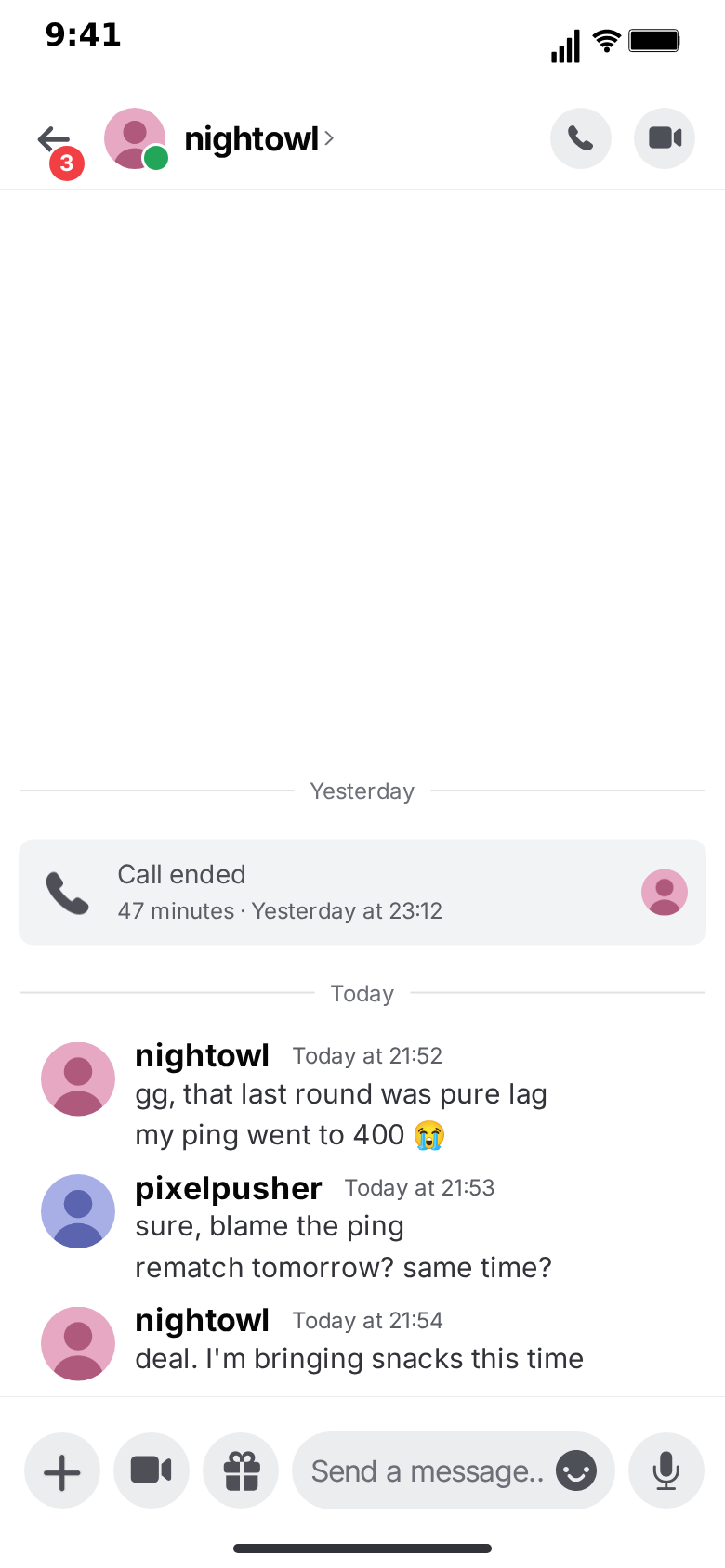
Gaming storytime, raid drama, the friend who "will be on in five" for three hours: some of the most watched conversation videos on TikTok and YouTube Shorts happen in Discord DMs. They work because the frame is instantly recognisable to a huge, young audience, and because Discord's look, avatars and bold names instead of bubbles, stands out in a feed full of iMessage screenshots.
This guide covers how to turn a Discord story into a short-form video that holds attention: the hook, the pacing, the formats, and the series ideas that keep a channel going. The examples use MockClip's free Discord template, which renders the DM, the direct-messages list and a server's channel list in the browser and exports MP4 or GIF.
Why Discord stories perform
Three things give Discord content an edge in short-form feeds.
Recognition in one frame. The dark background, the round avatars, the bold usernames and the server rail are visible before anyone reads a word. The viewer knows the genre, gaming, community, online friendship, and decides to stay.
A built-in cast. Discord handles are characters. "nightowl" and "pixelpusher" already have personalities; viewers fill in the rest.
Native pacing. Discord conversations come in runs: three short messages from one person, a pause, a reply. That rhythm is already the rhythm of a good short-form edit.
The hook: the first two seconds
Short-form viewers decide in the first frame. The hook in a conversation video is the first thing the viewer reads, so write it first and write it last.
Hooks that work in a Discord frame:
- A call card. "Missed call · Today at 03:12" as the first element. Somebody called at three in the morning; the viewer wants to know why.
- A one-line accusation. "why did you leave the raid". No greeting, no context, straight into conflict.
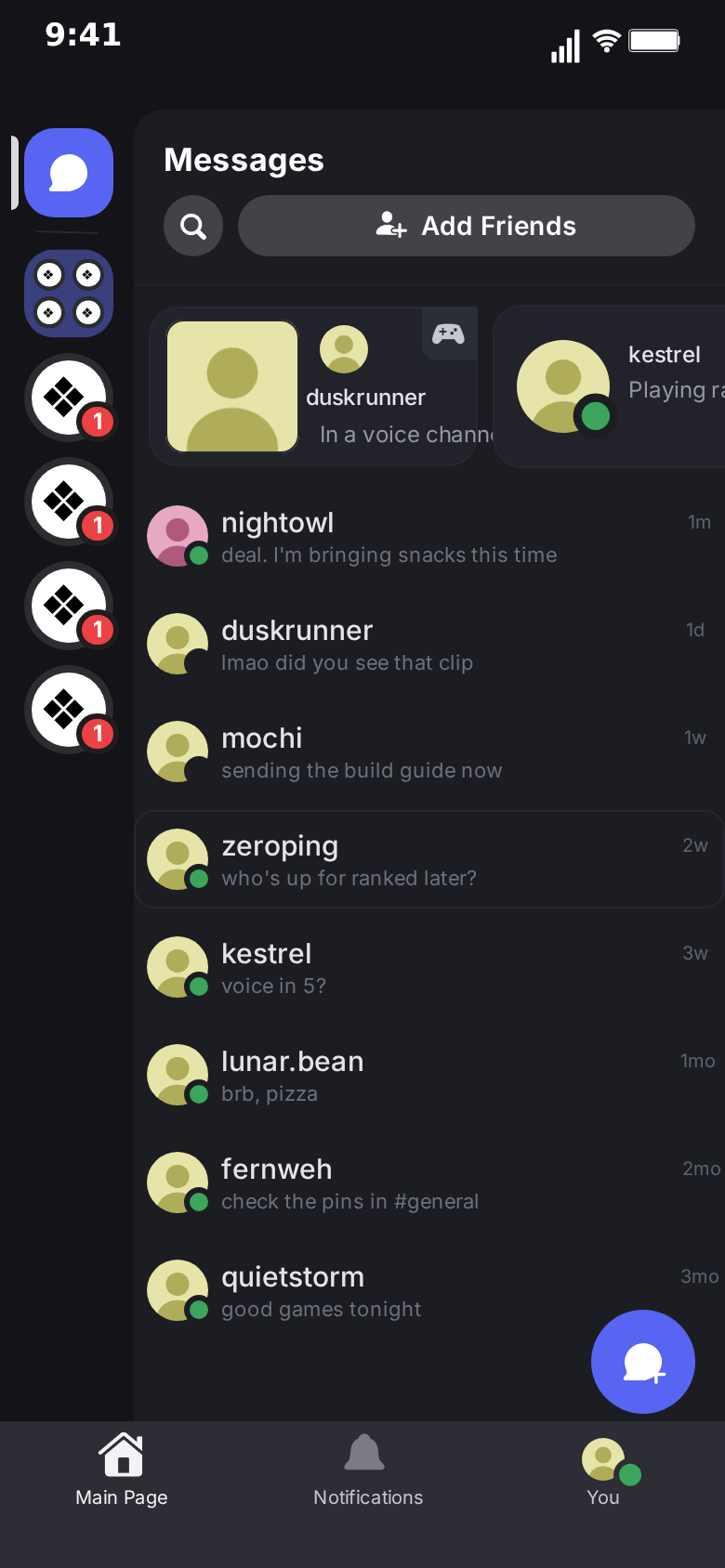
- The list first. Open on the direct-messages list with the conversation at the top, then tap into a chat whose back arrow carries a red unread count.
- A screenshot-style opener. "ok I need to show you something" followed by a typing pause.
Avoid opening on "hey" or "what's up". It is realistic and it is the scroll trigger.
Pacing: where the pauses go
The Discord editor gives every message a delay, and every message from the other person a typing duration during which "name is typing…" shows above the input bar. That typing line is your best tool for tension.
A pacing template for a 20-second story:
- 0–2 s. The hook: the call card or the first message.
- 2–10 s. The setup: a quick run of short messages, 0.4 to 0.8 seconds apart.
- 10–14 s. The pause: two to three seconds of "is typing…" before the turn.
- 14–18 s. The turn: the reveal, the confession, the punchline.
- 18–20 s. The reaction: one short reply, then let it sit.
If the clip is longer, add a second turn rather than more setup.
Formats for each platform
- TikTok, Reels, Shorts. 9:16 vertical MP4. Keep the important lines in the middle two thirds of the screen; platform captions and buttons cover the bottom.
- Twitter/X and feeds. 1:1 square. The template lays the conversation out into the visible part of the screen.
- YouTube long-form and compilations. 3:2 landscape, or 9:16 placed on a background.
- Discord itself, Slack, docs. GIF. Short loops of a single turn work best.
Exports run in the browser at 720p or 1080p. Free exports carry a small watermark; the one-time Pro upgrade removes it.
Story formats that work in Discord frames
Gaming storytime. The duo partner who blamed the lag, the clutch that nobody believed, the teammate who sold the game. Use call cards for the voice chat that happened offscreen.
Server drama. Open on a server's channel list, then move to the DM where the real conversation happens. The server name and channel names set the scene: "Night Shift", "#looking-for-group".
Online friendship. The first message after years of silence, the meetup that finally gets planned. The date divider between "Yesterday" and "Today", or between two dates far apart, carries the emotion.
Creator and moderator life. The DM from a fan, the collab invite, the ban appeal. These play well as recurring series.
Product and bot demos. If you build a Discord bot or a product with Discord notifications, show the DM your users will receive, in the context where they will receive it.
Short fiction. Horror and mystery told in DMs, with the typing line as the jump scare.
Example: a 20-second gaming storytime, beat by beat
Here is a complete short built with the pacing template above.
Screen flow. Open on the direct-messages list for one and a half seconds, with "nightowl" at the top of the DM list. Tap into the conversation, whose back arrow shows a red unread count of 3.
Beat 1, the hook (0–2 s). A call card: "Missed call · Today at 03:12". No text yet.
Beat 2, the setup (2–9 s). A run from nightowl, 0.5 seconds apart:
- "you awake?"
- "need you on in 5"
- "the raid group just kicked me"
Beat 3, the reply (9–11 s). Your run, typed into the input field:
- "it's 3am"
- "why did they kick you"
Beat 4, the pause (11–14 s). Three seconds of "nightowl is typing…". The dots move, the thread lifts, nothing lands.
Beat 5, the turn (14–17 s). "I may have pulled the boss while they were all AFK".
Beat 6, the reaction (17–20 s). One reply from you: "logging on". Pop back out to the DM list, where the top row now reads "logging on".
Every element of that clip is a field in the Discord editor. The first export takes a few minutes; the next episode is a matter of rewriting the lines.
Titles, covers and captions
The video is only half of the post. The other half decides whether it gets watched.
- On-screen title. One short line above the phone frame: "my duo partner at 3am". It frames the story without spoiling the turn.
- Cover frame. Pick a frame where the call card or the hook message is visible. A cover on the DM list alone is too quiet.
- Caption. Ask the question the video answers, or the one it leaves open: "would you log on?". Questions earn comments, and comments earn reach.
- Hashtags. Two or three that describe the content (#gaming, #storytime, #discord), not ten that describe everything.
Measuring what works
Short-form platforms tell you exactly where viewers leave. Use it.
- Drop in the first two seconds means the hook is weak. Test a call card versus an accusation versus the DM list opener.
- Drop in the middle means the setup is too long. Cut a message or tighten the delays.
- Drop right before the end means the pause is too long or the turn arrives too late.
- Replays near the end mean the payoff landed. Do more of that.
Because a variation only changes a few fields, A/B testing a hook costs minutes, not an evening of editing.
Posting cadence
Consistency beats volume. Two or three clips a week from the same recurring cast build more recognition than ten unrelated stories in one day. Batch-produce a week of episodes in one sitting: write the scripts, build the first clip, then duplicate it for the rest. Post the strongest turn first, and keep the series numbering visible so new viewers know where to start.
Building a series
One video is a test; a series is a channel. Discord stories lend themselves to series because the cast persists.
- Recurring characters. Keep the same handles and avatars across episodes. Viewers start recognising "nightowl" in the first frame.
- Numbered parts. End on the turn, title the next clip "part 2". The DM list is a natural recap screen: open each part on it, with the last message of the previous part in the top row.
- Templates for speed. Once a format works, duplicate it: change the names, the lines and the timestamps, keep the pacing.
- Comment-driven sequels. "What did nightowl reply?" is the comment you want. Answer it with the next part.
Repurposing one script across platforms
A good conversation script is an asset; use it more than once.
- TikTok and Reels. The 9:16 cut with voiceover and music.
- YouTube Shorts. The same cut, with the series number in the title and a pinned comment pointing at the next part.
- Twitter/X. The 1:1 export, or a GIF of the last three messages with the setup written as the post text.
- Discord itself. A GIF of the turn dropped into your own server's #memes or #clips channel. Communities love seeing their own app in a story.
- Compilations. Stack five parts into a landscape 3:2 video for YouTube long-form, each part introduced by its DM list shot.
The same script exported in light and dark also gives you a cheap A/B test of the cover frame.
Working with other creators
Discord stories are naturally collaborative: two creators can each "own" a handle and voice it. Agree on the cast, the handles and the avatars once, write the scripts together, and let each creator post the episodes from their side of the conversation. Crossover episodes, where one creator's character DMs the other's, are an easy way to introduce audiences to each other. Keep a shared document with each character's handle, avatar and voice so the series stays consistent no matter who builds the clip.
Sound, captions and editing
The exported clip is a clean screen-style video. In your editor of choice:
- Voiceover. Read the messages in character, or narrate over them. Leave the typing pauses silent.
- Music. Low and steady during the setup, cut or drop at the turn.
- Captions. Usually unnecessary for the messages themselves; useful for the hook text above the phone.
- Background. If you export with the phone bezel, place it on a blurred game screenshot or a solid colour; without the bezel, the frame fills the screen like a real recording.
Mistakes to avoid
Walls of text. A message that wraps to four lines is skipped. Split it into a run of short messages.
Even pacing. Every message landing at the same interval is monotonous. Vary it, and save the longest pause for the turn.
Real people. Do not use real handles, real server names or real profile pictures without permission, and never present a fictional conversation as real evidence about someone. MockClip's default content uses invented handles and generated avatars for this reason.
No payoff. A clever setup with no turn is a disappointing watch, and short-form audiences say so in the comments. Write the last line first.
A quick pre-publish checklist
Run through this list before every upload:
- The hook is visible in the first frame of the export, not two seconds in.
- Every message stays on screen long enough to read twice.
- The longest pause sits right before the turn.
- Handles, avatars and server names are invented.
- The cover frame shows the hook, and the caption asks a question.
- The series number, if any, is in the title and on screen.
Making it with AI
When ideas are flowing faster than scripts, the Describe it tab writes a full conversation from one sentence, including call cards and date dividers, and refines it with follow-up instructions. From an AI assistant, the create_discord_conversation tool on MockClip's MCP server does the same; the integrations page shows how to connect it.
Next steps
Start with the step-by-step tutorial if you have not made a Discord clip yet, and read the Discord chat animation generator overview for everything the template can show. For broader strategy across chat apps, see how to go viral with fake conversation videos and the Telegram chat video guide for TikTok and Shorts.
Free to use. No sign-up. Browser-based.
Make a Discord DM videoFrequently Asked Questions
What makes a Discord DM video work on TikTok?
A recognisable frame, a hook in the first message, short lines that read at a glance, a typing pause before the turn and a clear payoff. The Discord layout itself is part of the hook: viewers recognise it before they read anything.
What format should I export for TikTok, Reels and Shorts?
Vertical 9:16 MP4. MockClip's Discord template exports 9:16 directly, along with 1:1 for feeds and 3:2 for landscape edits.
How long should the video be?
Between 10 and 30 seconds for most stories: six to twelve messages. Longer stories work better as a numbered series than as one long clip.
Can I add voiceover or music?
Yes. Export the MP4 and add voiceover, music or captions in CapCut, Premiere or the platform's own editor. The clip is a clean screen-style video with no baked-in audio track you need to fight.
Is it allowed to post fake Discord conversations?
Fictional stories, skits and clearly framed reenactments are common content. Do not present a fabricated conversation as evidence about a real person, and do not use real people's handles or server names without permission.
Can the video open on the Discord server list or DM list?
Yes. The template has a direct-messages list and a server channel list. The clip can start on either and move into the conversation, which works well as an establishing shot.
Related Articles
Discord Chat Animation Generator: Make Fake DM Videos
Free Discord chat animation generator. Animate DMs with names, times, call cards and typing, plus the DM list and server channels. Export MP4 or GIF online.
How to Make a Fake Discord Conversation Video (Free)
Step-by-step: script, time and export a fake Discord DM video in the browser, with call cards, date dividers, typing and the DM list. Free, no sign-up needed.
Telegram Chat Video for TikTok & Shorts: Screen Flow Guide
Make Telegram chat videos for TikTok and Shorts that open on the chats list, push into the conversation and pop back. Free browser tool, MP4 and GIF export.
How to Go Viral With Fake Conversation Videos in 2026
Data-driven strategies for going viral with fake conversation videos on TikTok, Reels, and Shorts. Hooks, timing, and growth tactics.
Fake Chat Video Maker Free: Create Text Conversation Videos
Free fake chat video maker for TikTok and Reels. Create realistic animated text conversations with iMessage, WhatsApp, and Instagram DM interfaces in minutes.