Discord Chat Animation Generator: Make Fake DM Videos
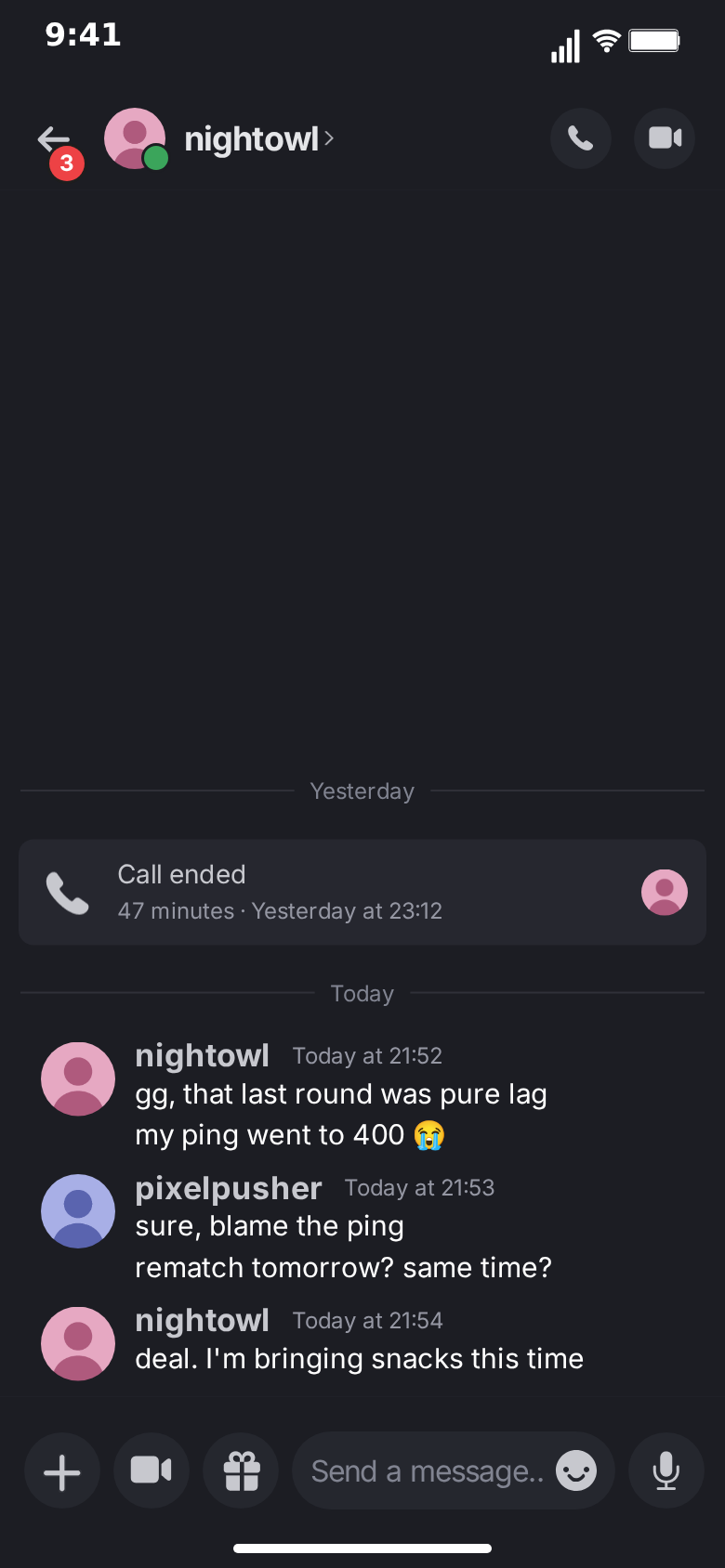
Discord does not look like other chat apps, and audiences notice. There are no bubbles. Every message hangs off a round avatar, a bold username and a timestamp, follow-up messages stack underneath without repeating the header, and a missed call sits in the thread as its own little card. A Discord chat animation generator recreates exactly that layout from a script, so a gaming moment, a friendship story or a product demo reads as "this happened in my DMs" in the first second of the video.
This guide explains what MockClip's Discord generator does, how to build a first animation in the Discord template, and how it differs from the bubble-based chat templates on the site.
What is a Discord chat animation generator
A Discord chat animation generator is a tool that renders a fake Discord direct message as a video. You write the messages, decide who sends what, set the pauses between them and the timestamps they show, and the generator draws the Discord interface frame by frame: the top bar with the back arrow and its unread badge, the contact's avatar with the green online dot, the name with its little chevron, the call and video buttons, the thread itself and the input bar with its round buttons and "Send a message…" field.
The difference between a generator and a screen recording is control. A screen recording shows whatever was on your screen, including real usernames, real server names, notification pop-ups and the occasional embarrassing pinned message. A generator shows only what you scripted, in the order and at the pace you chose, at a clean vertical resolution that TikTok, Reels and Shorts accept without cropping.
MockClip's Discord generator runs entirely in the browser. There is nothing to install, no account to create for the free tier, and the export happens on your own machine.
What MockClip's Discord template can animate
Every element below is a real control in the editor. Nothing here needs a plugin or a paid add-on.
- Flat Discord messages. No bubbles: each run of messages starts with the sender's avatar, name and time, and the follow-up messages from the same person continue underneath, exactly like the app groups them. A per-message switch forces the header back on or hides it.
- Your side of the chat. Your own messages use your own display name and avatar, set once in the editor. Your messages can be typed into the input field first, character by character, before they send.
- Call cards. Any message can become a call log card instead of text, with a phone icon, a title such as "Call ended" or "Missed call", a detail line with the duration and time, and the caller's small avatar on the right.
- Date dividers. A centred date with a thin line on each side, placed above any message, the way Discord separates "Yesterday" from "Today".
- Typing line. While the other person is typing, "nightowl is typing…" appears above the input bar with three animated dots, and the thread lifts to make room for it.
- Unread badge and online dot. A red count on the back arrow, set to any number or hidden, and the green presence dot on the contact's avatar while their status reads online.
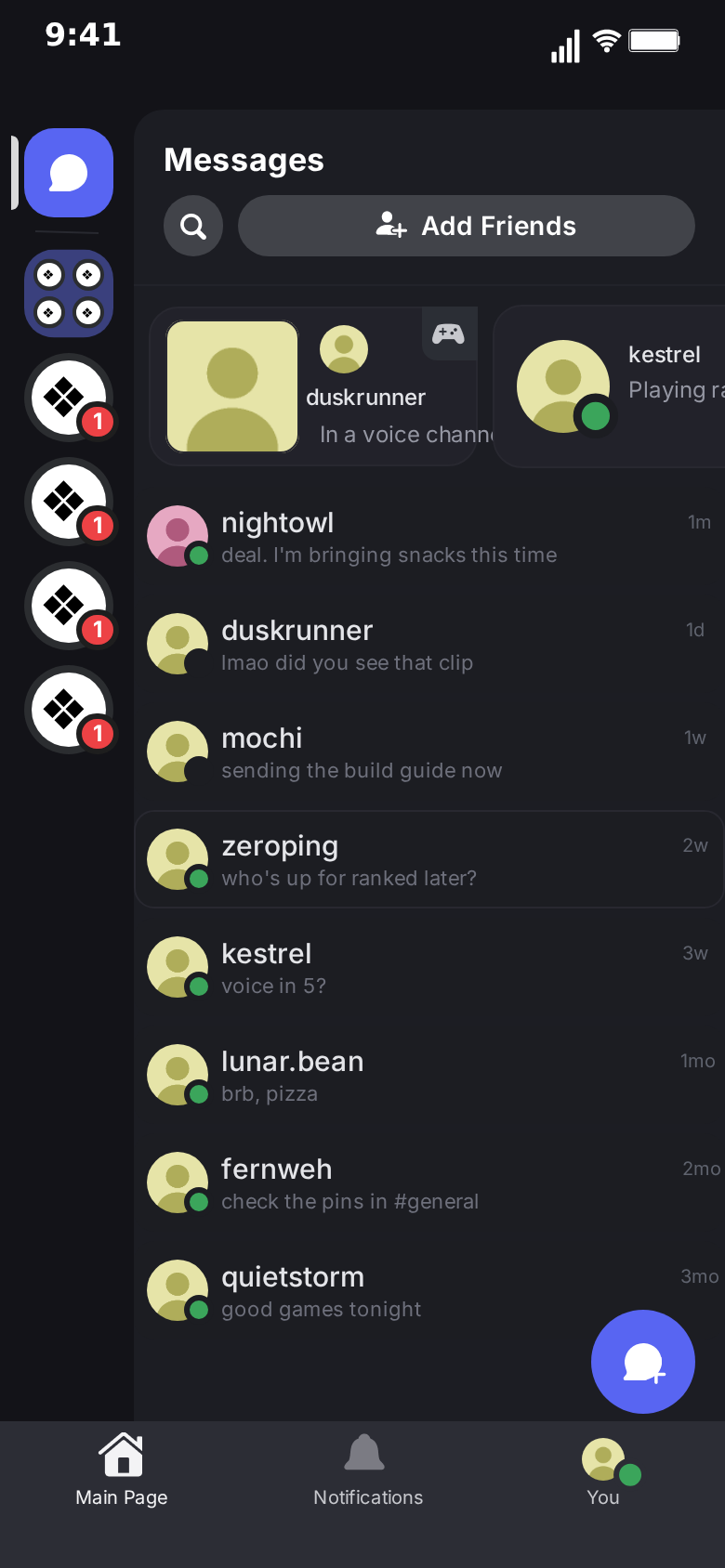
- The direct-messages list. The screen you see before opening a DM: the server rail on the left with its unread badges, the Messages header with search and Add Friends, the activity cards, and the list of DMs with avatars, previews, times and online dots. The top row mirrors the conversation you are animating.
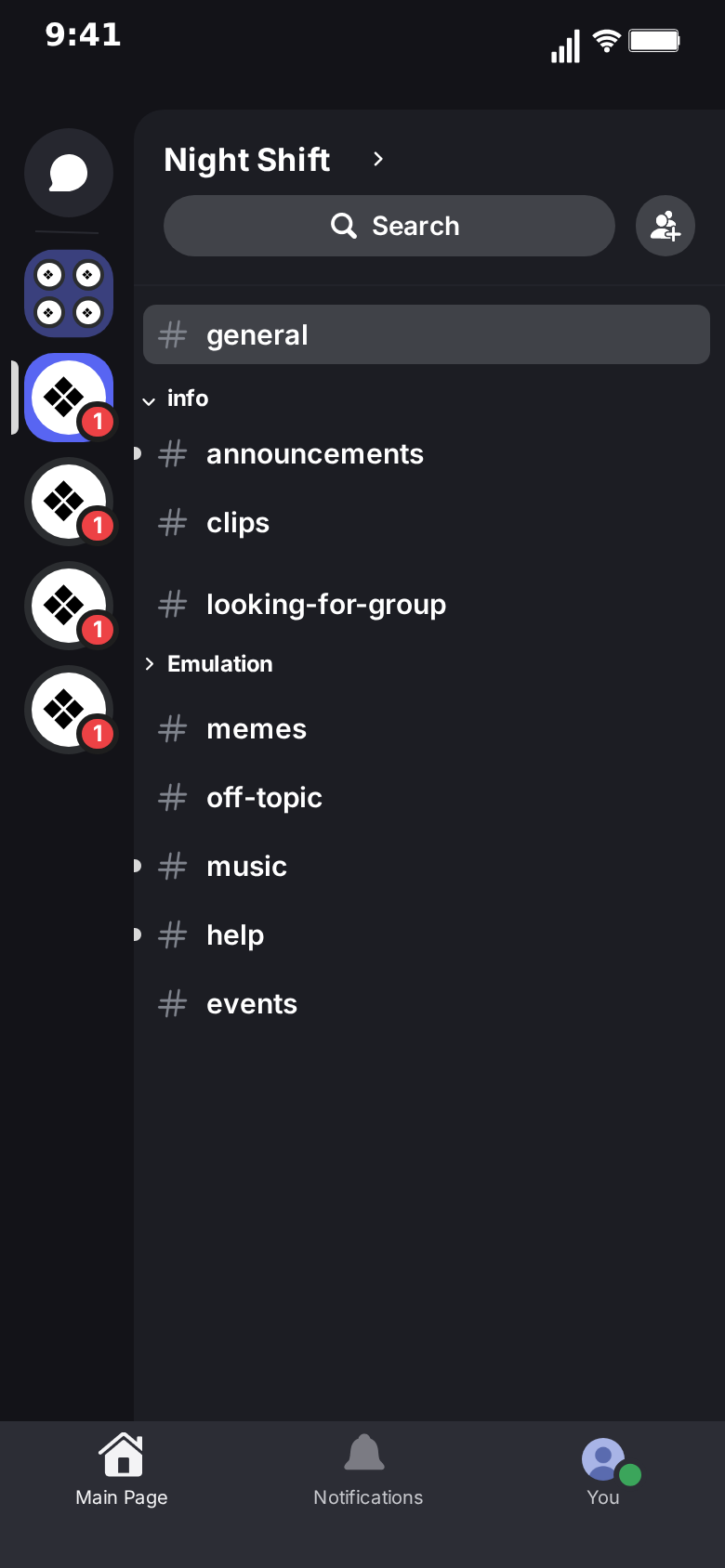
- A server's channel list. A third screen with the server name, a search field and the channel list, editable channel by channel.
- Screen flow with touch indicators. The clip can open on the DM list, push into the chat and pop back, or fade over to the server's channels. A soft touch indicator shows where the finger taps before each move.
- Light and dark themes. One control switches the whole template.
- MP4 or GIF export. Both rendered in the browser at 720p or 1080p, in vertical, square or landscape formats.
What the template does not do: server text channels as an animated chat, reactions, replies and threads, link embeds, image attachments inside messages and voice or video call screens. If your idea depends on those, it belongs in a different format.
Why creators use Discord animations
Discord is where a large part of the internet's gaming, streaming, study and hobby communities actually talk. For those audiences a Discord DM is not "a chat app", it is the place where the raid was planned, the clip was shared and the friendship started. Putting a story inside a Discord frame tells the viewer, before they read a single word, who these people are and what kind of story this is.
The other reason is contrast. A feed full of blue and green bubbles is a feed of iMessage and WhatsApp screenshots. A dark Discord thread with avatars and bold names stands out on the first frame, which is exactly the frame that decides whether someone keeps watching.
Typical uses:
- Gaming storytime. The duo partner who blamed the lag, the teammate who "will be on in five" for three hours, the rematch that was planned at 2 am.
- Community and creator content. A message from a moderator, an invite to a private server, a collab that started in DMs.
- Product and bot demos. A DM from a bot, a reminder, a notification flow, shown in the environment where your users will actually see it.
- Short fiction. Mystery, horror and romance stories told as a thread, with the pacing controlled to the half second.
If you work across platforms, the same script can also be told in the Telegram template or the Messenger template; each has its own look and its own screens.
How to make your first Discord animation
- Open the template. Go to the Discord editor. It opens on a ready-made conversation so you can press Play and see the whole flow before changing anything.
- Pick Describe it or the Manual editor. Describe it writes the conversation for you from a sentence, such as "my duo partner DMs me after we lost the ranked match, we blame the lag, then plan a rematch". The Manual editor gives you every field directly.
- Set the people. The contact's name, status and avatar go at the top of the Manual editor. Below them, set your own name and avatar for the messages you send, and the number on the back arrow's unread badge.
- Write the thread. Add messages, pick Me or Other for each, and type the text. Give the first message of a run a timestamp such as "Today at 21:52"; the following messages from the same person continue under it automatically.
- Add a call card or a date. Tick "Call card" on a message to turn it into a call log entry, and fill in the title and detail. Type "Yesterday" or "Today" into "Date line above" to put a divider in front of a message.
- Tune the timing. Each message has a delay before it appears. Messages from the other person can show the typing line for a set number of seconds first; your own messages can be typed into the input field at a speed you choose.
- Choose the screens. In the Video flow strip, decide whether the clip starts on the DM list, pushes into the conversation and pops back, or stays on the chat alone.
- Preview and export. Press Play, scrub through the result, then export MP4 or GIF in the format you need.
The first export takes a few minutes. After that, making a variation means changing a name, a line or a timestamp and exporting again.
Writing a Discord conversation that feels real
The layout does a lot of work, but the words decide whether the viewer believes it. A few things make a Discord thread read as genuine:
Lowercase usernames. Real Discord names are handles, not full names: "nightowl", "pixelpusher", "lunar.bean". A "John Smith" in a Discord frame gives the fake away instantly.
Runs, not ping-pong. People on Discord send three short messages instead of one long one. Let a run of messages stack under one header before the other person answers; the grouping is what makes it look like the app.
Timestamps that move. "Today at 21:52", then "Today at 21:53" on the reply. A thread where every header shows the same minute looks generated.
Calls in the thread. A "Call ended · 47 minutes" card between yesterday's and today's messages tells a whole backstory without a single word.
One idea per clip. The best performing short-form conversations have one turn: a reveal, a punchline, a twist. Write toward that line and cut everything that does not set it up.
The direct-messages list and the server screen
Most chat generators show only the conversation. The Discord template also has the screen around it. The direct-messages list shows the server rail, the activity cards and eight DM rows you can rename, re-word and mark online or offline. Its top row is live: it takes the contact's name, avatar and the last message shown, so when the clip pops back out of the chat, the list already reflects what just happened.
The server screen shows a server's channel list. Rename the server, rename the channels, and use it as the opening shot of a story that starts in a community before it moves to DMs. Moves between the screens are set in the Video flow strip, and the touch indicator can be turned off if you prefer clean cuts.
Formats, themes and export
The template exports in vertical 9:16 for TikTok, Reels and Shorts, in the taller 9:19.5 iPhone shape, in 1:1 for feeds and in 3:2 for landscape edits. The phone bezel can be shown or hidden, and the home indicator toggled. Both themes are available: dark, which is how most people use Discord, and light, built from Discord's light palette on the same layout.
Free exports, at 720p or 1080p, carry a small watermark. The one-time Pro upgrade removes it and adds more AI generations each month.
Generating Discord animations with AI
Two AI paths exist. Inside the editor, Describe it turns a sentence into a full conversation, call cards and dates included, and you can refine it with follow-up instructions. Outside the editor, MockClip's MCP server exposes a create_discord_conversation tool to Claude, ChatGPT and other assistants that support MCP; the integrations page and the guide to connecting MockClip to Claude and ChatGPT explain the setup. The assistant writes the script, MockClip renders it, and you get a link that opens the finished animation ready to export.
Discord, Telegram, Messenger or WhatsApp?
Pick the app your audience lives in. Discord fits gaming, streaming and community stories. WhatsApp fits family and friends stories for international audiences. Telegram fits crypto, tech and channel culture. Messenger fits audiences who grew up on Facebook. The free fake chat video maker guide compares every chat template side by side if you are unsure.
Common mistakes
Too much text per message. A Discord message that wraps to five lines is hard to read in a vertical video. Split it into a run.
No pauses. A conversation where every message lands half a second after the last one reads like a log file. Give the punchline a longer delay, and let the typing line build suspense before it.
Forgetting the list. If the story starts with "I opened my DMs and saw…", start the clip on the DM list and push into the chat. It is one extra step in the flow strip.
Real names and servers. Use invented handles and server names. The default conversation already uses fictional ones, and the template never ships the design kit's example people.
Frequently asked questions
The answers to the most common questions are in the FAQ at the top of this page: what the generator is, whether it is free, how the screen flow works, light mode, call cards, unsupported features and the AI paths.
Free to use. No sign-up. Browser-based.
Open the Discord animation generatorFrequently Asked Questions
What is a Discord chat animation generator?
A Discord chat animation generator is a browser tool that turns a scripted conversation into a video that looks like a screen recording of a Discord direct message. MockClip's Discord template draws each message the Discord way, with the sender's avatar, name and time, adds call log cards, date dividers and an 'is typing…' line, and exports the result as MP4 or GIF.
Is MockClip's Discord generator free?
Yes. The Discord template runs free in the browser with no account required. Free exports carry a small MockClip watermark; the Pro upgrade removes it. See the pricing page for details.
Can the video start on the Discord direct-messages list?
Yes. The Video flow strip lets the clip open on the direct-messages list with the server rail, push into the conversation and pop back out. The top row of the list mirrors the conversation, so after the chat plays it shows the last message. A server's channel list is available as a third screen.
Does it support light mode?
Yes. The template has a light and a dark theme. Dark matches the Discord design the template was built from; light uses Discord's light palette on the same layout.
Can I show a missed or ended call?
Yes. Any message can be turned into a call card instead of text: a phone icon, a title such as 'Call ended' or 'Missed call', a detail line such as '47 minutes · Yesterday at 23:12' and the caller's small avatar.
Which Discord features are not supported?
Server text channels as an animated chat, reactions, replies and threads, embeds, image attachments inside messages, voice and video call screens and Nitro effects are not part of the template. It focuses on one-to-one direct messages and the screens around them.
Can I generate a Discord animation from Claude or ChatGPT?
Yes. MockClip has an MCP server with a create_discord_conversation tool. Describe the conversation and it returns a link that opens the finished animation in MockClip, ready to export.
Related Articles
How to Make a Fake Discord Conversation Video (Free)
Step-by-step: script, time and export a fake Discord DM video in the browser, with call cards, date dividers, typing and the DM list. Free, no sign-up needed.
Discord DM Videos for TikTok and Shorts: A Creator Guide
How to turn Discord DM stories into TikTok, Reels and Shorts videos: hooks, pacing, formats and series ideas, with a free browser-based Discord animation tool.
Telegram Chat Animation Generator: Make Fake Chat Videos
Free Telegram chat animation generator. Animate the chats list, reply quotes, image attachments, ✓✓ read marks and typing. Export MP4 or GIF in the browser.
Messenger Chat Animation Generator: Make Fake Chat Videos
Free Messenger chat animation generator. Animate the chats list, photo grids, read avatars, calls, camera and story screens. Export MP4 or GIF in the browser.
Fake Chat Video Maker Free: Create Text Conversation Videos
Free fake chat video maker for TikTok and Reels. Create realistic animated text conversations with iMessage, WhatsApp, and Instagram DM interfaces in minutes.