Airbnb Message Video Ideas for Hosts and Travel Creators
If you host, co-host, teach short-term rentals or make travel videos, the message thread is where your subject lives. This post is a list of Airbnb message video ideas you can build today, each with a script you can type straight into MockClip's Airbnb Messages template: the messages, the times, the listing panel and the timing.
The template draws the Airbnb Messages page as it looks on a computer, inside a browser window, and plays a conversation in it as a 16:9 clip. If you have not used it yet, the step-by-step guide covers every field. This post is about what to say.
What you have to work with
A short summary, so the scripts make sense:
- One guest and one host, in text. You write as the guest; the contact is the host. Each run of messages starts with the sender's avatar, name and time.
- Automated notices. Any message can be a grey pill with a short line and a link, such as
Your inquiry has been sent.withShow listing. - Date lines. A centred line such as
Nov 24, 2026above a message marks the day. - A typing line. While the host writes, their name and "is typing" show above the message field. Your own messages can type into the field before they are sent.
- The response time. A line under the host's name, such as
Response time: 1 hour. - The listing panel. A label over the picture, a notice with a title and a text, and the listing's title and place.
- The inbox row. The open conversation's row shows the host's name, the city, a status line and the latest message on screen.
The thread has no photos, files, voice notes or reactions, the other inbox rows are fixed, and there are no booking or payment screens. The scripts below stay inside those limits.
A note before you start
Every conversation in this post is fictional, and yours should be too. Use made-up names and a made-up listing. Do not copy a real guest's or host's messages, do not impersonate a real person, and do not present a staged exchange as a real one. Do not write a message, a notice or a panel text that reads like a booking confirmation, a reservation code or a receipt. Label the clip in the caption or on screen: "example conversation" for a tutorial, "dramatised" for a story.
MockClip is an independent recreation of the interface for video mockups. It is not affiliated with Airbnb, and Airbnb is a trademark of Airbnb, Inc. The scam awareness section is general education, not legal or financial advice; for the platform's own guidance and to report a real problem, use its official help and reporting tools.
How to read the scripts
Each idea lists the same things:
- Panel: what to put in the listing panel and the response time line.
- Script: the messages in order, with who sends each one and its timestamp. "Same run" means a second message from the same person: it sits under the first without a new avatar, name or time.
- Timing: typing durations and delays worth changing from the defaults.
- Use it for: where the clip fits in a video.
All scripts use the same fictional pair: a guest called Daniel and a host called Maria, with the listing Bright garden cottage near the old town in Lisbon. Change them to your own fictional names and place.
Ideas for hosts: hosting tutorials
These are for hosts who teach other hosts, on YouTube, in a newsletter or in a community group. Each one shows a common question and a reply worth copying.
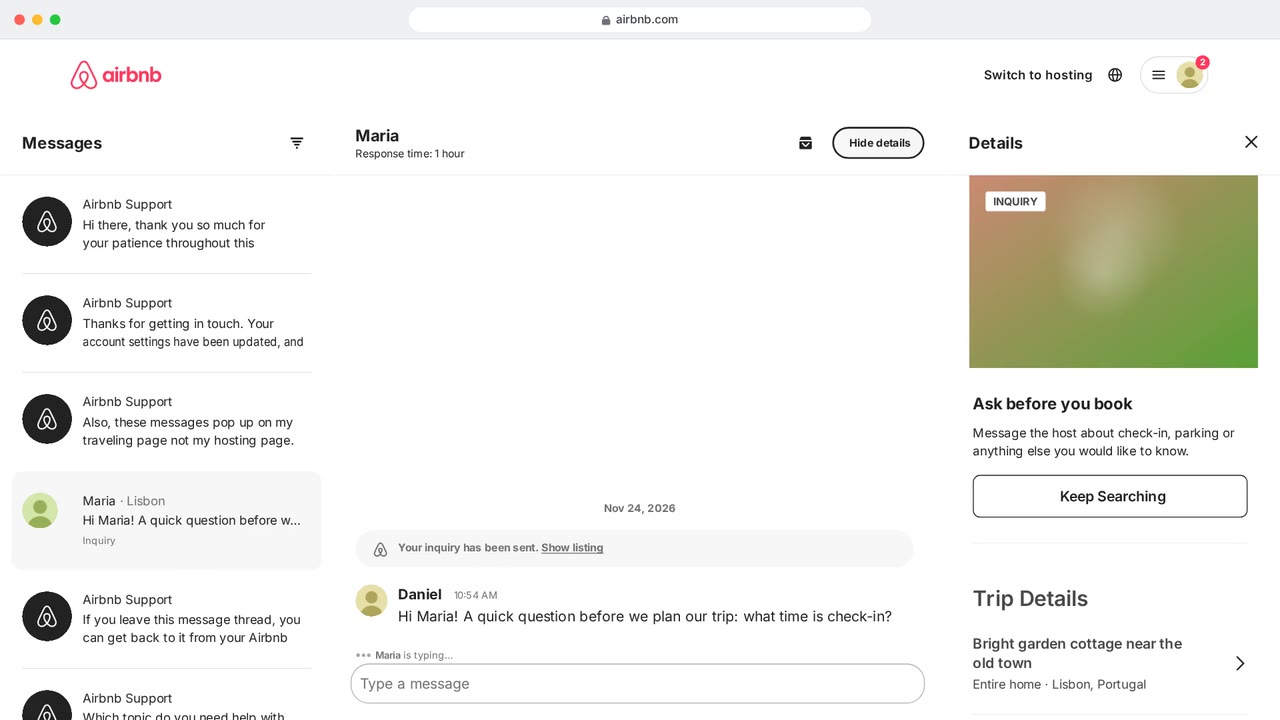
1. The check-in question, answered in one message
Panel: Notice Title Ask before you book. Response time Response time: 1 hour.
Script:
- Notice:
Your inquiry has been sent.with the linkShow listing - Guest, 10:54 AM:
Hi Maria! A quick question before we plan our trip: what time is check-in? - Host, 11:02 AM:
Hi! Check-in is any time after 3 PM. There is a lockbox, so you can arrive whenever suits you. - Guest, 11:03 AM:
Great. Is there parking nearby? - Host, 11:05 AM:
Yes, there is a free space right in front of the house.
Timing: this is the template's sample, so the timing is already set: the host types for a little over a second before each answer.
Use it for: the opening example of a "how to answer guest questions" video. Pause on the first answer and point out that it gives the time and removes the next question (how do I get in) in the same message.
2. The late arrival
Panel: Notice Title Arriving late?, Notice Text Ask the host how check-in works after dark.
Script:
- Guest, 9:12 PM:
Hi Maria, our flight lands at 11:30 PM. Is a late arrival a problem? - Host, 9:20 PM:
Not at all. Check-in is by lockbox, so you can arrive at any hour. - Host, same run:
I will send directions from the airport the day before you travel. - Guest, 9:21 PM:
Perfect, thank you!
Timing: the host's second message continues the first as part of the same run, without a second avatar, name or time. Give it a short typing duration, under a second.
Use it for: a lesson on self check-in. The second host message is the teaching point: a good reply answers the question and then says what happens next.
3. The polite no
Panel: Notice Title House rules, Notice Text Not sure if something is allowed? Ask the host first.
Script:
- Guest, 4:05 PM:
Hi! Would it be possible to bring our dog? He is small and very calm. - Host, 4:18 PM:
Thank you for asking first. I am sorry, the cottage is not suitable for pets: the garden is not fenced. - Host, same run:
If your plans change, you are very welcome. - Guest, 4:20 PM:
Understood, thanks for the quick answer.
Timing: set the host's first typing duration to around 2.5 seconds. A longer typing line before a refusal reads as a host choosing their words.
Use it for: a segment on saying no without losing the guest's goodwill. Thank, refuse with a reason, leave the door open.
4. The question about getting around
Panel: Listing Place Entire home · Lisbon, Portugal, Notice Title Travelling without a car?
Script:
- Guest, 8:30 AM:
Hello! Is the cottage close to the train station? We are travelling without a car. - Host, 8:41 AM:
Hi Daniel. Yes, it is a 10 minute walk, mostly flat. A bus also stops at the end of the street. - Guest, 8:43 AM:
That is ideal. Is there a supermarket nearby? - Host, 8:45 AM:
A small one, two streets away, open until 9 PM.
Use it for: showing that specific answers (minutes, streets, opening hours) do more than "yes, very central".
Type any script from this post. Free to use, no sign-up for the manual editor.
Open the Airbnb Messages editorIdeas for co-hosts and teams: guest-communication training
These work as pairs. Export two clips from the same question, one with a weak reply and one with a strong one, and show them one after the other in a training session or a lesson.
5. Weak reply, strong reply
Script, clip A:
- Guest, 11:03 AM:
Is there parking nearby? - Host, 11:05 AM:
yes
Script, clip B:
- Guest, 11:03 AM:
Is there parking nearby? - Host, 11:05 AM:
Yes, there is a free space right in front of the house. It fits a large car.
Timing: in clip A, set the host's typing duration to half a second. In clip B, 1.5 seconds.
Use it for: the first exercise of a communication training. Ask the team what question the guest will have to send next after clip A. Clip B has already answered it.
6. The response-time lesson
Panel, clip A: Response time: a few days. Panel, clip B: Response time: 1 hour.
Script, clip A:
- Date line
Nov 24, 2026. Guest, 9:12 PM:Hi! Is the cottage free for the first weekend of June? - Date line
Nov 26, 2026. Host, 11:40 AM:Hi, yes it is.
Script, clip B: the same question at 9:12 PM, and the host's answer at 9:20 PM under the same date line.
Timing: in clip A, set a delay of two or three seconds before the host's message, so the viewer sits with the unanswered question. The new date line does the rest.
Use it for: making the cost of a slow reply visible. The header line and the timestamps tell the story without a voiceover.
7. Three questions in one message
Script:
- Guest, 2:15 PM:
Hi Maria! Three quick ones: is there wifi, is there a washing machine, and can we check out a bit later on Sunday? - Host, 2:24 PM:
Hi Daniel! Yes, there is fast wifi in every room. - Host, same run:
There is a washing machine in the kitchen, with detergent. - Host, same run:
Sunday check-out can move to 1 PM, since nobody arrives that day.
Timing: the second and third host messages continue the run under the first. Give each a typing duration of about a second, so the answers arrive one by one.
Use it for: teaching a team to answer every part of a message, in the order the guest asked.
8. The question the listing already answers
Script:
- Guest, 6:40 PM:
Hi, does the place have a desk? I need to work for two of the days. - Host, 6:52 PM:
Hi Daniel. Yes, there is a desk in the bedroom, next to the window, and the wifi is fast enough for video calls. - Guest, 6:53 PM:
That is all I needed. Thanks!
Use it for: a reminder that "as stated in the listing" is never the right first line. Answer the question as if it were new.
Ideas for travel creators: stories
A travel video often starts before the trip. These clips give you an opening shot or a chapter marker that is specific to the story.
9. The message that started the trip
Panel: a listing title with character, such as Bright garden cottage near the old town.
Script:
- Notice:
Your inquiry has been sent.with the linkShow listing - Guest, 7:02 PM:
Hi Maria! We are two friends planning five days in Lisbon in May. Is the cottage really that close to the old town? - Host, 7:10 PM:
Hi! About ten minutes on foot. And the bakery on the corner opens at 7. - Guest, 7:11 PM:
Say no more.
Timing: tick Show typing in input field on the last guest message and slow the typing speed to around 12 characters per second, so the clip ends on the line being typed and sent.
Use it for: the cold open of a vlog. Cut from the last message straight to the first shot of the trip.
10. The host's local tips
Script:
- Guest, 5:30 PM:
We arrive tomorrow evening. Where would you eat on a first night? - Host, 5:44 PM:
The small grill by the church, two minutes from the door. Go before 8, it fills up. - Host, same run:
And for breakfast, the bakery on the corner.
Use it for: chapter cards. Show the clip, then the footage of each place the host mentions. Keep the places fictional or generic unless they are your own recommendations.
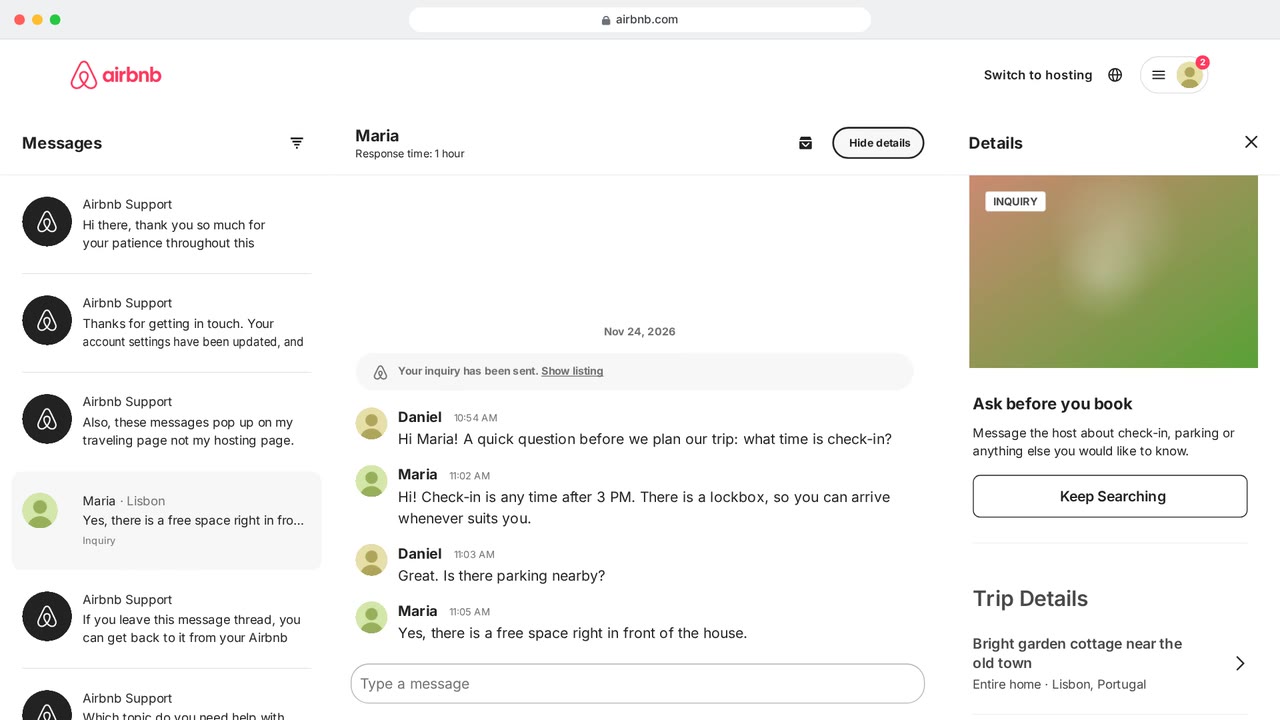
11. The night it went sideways (dramatised)
Panel: keep the label and status neutral. Do not change them to anything that reads like a confirmation.
Script:
- Date line
Jun 6, 2026. Guest, 11:48 PM:Hi Maria, we are at the door but the lockbox is empty. - Guest, same run:
Are you there? - Date line
Jun 7, 2026. Host, 12:20 AM:I am so sorry! The cleaner still has the key. She is on her way, ten minutes.
Timing: a delay of two seconds before the second guest message, then a typing duration of three seconds for the host. The long typing line is the suspense, and the new date line shows that midnight has passed.
Use it for: storytime videos. Say clearly that the exchange is dramatised, and never name or describe a real host or listing.
Ideas for educators: scam awareness
A red flag is easier to recognise in context than in a list of rules. Each clip below shows one pattern and ends on the safe reply. Keep each clip to one pattern, never include a working link, a phone number or account details, and label it as a fictional example.
12. "Message me somewhere else"
Script:
- Guest, 2:10 PM:
Hi! Is the apartment free for the first weekend of June? - Host, 2:11 PM:
Yes it is. Message me on another chat app and I will send you the details there. - Guest, 2:13 PM:
I would rather keep everything in this thread. Can you answer here?
The red flag: a request to move the conversation off the page before anything has been agreed.
13. "Pay me directly to hold the dates"
Script:
- Guest, 3:40 PM:
The place looks great. How do I confirm the dates? - Host, 3:41 PM:
Lots of people are asking. Send me a bank transfer today and I will hold it for you. - Guest, 3:44 PM:
No thanks. I only pay through the booking page.
The red flag: pressure plus a payment outside the platform. Do not put an amount, a bank name or any account detail in the message; the wording alone carries the lesson.
14. The guest who wants to skip the platform
This one is for hosts. The request comes from the guest's side, and the lesson is the host's reply.
Script:
- Guest, 10:05 AM:
Hi Maria, could we arrange this between us directly to avoid the fees? - Host, 10:16 AM:
Thanks for your interest, Daniel. I keep all bookings and messages on the platform. - Host, same run:
Happy to answer any questions about the cottage here.
The lesson: a polite, fixed line that a host can reuse every time.
Timing for ideas 12 and 13: give the host's message that contains the red flag a short typing duration, around half a second. A fast, eager answer is part of the pattern. Then let the guest's safe reply type into the message field at a calm speed. In idea 14 it is the other way round: type the guest's request into the field, and give the host's reply a normal typing duration.
Turning one script into a series
One clip is an example. Five clips with the same host, the same listing and the same look are a format.
- Keep the pair. Use the same two names and avatars in every clip, so viewers recognise the series.
- Change one thing per episode. The question changes; the listing, the theme and the response time stay.
- Number the lessons. Use the Notice Title in the listing panel as a quiet episode title:
Lesson 3: saying no. - Pair good and bad. For training, every topic gets two clips, as in ideas 5 and 6.
Timing rules that apply to every script
- Typing duration follows the length of the answer. Around a second for a short line, two or more for a long one.
- Half a second between messages keeps a friendly exchange moving. Use a longer delay only where the wait is the point.
- Type your own message into the field when it matters. The opening question and the final line are worth watching being typed. A quick
Thanks!is not. - Let the last message sit. Leave a second or two at the end in your edit so the viewer can finish reading before the cut.
Where these clips go
The clip is 16:9, so it fits a YouTube video, a webinar, a course lesson or a slide without cropping. For a talking-head video, cut to the clip full screen, then back to you for the commentary.
There is no vertical or square version. For TikTok, Reels and Shorts, place the landscape clip inside a vertical edit in your own video editor, for example as the top half of a split screen with you below it, or zoomed in on the thread. If you want a native vertical chat, tell the same story in a phone template such as WhatsApp or the brand-free text chat.
The template recreates a real site's interface, so these clips are for your own content. If you make videos for clients or for paid ads, the terms point you to a brand-free template instead. The pricing page explains the plans, including watermark-free and Full HD export.
Drafting scripts faster
Two shortcuts, if you would rather not type every field:
- Describe it. On the template's page, type one sentence, such as
a guest asks an Airbnb host whether a late arrival would be a problem, and the AI drafts the messages and their timing. The result opens in the manual editor for you to adjust. It requires signing in. The Describe it guide has more examples. - Claude or ChatGPT. MockClip's MCP server has a
create_airbnb_conversationtool. It takes the host's name, up to twenty messages with their times, date lines, automated notices and typing settings, plus your own name, the response time and the listing details, and returns a link that opens the finished animation in MockClip. The setup guide shows how to connect it.
Common mistakes to avoid
- Putting two lessons in one clip. One question, one point.
- Long paragraphs from the host. Split a long answer into two or three short messages in the same run.
- A response time line that contradicts the timestamps, unless the contradiction is the lesson.
- Scam examples with real-looking links, numbers or account details. Leave them out entirely.
- Planning for a vertical export. The clip is landscape; decide how it sits in your edit first.
- Recreating a real guest's messages. Rewrite them as fiction and change every identifying detail.
Quick start
- Open the Airbnb Messages template.
- Pick one idea from this post.
- Set the host's name, your name and the response time line.
- Fill in the listing panel for that idea.
- Type the script, with a timestamp on every message.
- Adjust the typing durations and delays the idea calls for.
- Export MP4 or GIF, and label the clip as an example.
Related MockClip templates and guides
- Airbnb Messages video maker: the template used for every idea here
- How to make a fake Airbnb message video: the field-by-field tutorial
- Marketplace scam awareness video: more red-flag patterns and how to label them
- WhatsApp chat videos for teachers and educators: using chat clips in lessons
- Fake text conversation videos for YouTube Shorts: vertical formats with phone templates
- Etsy message template: another desktop page, for a buyer and a shop
- Pricing: plans and export options
Frequently Asked Questions
What kinds of videos can I make with an Airbnb message mockup?
Hosting tutorials that show a good reply to a common question, guest-communication training for co-hosts and teams, travel stories that open on the exchange that started the trip, and scam awareness examples that end on the safe reply.
Whose side of the conversation does the video show?
The guest's. The clip draws the Messages page as a traveller sees it: you write as the guest, the contact is the host, and the listing panel on the right describes the place. A host's reply is shown the way a guest would read it.
How long should each script be?
Three to five messages. Each run of messages starts with a row carrying an avatar, a name and a time, so a short exchange fills the thread. The sample, two questions and two answers, is a 13 second clip.
Can I post these videos on TikTok, Reels or Shorts?
The clip is always 16:9, with no vertical version. Place it inside a vertical edit in your own video editor, for example as the top half of a split screen or zoomed on the thread, or use one of MockClip's phone templates for a native vertical chat.
Can I recreate a real conversation with a guest or a host?
Rewrite it as a fictional example instead. Change the names, the listing and the wording, remove anything that identifies a real person or place, and label the clip as an example or a dramatisation. Do not present a staged exchange as real.
Can the scam awareness clips show a booking or payment screen?
No. The template draws the Messages page only: the inbox, the thread and the listing panel. It has no booking or payment screens, so the red flag has to be shown in the wording of a message.
Do I need an account to make these videos?
No. The manual editor works without signing up and exports with a small watermark. Describe it, which drafts a conversation from one sentence, requires signing in. The pricing page explains the plans.
Related Articles
How to Make a Fake Airbnb Message Video (2026 Guide)
Step-by-step guide to a fake Airbnb message video: the desktop Messages page with the inbox, automated notices, a typing line and the listing panel.
How to Make a Marketplace Scam Awareness Video (Free)
Make short safety videos that show common Facebook Marketplace scam red flags as fictional chats, each ending on the safe reply. Free, exports MP4.
WhatsApp Chat Videos for Teachers and Classroom Lessons
Build chat mockup videos for teaching — language dialogues, online-safety scenarios, and parent-communication training — using the WhatsApp template.
AI Fake Chat Video Generator: Describe It, Get the Clip
Type what the clip should be and MockClip's Describe it mode writes the messages and timing for WhatsApp, iMessage, ChatGPT, Tinder and more. Refine by second.