Reddit Comment Thread Video Maker for YouTube Creators
Reddit thread videos are one of the most dependable formats on YouTube, and the reason is structural rather than fashionable: a thread is a pre-built story with conflict in the post and a chorus of reactions underneath it. The post sets up the question. The comments argue about it. Each comment is a new beat, which means the video has as many hooks as it has comments.
This guide covers why the format suits YouTube specifically, exactly what MockClip's Reddit template renders and controls, the production workflow from empty editor to uploaded video, and the scripting and packaging decisions that separate a channel that grows from one that stalls.
Why the format suits YouTube
Short-form platforms reward the opening seconds. YouTube rewards duration, and a Reddit thread is a format whose runtime scales with its content rather than its production effort.
Length scales with the writing, not the work. A five-comment thread runs a couple of minutes; a twenty-comment thread with nested replies runs ten or more. The difference in editor time is small — you are adding comment cards, not shots.
The structure repeats; the story never does. Every video in the format has the same visual container, so viewers do not have to re-learn anything, and every video has completely different content. That combination is rare and it is why the format survives trend cycles.
Production overhead is close to zero. No camera, no lighting, no on-screen presence. A browser and a microphone. That is what makes a three-to-five-videos-a-week cadence realistic for one person.
Each comment is a retention hook. "What does the top comment say." "Did anyone disagree." "There's a reply — what did they say back." You are not relying on a single narrative arc to hold ten minutes; you are stacking twenty small ones.
Viewers already know what they clicked. Someone searching "Reddit AITA" knows the format and usually wants more than one video. That is a session-length advantage you get for free if your library is deep enough.
The honest limits: the format is a reading experience, so it needs a voiceover or clear captions; and it lives or dies on the writing, because the animation is identical in every video you will ever make.
For the cross-platform version of this argument, see how to go viral with fake conversation videos.
Two formats: Shorts and long-form
Most channels in this niche run both: Shorts for discovery, long-form for watch time.
Shorts, 30 to 60 seconds
One post, one to three comments. The title is the hook, the body is two to four sentences, and a single comment delivers the verdict or the punchline.
Shorts suit:
- AITA verdicts — the title asks, one top comment rules
- A single savage comment — the post is setup, the comment is the joke
- Confessions — a short post and one devastating reaction
Production is fast: write the thread, build it in the Reddit template, export, add narration, upload. Ten to twenty minutes per Short once the workflow is settled. The YouTube Shorts conversation-video guide covers the short-form side in more depth.
Long-form, 8 to 15 minutes
Fifteen to twenty comments with nested replies. This is where a channel's watch time accumulates, and where the comment section stops being a coda and becomes the body of the video.
Long-form suits:
- Full AITA threads — every angle, including the ones that disagree
- Compilations — three to five shorter threads on one theme
- AskReddit-style prompts — one question, twenty standalone answers
- Update threads — the original post, the update, and comments on both
In long-form the comment section is most of the video. The post might take ninety seconds to read; the remaining ten minutes are comments, which is where nested replies stop being decorative and start being the structure.
What the template renders and controls
Before the workflow, here is precisely what you can set — and the two or three things older guides to this format get wrong.
The post
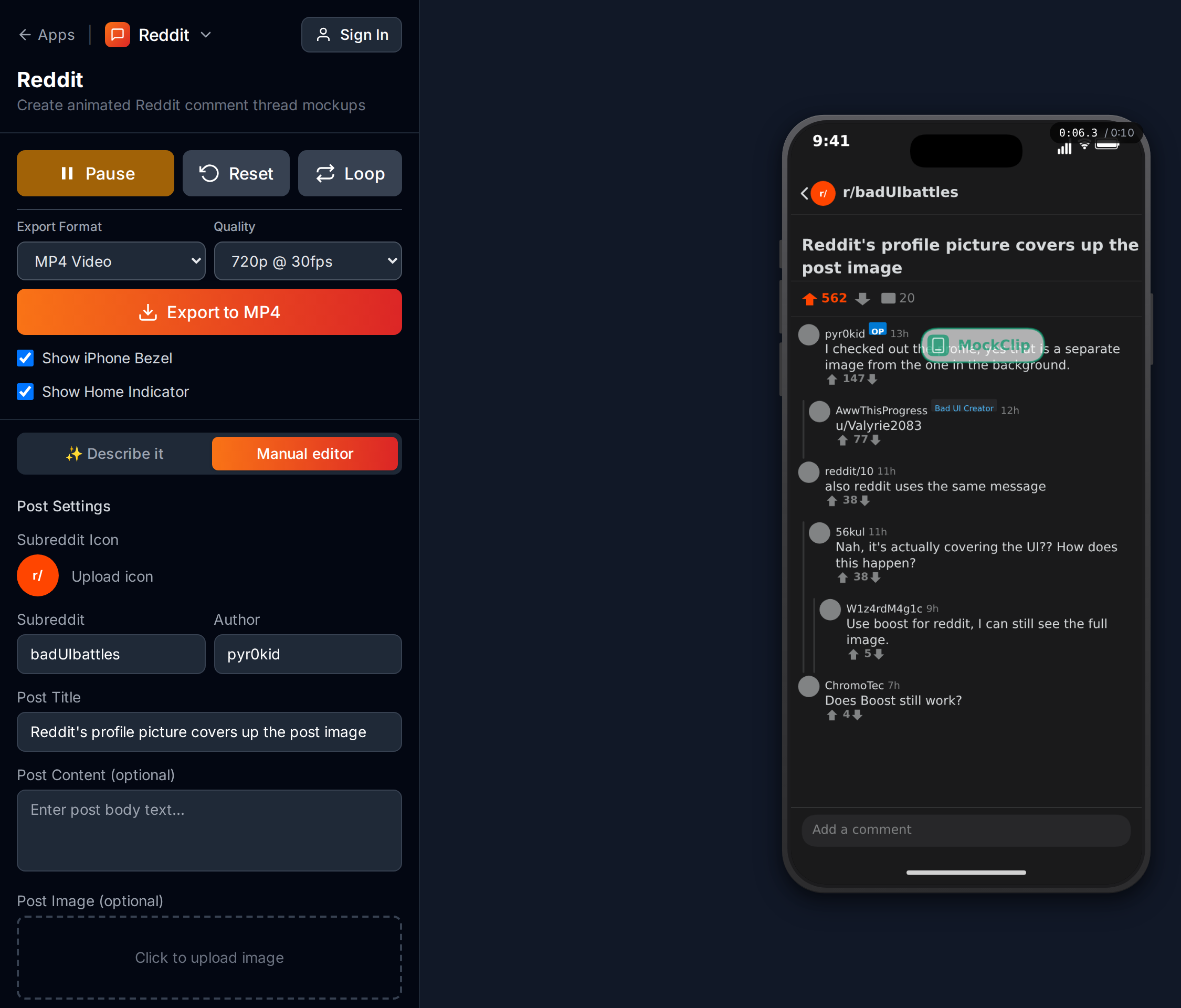
| Field | What it does |
|---|---|
| Subreddit | The r/name in the header |
| Subreddit icon | Optional image upload shown next to it |
| Post title | The large headline on the card |
| Post content | Optional body text under the title |
| Post image | Optional image upload under the body |
| Votes | A number; 1200 renders as 1.2k |
| Comments | The comment count shown in the summary bar |
| Vote state | None, Upvoted or Downvoted — colours the arrow |
| Author | Stored with the clip, but not drawn on screen |
Two things to be clear about. The post is on screen from the first frame — there is no typing or line-by-line reveal of the title or body, and no speed control for one. Only the comments animate. And the post's author name is not displayed: usernames appear on comments, not on the post card, so do not spend writing effort on a clever throwaway handle for the post itself.
Vote counts are plain numbers that the UI formats for you: anything from 1000 up renders with one decimal and a k, so typing 8300 gives you 8.3k and typing 8000 gives you 8k. If you want the un-round look, type an un-round number.
Each comment
| Field | What it does |
|---|---|
| Author | The username on the comment |
| Timestamp | Free text — "2h", "13h", "3d" |
| Author Flair | Optional chip next to the name |
| Avatar | Optional image you upload |
| Comment | The body text |
| Votes | A number, formatted the same way as the post's |
| Vote State | None, Upvoted or Downvoted |
| Delay | Seconds of dead time before this comment appears |
| OP | Marks the comment as the original poster |
| Animate vote change | Shifts the vote state to a target a chosen number of seconds after the comment appears |
| Animate collapse | Collapses the comment a chosen number of seconds after it appears |
| Add reply | Nests a child comment underneath, at any depth |
Each comment slides in over about 0.3 seconds; the gap you control is the Delay before it. Replies indent one step per level with the vertical thread line drawn down the side, and the thread scrolls itself as comments arrive, so a long thread keeps the newest comment in frame without you doing anything.
The two animation options are the ones most people miss. A comment that appears neutral and then visibly jumps to upvoted a second later is a tiny piece of motion that reads as the thread being alive. A comment that collapses after a beat is how you show a downvoted take being buried. Neither is available in a screenshot, and both are per-comment checkboxes here.
Finally, Sound Effects is on by default and bakes a soft tick as each comment lands into the exported file. Turn it off if you are laying your own audio over the clip.
Step by step
1. Open the template
Go to mockclip.com/app/reddit. The page opens on Describe it, the AI panel: describe the thread you want and it writes the post and the comments, with a list of what happens at which second. It needs a Google or GitHub sign-in and is the metered part of the product; the manual editor is unlimited on the free plan. The toggle above the panel switches between them and remembers your choice in that browser.
In the manual editor, press Play on the sample thread first. Fifteen seconds tells you what the export will look like.
2. Set the subreddit and the summary bar
Pick a subreddit that matches the story — r/AITA, r/relationship_advice, r/tifu, r/AskReddit, r/MaliciousCompliance, or a niche one. Upload a subreddit icon if you want the header to look specific rather than generic.
Then set the two numbers in the summary bar. Keep them proportional to each other and to the subreddit: a default-sized subreddit does not produce 40k-upvote posts every day, and a post with a huge vote count and a tiny comment count looks wrong even if the viewer could not say why.
3. Write the title and the body
The title is the most important line in the video. It decides the click on the thumbnail and it decides whether someone who started watching stays past five seconds.
Patterns that work:
- The direct question — "AITA for refusing to let my mother-in-law stay after what she did at Thanksgiving?"
- The confession with stakes — "I've been lying to my friend group for three years. Today someone found out."
- The workplace escalation — "My boss told me I'm 'not a team player.' So I showed him what that looks like."
- The update — "UPDATE: I finally confronted my roommate about the camera I found."
Body text: 100–300 words for a Short, 200–500 for long-form. First person, short paragraphs, each one escalating. Because the body is visible from the first frame rather than revealed gradually, write it to be scannable — a wall of text is a wall of text from second zero.
4. Build the comment section
This is where a long-form video lives or dies. Archetypes worth having in every thread:
- The verdict. A clear ruling, high vote count, placed first. Anchors the viewer's reading.
- The counterpoint. Disagrees with the verdict, lower votes, second or third. A thread where everyone agrees is a thread with no tension.
- The anecdote. "This happened to me with my SIL — here's what I did." Moderate votes, gives the thread texture.
- The one-liner. Short, brutal, quotable. This is the comment people screenshot.
- The nested argument. Two commenters disagreeing in a reply chain. A sub-plot inside the thread and the single best use of nesting.
- The OP reply. Tick the OP box. Often carries the second reveal that flips the whole thread.
Give each comment an author, a timestamp that is older than the comments below it, and a vote count that fits its position. Flairs ("Certified Proctologist", "Asshole Aficionado") add subreddit-specific flavour to AITA content; avatars help viewers track who is who in a long argument. The nested replies guide goes deeper on structuring reply chains.
5. Set the pacing
Pacing is the per-comment Delay. One to two seconds between comments is the usual range: that gap is where the viewer finishes reading, forms an opinion, and anticipates the next one. Rushing it turns twenty distinct beats into one blur.
If you are narrating, set the delay to roughly the time it takes you to read the previous comment aloud, then add half a second. Build the thread, read along with the preview, adjust.
Then add motion where it pays: vote animations on the two or three comments whose standing is part of the story, and a collapse on the take that deserves to be buried.
6. Preview and export
Press Play and watch the whole thing. Check that the title fits without awkward wrapping, that the pacing matches your planned narration, that the punchline comment is at or near the end, and that the vote counts read as proportional.
Then set the frame and the file. Show iPhone Bezel is on by default at 9:16; turn it off and you can pick 9:16, iPhone (393×852) or 3:2. The Reddit template renders vertically — the square option that the chat templates offer does not apply here, so for a landscape YouTube upload you will be placing the vertical export onto a background in your editor.
Pick an Export Format — MP4, GIF, MOV · ProRes 4444 or WebM · VP9 — and a Quality: 720p or Full HD at 15, 24, 30 or 60 fps. 720p at 30 fps is the default and is plenty for a thread of text; Full HD takes up to four times as long to encode, and exports run several times faster in Chrome or Edge than in Firefox. Exports carry a watermark unless your plan removes it — see pricing. The export settings guide covers every combination.
For a slower walkthrough with screenshots, see the complete fake Reddit thread video guide.
7. Post-production
The export is a vertical video of a thread. For YouTube it needs at least narration.
Voiceover. An AI text-to-speech service is the fastest route and keeps a consistent voice across a library; your own voice is slower but builds a connection a synthetic one cannot. Platform TTS voices work for Shorts and sound out of place over ten minutes.
Layout for landscape. Three options: centre the vertical video over a blurred copy of itself; put it on one side with commentary or art on the other; or run ambient gameplay footage behind or below it, which is the genre convention for the category.
Captions. Burn them in or use your editor's auto-caption tool. The on-screen comment text is small once a vertical video is letterboxed into a landscape frame, and captions carry the line to anyone watching at a glance.
Free in the browser. No account needed for the manual editor.
Create a Reddit thread videoWriting threads that hold attention
The animation is the container. The script is the product.
The post title is the video title
"AITA for refusing to attend my sister's wedding after what she said?" works as both. Write it once, with the YouTube search box in mind.
Strong titles do three things: imply a story the viewer can already picture, pose a question they want answered, and include a specific detail. "AITA for what I did at Thanksgiving" is weak. "AITA for telling my mother-in-law she's not welcome at Thanksgiving after she insulted my cooking in front of fifteen guests" is not.
Comment order is the emotional arc
- First comment — the immediate reaction, usually the verdict. Anchors interpretation.
- Middle comments — the debate. Counterpoints, anecdotes, requests for more information.
- Nested replies — arguments inside arguments. The sub-plots.
- Last comment — the punchline, the twist, or the resolution. Whatever the viewer reads last is what they take away. Make it the strongest line you wrote.
Nesting is comic timing
A top comment: "Your husband needs therapy." A nested reply: "The husband IS the therapy. For everyone else's patience."
The indent is the beat. The viewer reads the first line, processes it, and the visual step down delivers the second one at exactly the right moment. Use the structure deliberately rather than nesting at random.
For more premise ideas across formats, see AI conversation video content ideas.
Choosing the subreddit
The subreddit sets expectations before a word is read.
r/AmITheAsshole — built-in conflict and built-in audience participation, because viewers vote in your comments. The most-covered corner of the niche and the most competitive.
r/AskReddit — one question, many standalone answers. Ideal for compilations: a single prompt can carry ten minutes.
r/TIFU — confessional comedy where the narrator is the one who messed up. Works at both lengths.
r/MaliciousCompliance — workplace revenge with a clean payoff. Skews to an audience that recognises the office dynamics.
r/PettyRevenge and r/ProRevenge — escalation with a resolution. Viewers stay for the payoff.
r/relationship_advice — emotionally charged and endlessly variable; update posts are the strongest material in the category.
Differentiating
Everyone covers AITA. Pick one or two smaller subreddits as your channel's identity: r/legaladvice, r/talesfromretail, r/talesfromtechsupport, r/choosingbeggars, r/entitledparents, r/BestofRedditorUpdates. Cover the big ones for discoverability and the niche ones for the reason people subscribe.
More on the storytelling conventions in Reddit story video format explained.
Packaging for YouTube
Titles
Mirror how people search: "Reddit AITA [topic]", "Best Reddit [subreddit] stories", "Reddit [topic] compilation", "r/[subreddit] top posts". Put the subreddit name or the word Reddit near the front.
Thumbnails
Three conventions, all recognisable at a glance: the Reddit UI itself with the post title legible; a reaction face overlaid on the post; or a short phrase from the thread in heavy type. Pick one and keep it consistent across the channel, so your videos are identifiable in a feed before anyone reads the title.
Descriptions and playlists
Put the subreddit name and the post title in the description so the page has the words people search for. Group videos into playlists by subreddit or theme — a viewer who finishes one AITA video should be served your next one rather than someone else's.
Mistakes that kill the format
The post is too long. A 500-word body takes three or four minutes to read aloud, and the comments are the good part. Keep it tight and let the thread carry the runtime.
Every comment agrees. No debate, no tension. Always include at least one dissent.
The numbers don't hang together. A post at 47k with a top comment at 58 reads as fake. Scale them to each other.
No voiceover. Silent text videos ask a YouTube audience to read for ten minutes. Narration is the minimum.
The comments rush. A beat of one to two seconds between comments is what makes each one land. Cutting it saves thirty seconds and costs the whole structure.
No nesting. A flat list of top-level comments reads as a list. Real threads argue with themselves.
The same subreddit every time. Pick a lane the channel can own.
For the TikTok-focused version of the format, see fake Reddit post video maker.
Troubleshooting
The post body is on screen immediately and I wanted it revealed. That is how the template works: the post card is static and the comments animate. If you want a staged reveal of the body, cut to it in your editor or carry it in the voiceover.
My vote count shows as 8k and I typed 8000. Counts of 1000 and over are formatted with one decimal and the trailing .0 dropped. Type 8300 for 8.3k.
The username I set on the post isn't showing. The post card does not display an author. Usernames show on comments only.
The thread scrolled past a comment I wanted on screen. The preview follows the newest comment. Shorten the thread, or split a long one into two clips and cut between them.
The export is slow. Drop to 720p at 30 fps and run it in Chrome or Edge.
The clip is longer than planned. The duration is the sum of the per-comment delays plus the animations. Trim delays rather than deleting comments.
Scaling to a channel
The format rewards batching, because writing is the slow part and rendering is the fast part.
Early week: script five to seven threads. Subreddit, title, body, comments, nested replies — all in a plain document, no editor open.
Mid week: build them in the Reddit template back to back. Staying in one editor is what makes each thread a ten-to-twenty-minute job instead of an hour.
Late week: one post-production pass across all of them — narration, backgrounds, captions, export.
Weekend: titles, descriptions, thumbnails, scheduled uploads.
That is five to seven videos a week, a mix of Shorts and long-form, within reach of one person working part of each day. The library is also modular: a long-form video's best comment becomes a Short, three Shorts become a compilation, and a thread that performed can be recut with different narration.
For the wider view of the mockup-video format across templates, see app mockup videos for social media and the blog index.
The bottom line
Reddit thread videos are not a trend; they are a container. The supply of stories is effectively infinite, the production cost is a browser tab and a microphone, and the format accommodates both the Shorts that bring people in and the long-form that keeps them watching.
The Reddit template handles the animation — the thread, the nesting, the votes, the collapses. The writing is yours, and it is the only part that decides whether the video works.
Free Reddit template, browser-based, MP4 export.
Start making Reddit videosFrequently Asked Questions
What is a Reddit comment thread video?
An animated recreation of a Reddit post and its comment section. The subreddit header, title, body and vote counts are on screen from the start, then comments appear one at a time — the same reading flow a real user gets scrolling a thread — and the result exports as a video for YouTube, Shorts, TikTok or Reels.
Is MockClip's Reddit template free?
The template at mockclip.com/app/reddit runs in the browser and the manual editor needs no account. Exports carry a watermark unless your plan removes it — see the pricing page. Only the AI Describe it panel is metered; every export quality is available on every plan.
Can I use nested comment replies?
Yes. Every comment has an Add reply button, and replies can nest as deep as you like. Each level indents and draws the vertical thread line Reddit uses, so a two-person argument inside a thread reads correctly on screen.
Can I add author flairs, avatars and OP badges?
Yes, per comment. Each one takes an author name, a timestamp, an optional flair chip, an optional avatar image you upload, a vote count and an OP toggle that marks it as the original poster. The post itself takes a subreddit name, an optional subreddit icon, a title, body text and an optional image.
Can comments animate their votes or collapse?
Yes. Each comment can be set to animate its vote state to upvoted or downvoted a chosen number of seconds after it appears, and can be set to collapse after a delay. Both are per-comment options in the editor and both are rendered in the export.
How long should a Reddit thread video be?
For Shorts, 30 to 60 seconds with one post and one to three comments. For long-form, eight to fifteen minutes with fifteen to twenty comments and nested replies. The format scales cleanly because each comment is its own beat with its own delay.
What does the Reddit template export?
MP4, GIF, MOV or WebM at 720p or Full HD and 15, 24, 30 or 60 fps. The frame is vertical — the iPhone bezel at 9:16 by default, or 9:16, iPhone 393x852 or 3:2 with the bezel turned off. For a landscape YouTube upload, place the vertical export over a background in your editor.
Do I need permission to recreate a Reddit thread?
Writing original content inspired by a topic needs no permission — it is fiction. Recreating a real thread verbatim brings Reddit's content policy and the original poster's rights into play. Most creators in this format write original dialogue inspired by real topics rather than copying posts word for word.
Related Articles
How to Make a Fake Reddit Thread Video (AITA, Storytime)
Complete 2026 guide to making fake Reddit thread videos for TikTok and YouTube — animated post, upvotes, comments, voiceover-ready MP4 export.
Reddit Thread Video: Animating Nested Comment Replies
Build Reddit thread videos with real nested replies. Time each comment, indent the reply tree, set OP badges and vote states, and export a vertical MP4.
How to Make a Fake Reddit Post Video for TikTok
Create animated fake Reddit post videos with upvotes, comments, and the Reddit UI. Free browser tool with MP4 export.
The Reddit Story Video Format Explained (2026 Guide)
How the Reddit story video format works on TikTok and YouTube Shorts — hook, post screenshot, voiceover, B-roll, and comment payoff broken down step by step.
How to Create Fake Text Conversation Videos for YouTube Shorts
Make animated fake text conversations optimized for YouTube Shorts — with templates, monetisation strategy, voiceover tips, and a full posting playbook.