Fake Email Video Ideas for TikTok, Reels and Shorts
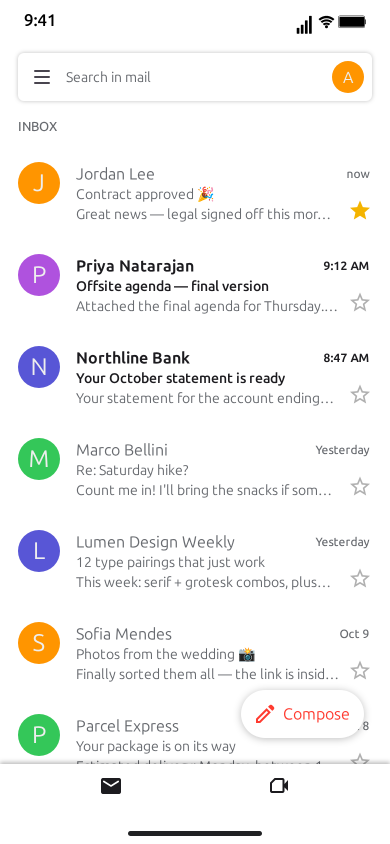
Some of the biggest moments in a person's life now arrive as an email. The job offer, the college decision, the landlord's "small update to your lease", the colleague who writes "per my last email" for the third time this week. Everyone knows the feeling of seeing a subject line slide in at the top of the inbox and freezing before opening it. That freeze is a story, and a fake email video is a fast way to stage it.
This guide covers how to turn those moments into short-form videos with MockClip's Gmail template: why the format works, the hook, the pacing, seven ready-to-build skits with their inbox rows and scripts, and the export settings for TikTok, Reels and Shorts. Every email in these skits is written by you. There is no Gmail account involved and nothing is sent anywhere; the template only draws and animates the inbox you script.
Why email skits work
Three things make the format work.
Instant recognition. A column of rows with colored letter discs, bold unread subjects and a search bar at the top: viewers know they are looking at an inbox before they read a word. That saves the first second, which is the one that matters most.
A subject line is a headline. An email arrives with its story already summarized: the sender, the subject, a one-line preview. Viewers read all three in a glance, and the gap between what the subject promises and what the body says is where the joke or the drama lives.
Reactions without a face. You do not need to be on camera. A star that fills gold, an email marked important, a long pause on the open email, a reply typed letter by letter and sent: each of these is a reaction the viewer reads instantly. The whole clip can be the character's inner life, told through taps.
The hook: the first two seconds
The arriving email is the hook. A new row slides in at the top of the inbox, pushing the others down, unread and in bold, with a sound. Viewers read the sender and the subject as it lands, so both have to work as text in about two seconds.
Hooks that work:
- A decision. "Your application decision", "Update on your offer", "Regarding your visit on Saturday".
- A formal subject for an informal problem. "Re: us", "Following up on our conversation", "Notice regarding the shared fridge".
- A subject everyone dreads. "Lease renewal — updated terms", "Quick chat?", "Action required".
- A subject that is too excited. "YOU'RE IN 🎉", "Contract approved 🎉", "Big news!!!".
Use the Preview line as the second half of the hook. "We are delighted to offer you" and "After careful consideration" are both eight words, and viewers know the ending of each before the email opens.
For short-form, get to the arrival fast. Lower the Wait on the first "New email arrives" step so the email lands almost as soon as the clip starts. A full inbox behind it helps: the new row has more weight when it pushes five or six rows down.
Pacing: where the pauses go
An email skit has four timing controls that matter:
- Wait (s) on every step. Leave it empty for an automatic pause, under a second and a half, which looks natural. Set it by hand when the gap is part of the joke.
- Pause steps, which hold the frame for as many seconds as you set.
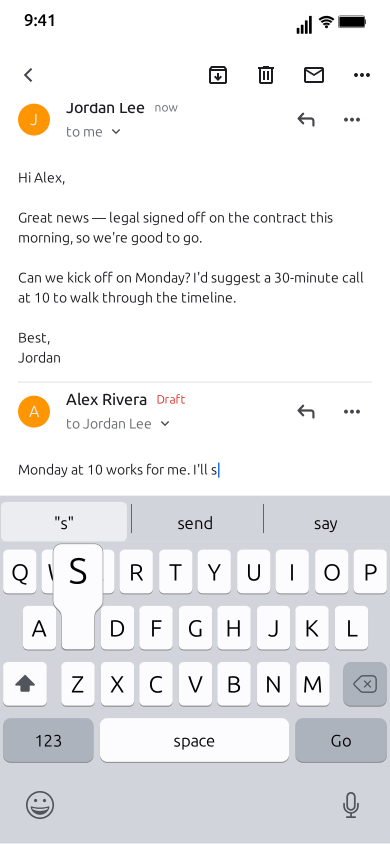
- Typing speed of the reply (Chars/s). 16 characters per second is the default. Slower typing reads as hesitation; faster typing reads as rage or excitement.
- The order of the small actions. Starring before opening means "I have been waiting for this". Opening, pausing, and going back without replying means "I cannot deal with this right now".
The rules of thumb for skits:
- Arrive fast, open slow. A quick arrival, then a longer Wait before Open email builds the "do I open it?" tension.
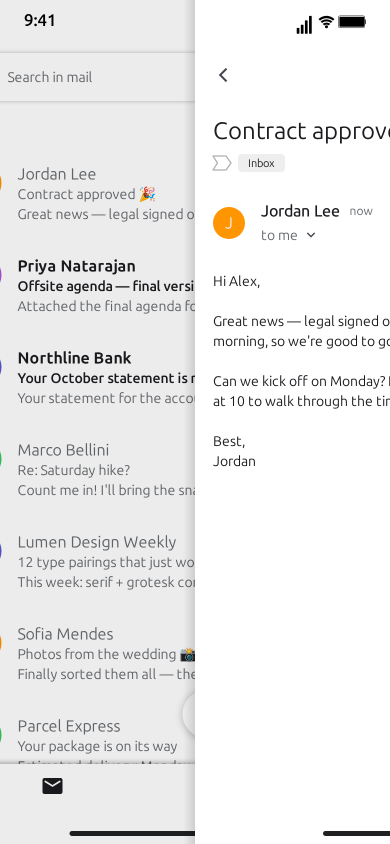
- Hold on the body. After an email opens, give viewers enough time to read it. Two or three seconds for a short body, more for a longer one, using the Wait on the next step or a Pause.
- The pause is the reaction. A Pause of two or three seconds on the open email, with no reply, is often funnier than any reply you could write.
- End on the inbox. Back to inbox shows the row now read, and starred if you starred it. That last frame is the epilogue.
Seven email skits, ready to build
Each skit lists the inbox rows, the arriving email and the script. Steps without a Wait use the automatic pause. Swap in your own wording; keep the structure. All names and companies are invented.
1. The job offer
The email everyone refreshes their inbox for.
- Your name: Sam Ortiz
- Inbox rows: Parcel Express, "Your package is on its way"; Lena Brooks, "Re: Saturday brunch?"; Job Board Daily, "12 new roles that match your search"; Copperleaf Analytics, "Interview confirmation — Thursday 2 pm"; City Library, "Your hold is ready".
- Arriving: Maya Chen, "Offer letter — Product Designer", preview "Hi Sam, we're thrilled to share some good news…". Body: "Hi Sam," (blank line) "On behalf of the whole team at Copperleaf, I'm thrilled to offer you the role of Product Designer." (blank line) "Your start date would be Monday, November 2. The full offer is waiting for you in our HR portal, and I'm happy to walk through it on a call." (blank line) "Welcome aboard," (blank line) "Maya".
- Script:
- New email arrives (Wait 0.3 s).
- Star the new row (Wait 0.4 s).
- Open email.
- Pause 2.5 s.
- Mark important.
- Type a reply at 30 chars/s: "YES. I mean, thank you so much, I'd be delighted to accept!"
- Back to inbox, then Pause 1.5 s.
Why it works: the star before opening tells viewers the character knew what this was. The fast reply that corrects itself mid-sentence is the punchline, and the interview confirmation in the inbox gives careful viewers the backstory. Note that the body only mentions a portal; the template has no attachments, so do not write "see attached" and leave viewers looking for one.
2. The college acceptance
A decision letter, played for tension.
- Your name: Riley Park
- Inbox rows: Mom, "did you eat"; Westbrook College Admissions, "Your application is complete"; Study Hub, "Your weekly progress report"; Jules, "are you checking every 5 min too"; Pizza Corner, "Your order is confirmed".
- Arriving: Westbrook College Admissions, "Your admission decision is available", preview "Dear Riley, thank you for your patience…". Body: "Dear Riley," (blank line) "Congratulations! It is my pleasure to inform you that you have been admitted to the Westbrook College class of 2031." (blank line) "Watch your inbox over the coming weeks for next steps about housing and orientation." (blank line) "Warm regards," (blank line) "Office of Admissions".
- Script:
- New email arrives (Wait 0.5 s).
- Pause 2 s.
- Open email (Wait 1.5 s).
- Pause 3 s.
- Star.
- Back to inbox, then Pause 2 s.
Why it works: the preview is deliberately neutral, so viewers do not know the outcome until the body is on screen. The long wait before opening is the tension, and the star is the only celebration: no reply, just a gold star on the row at the end. Write a rejection version with the same inbox and the same script and post them as a pair.
3. The breakup email
A relationship ended in the format of a quarterly review.
- Your name: Casey Moore
- Inbox rows: Streamly, "New episodes this week"; Jordan, "Re: dinner Friday?"; Pet Supply Co., "Your cat food subscription renews soon"; Jordan, "Calendar: our anniversary 🎂"; Bank of Elm Street, "Your statement is ready".
- Arriving: Jordan, "Re: us", preview "Hi Casey, I hope this email finds you well." Body: "Hi Casey," (blank line) "I hope this email finds you well." (blank line) "Following our conversation on Sunday, I've decided to move in a different direction. I'd like to thank you for the last two years and wish you every success in your future relationships." (blank line) "I'll collect my things on Saturday between 10 and 12. Please confirm a time that works." (blank line) "Best regards," (blank line) "Jordan".
- Script:
- New email arrives (Wait 0.3 s).
- Open email (Wait 1 s).
- Pause 3.5 s.
- Type a reply at 6 chars/s: "11 works."
- Pause 1 s.
- Back to inbox, then Pause 1.5 s.
Why it works: the earlier rows from the same sender (dinner plans, an anniversary invite) set up a relationship before the email arrives. "I hope this email finds you well" in a breakup is the first joke; the slow, two-word reply is the second.
4. The landlord's rent increase
A familiar pain, written in a familiar tone.
- Your name: Morgan Hale
- Inbox rows: Harbor Lane Properties, "Reminder: hallway painting on Tuesday"; Power & Light Co., "Your bill is higher than usual"; Taylor, "can you send me the wifi password again"; Harbor Lane Properties, "Rent receipt — October"; Grocery Go, "Your delivery is on its way".
- Arriving: Harbor Lane Properties, "Lease renewal — updated terms", preview "Dear Tenant, we're excited to share some updates…". Body: "Dear Tenant," (blank line) "We're excited to share some updates to your lease for the coming year!" (blank line) "To continue providing the high-quality living experience you enjoy, monthly rent will increase by 18% from January 1. This reflects recent improvements, including the new paint in the hallway." (blank line) "Please sign and return your renewal within 7 days." (blank line) "Kind regards," (blank line) "Harbor Lane Properties".
- Script:
- New email arrives (Wait 0.4 s).
- Open email.
- Pause 3 s.
- Type a reply at 14 chars/s: "Thank you for the update. Could you share which improvements other than the paint are included?"
- Back to inbox, then Pause 1.5 s.
Why it works: "we're excited" in a rent increase is the setup, "the new paint in the hallway" is the punchline, and the earlier painting reminder in the inbox pays it off for anyone paying attention. The polite reply lets viewers project their own fury onto it.
5. "Per my last email"
Office drama in its purest form.
- Your name: Avery Quinn
- Inbox rows: Drew Patel, "Q3 report — draft attached"; Office Admin, "Who took the stapler"; Drew Patel, "Re: Q3 report — draft attached"; Team Calendar, "Weekly sync moved to 4:30"; Drew Patel, "Re: Re: Q3 report — draft attached".
- Arriving: Drew Patel, "Re: Re: Re: Q3 report — draft attached", preview "Hi Avery, just circling back on this…". Body: "Hi Avery," (blank line) "Just circling back on this. Could you send over the Q3 report when you get a chance?" (blank line) "Thanks!" (blank line) "Drew".
- Script:
- New email arrives (Wait 0.3 s).
- Open email.
- Pause 1.5 s.
- Mark important.
- Type a reply at 28 chars/s: "Hi Drew, per my last email, the report is in my last email. And the one before that. Best, Avery"
- Back to inbox, then Pause 1.5 s.
Why it works: the inbox rows are already the joke, a growing stack of "Re:" from the same person. The fast typing reads as barely contained frustration, and marking the email important right before replying turns a tiny tap into a declaration of war.
6. The anticlimax
The email you have waited for all day turns out to be something else.
- Your name: Jamie Fox
- Inbox rows: Study Hub, "Results will be posted today"; Alex, "did you get yours yet??"; Study Hub, "Results delayed until this afternoon"; Sam, "mine came through!!"; Food Box, "Your meal kit is out for delivery".
- Arriving (two emails): first Study Hub, "Your results are ready", preview "Log in to see your results…"; second Sunny Socks, "🧦 40% off ankle socks today only", preview "Don't miss our biggest sock sale…".
- Script:
- Pause 1 s.
- New email arrives: the Sunny Socks email (Wait 0.5 s).
- Pause 2 s.
- New email arrives: the Study Hub email (Wait 0.2 s).
- Star the new row.
- Open email.
- Pause 2 s.
- Back to inbox, then Pause 1.5 s.
Why it works: the inbox rows build the anticipation, the first arrival is a sock sale, and the real email lands right after the disappointment. Pick each email in the step's dropdown so they arrive in the order you want. For a darker version, swap them: the results arrive first, then a sock sale, and the clip ends on the socks.
7. The inbox that tells a story
The arriving email is the setup; the rows below it are the punchline.
- Your name: Dana Brooks
- Inbox rows: Gym Central, "We miss you! It's been 94 days"; Language Pal, "Your streak is in danger 🔥"; Library Notices, "Final notice: 3 overdue books"; Plant Shop, "How is your fern doing?"; Online Course Co., "You're 4% through the course!".
- Arriving: Dana Brooks, "New Year goals ✨", time "now", preview "1. Go to the gym 2. Learn Spanish 3. Read more…". Body: "1. Go to the gym" / "2. Learn Spanish" / "3. Read more" / "4. Keep a plant alive" / "5. Finish one course", with a blank line between each goal.
- Script:
- New email arrives (Wait 0.5 s).
- Open email.
- Pause 2.5 s.
- Back to inbox.
- Pause 3 s.
Why it works: a list of goals the character sent to themselves, set against an inbox that quietly proves none of them happened. The long final pause on the inbox lets viewers read every row, and it rewards rewatches.
Scripting tips for email skits
Write subjects like real subjects. Short, practical, a little dull: "Quick question", "Re: Friday", "Following up". The drama comes from what the subject hides, not from making it loud.
Write bodies like real emails. A greeting, two or three short paragraphs, a sign-off. The body is plain text with paragraphs kept, so blank lines are your formatting. No bold, links, images or attachments.
Use the formal register. "I hope this email finds you well", "just circling back", "please don't hesitate to reach out". Put a personal or absurd story inside that register and the contrast does the work.
Let the inbox carry backstory. Earlier rows from the same sender, an interview confirmation, a painting reminder: the rows set up the twist so the arriving email can pay it off.
One email, one turn. A skit with one clear twist beats one with four small ones. Save the others for the next episode.
Back-and-forth with arrivals. Replies always come from the account owner. To show the other person answering, add a second email to the "Arriving during the clip" list and bring it in with another "New email arrives" step.
Invented details only. Use invented names for every sender and invented companies for every brand, and keep real people, real employers and real schools out of it.
Formats for each platform
- TikTok, Reels and Shorts: 9:16 vertical MP4, the template's default. Keep the clip under 25 seconds and make sure the email body does not sit under the platform's caption area at the bottom of the screen.
- Feeds and X: the 1:1 square crop keeps the inbox and the email in the visible part of the screen.
- Group chats, newsletters and slides: export a GIF of the email arriving and being starred.
All exports are 720p or Full HD at 15 to 60 fps, with or without the iPhone bezel. The export settings guide and the square video guide cover the details. Free exports carry a small watermark; Pro removes it.
Light or dark
The Gmail template defaults to the light theme, which reads like a phone in daylight and suits office, school and landlord stories. Dark reads like a late-night screen, which suits breakups and "this arrived at 11:48 pm" drama. Export one skit in both and see which your audience responds to.
Titles, covers and captions
Title the post with the situation, not the outcome. "When the college decision finally arrives" gets the curiosity; the clip delivers the answer.
Pick a cover frame with the subject visible. The frame where the new email has just landed in bold at the top of the inbox is usually the best thumbnail: it shows the setup and promises a payoff.
Use the caption for context, not the punchline. "third time this week" under the "per my last email" skit adds a layer without spoiling the reply.
Building a series
Email skits lend themselves to series, because the inbox stays the same and only the arriving email changes.
- "Emails I never want to receive" — one dreaded subject line per episode.
- "My landlord's emails, ranked" — the same property manager, a new update every week.
- "The Q3 report saga" — the "per my last email" thread, one "Re:" longer each episode.
Keep the account name, the theme and the inbox consistent across episodes so returning viewers recognize the format instantly. A recurring sender with the same disc color and letter becomes a character in its own right.
Sound, captions and editing
The template has its own short sounds for an arriving email, a star and a sent reply. They are MockClip's original sounds, not Gmail's, and you can switch them off with Sound Effects. The exported MP4 is a clean screen clip: add a voiceover reading the email aloud, a reaction cam in the corner, music or captions in your editor of choice or in the platform's own editor.
Mistakes to avoid
Bodies that are too long. If the email needs to scroll, viewers lose the punchline. Keep it to a few short paragraphs.
No time to read. An email that opens and closes in a second is wasted. Hold on the open email long enough for a slow reader.
Writing "see attached". The template has no attachments, so a body that points at one sets up something the viewer never sees.
Claiming it is real. A made-up email presented as a real message from a real company or person is misleading. Frame skits as skits.
Making it with AI
If you would rather start from a draft, switch to Describe it in the editor and type one sentence, such as "Riley waits all day for a college decision, gets a sock sale email first, then the acceptance". MockClip's own AI drafts the inbox, the arriving emails and the script for you to adjust; it needs a Google or GitHub sign-in. The Describe it guide explains how it works, and the AI chat video prompt ideas list has more ways to phrase a starting sentence.
A note on fair use
MockClip is an independent tool and is not affiliated with, endorsed by or sponsored by Google LLC; Gmail is a trademark of Google LLC. The template is for parody, skits, education and mockups. Write every email yourself, use invented names and companies, and do not present a made-up email as real or use it to impersonate a real person or organization.
Next steps
For the full walkthrough of every field and step, read how to make a fake Gmail email video. For broader advice on hooks and series, see how to go viral with fake conversation videos. If the story continues in a chat, the iMessage template and the WhatsApp template pick it up from there, and every format is in the app picker.
Free to use. No sign-up. Browser-based.
Make a fake Gmail videoFrequently Asked Questions
What makes a fake email skit work on TikTok?
A subject line people recognize from their own life, a preview that sets up the twist, and a reaction the viewer can see: a star, a long pause, a reply typed too fast or too slowly. The inbox layout tells viewers what they are watching in the first second.
How long should an email skit be?
Between 10 and 25 seconds for most skits: one email arriving, the email opening, one reply or one pause. Longer stories work better as a series of short episodes.
What format should I export for TikTok, Reels and Shorts?
Vertical 9:16 MP4, which is the Gmail template's default. It exports at 720p or Full HD and 15 to 60 fps, and also offers a 1:1 square crop for feeds.
Can other characters reply in the email thread?
No. Replies always come from the account owner, typed into a draft under the email and then sent. To show a back-and-forth, use several arriving emails, each one a new message from the other person.
Can I add voiceover or music?
Yes. The template has its own original sound effects, which you can switch off. Export the MP4 and add voiceover, music or captions in your editor of choice or in the platform's own editor.
Is it allowed to post fake emails?
Fictional skits and clearly framed reenactments are common content. MockClip is independent and not affiliated with or endorsed by Google LLC. Write every email yourself, use invented names and companies, and do not present a made-up email as real or impersonate a real person or company.
Related Articles
How to Make a Fake Gmail Email Video (Free, in Browser)
Step-by-step: build a fake Gmail inbox video in your browser, with a new email sliding in, a gold star, the email opening and a reply typed and sent. Free.
How to Go Viral With Fake Conversation Videos in 2026
Data-driven strategies for going viral with fake conversation videos on TikTok, Reels, and Shorts. Hooks, timing, and growth tactics.
AI Chat Video Prompt Ideas for TikTok, Reels and Shorts
30+ ready-to-paste prompts for MockClip's Describe it mode: WhatsApp, iMessage, Telegram, ChatGPT, Reddit, Tinder and more. One sentence in, a chat video out.
How to Create Fake Text Conversation Videos for YouTube Shorts
Make animated fake text conversations optimized for YouTube Shorts — with templates, monetisation strategy, voiceover tips, and a full posting playbook.