Instagram DM Conversation Generator: Fake Chat Video
An Instagram DM conversation generator turns a scripted conversation into an animated video that looks like a real Instagram Direct Message thread. The tool renders the Instagram UI — the contact header, the message bubbles, the typing indicator, the reactions, the seen receipts — and exports the whole animation as a vertical MP4. No screen recording, no editing software, no Photoshop layers. Type the conversation, press export, upload to TikTok.
The format has taken over short-form video because it lets creators script conversations that would be impossible to capture organically. Brand collaboration DMs, celebrity responses, awkward exchanges, confession threads — the content requires a specific conversation, and an Instagram DM generator lets you build exactly the conversation the story needs.
This guide covers how the generator works, what makes Instagram DM videos perform on social platforms, the step-by-step workflow in MockClip, content patterns that consistently drive views, and how to post the finished video for maximum reach.
Why Instagram DM videos perform on social media
Instagram DM conversations carry a specific social signal that other chat formats don't. Four properties make the format powerful for short-form video.
DMs imply privacy. An Instagram DM is a private message. When a video shows a DM conversation, the viewer feels like they're seeing something they shouldn't — a leaked exchange, a private confession, or a behind-the-scenes interaction. That voyeuristic hook is one of the strongest engagement triggers in social video. The viewer stays to see the full conversation because the format promises private information.
The IG interface signals authenticity. Instagram is a visual platform. When viewers see the Instagram DM UI in a video — the circular avatar, the specific shade of purple-blue message bubbles, the "Seen" indicator — they subconsciously assume the conversation is real. That assumption drives emotional investment. Even when viewers know the conversation is scripted, the authentic-looking UI keeps them in the story.
Typing indicators build suspense. The three-dot typing animation is a universal anxiety trigger. Viewers who have ever waited for a reply on Instagram know the tension of watching those dots pulse. In a video, the typing indicator creates a 2-3 second window of pure suspense before each message appears. That's dead time that keeps viewers glued to the screen.
Reactions add emotional commentary. Instagram DM reactions — the heart, the laugh, the surprised face — are visual shorthand for emotional responses. When a reaction emoji animates onto a message in the video, it's a punchline delivery mechanism. The reaction tells the viewer how to feel about the message, which increases engagement by giving them a shared emotional response.
These mechanics combine to make the Instagram DM format one of the most versatile conversation video types for creators. It works for comedy, drama, storytelling, brand content, and educational videos.
How MockClip's Instagram DM generator works
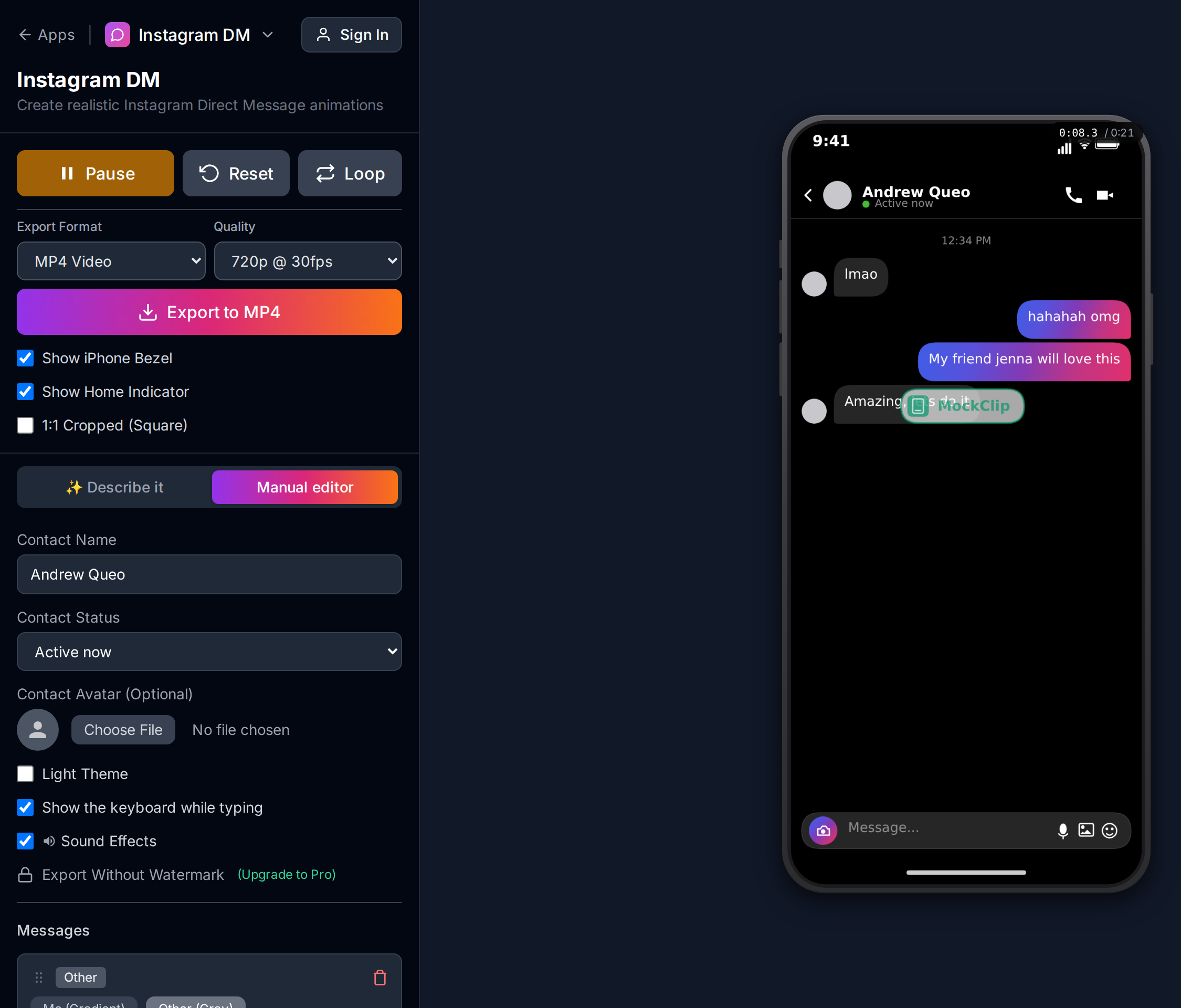
MockClip's Instagram DM template is a browser-based editor that renders the Instagram Direct Message interface as a frame-accurate animated video. The editor shows the conversation fields on the left — contact name, messages, typing indicators, reactions, seen receipts — and a live preview of the animation on the right.
The workflow is straightforward: type the conversation, configure the animation timing, preview, and export. The export pipeline captures every frame of the animation and compiles it to a vertical 1080x1920 MP4 — the format TikTok, Reels, Shorts, and Spotlight expect.
Under the hood, the editor renders the complete Instagram DM interface: the contact header with avatar and status, the message bubbles with the correct gradient colors, the typing indicator dots with their bounce animation, the reaction emoji overlays, the "Seen" receipt text, and the input bar at the bottom. Every element matches the production Instagram app.
No install, no account, no upload step. The entire process happens in the browser. The Pro plan removes the watermark and unlocks higher-resolution exports.
Step-by-step: creating a fake Instagram DM video
From blank editor to finished MP4 in about five minutes.
Step 1: Open the Instagram DM editor
Go to mockclip.com/app/instagram-dm. The editor loads with a sample conversation. Press Play to preview the animation and understand the timing before you start editing.
Step 2: Set the contact name
The contact name in the Instagram DM header is the first thing viewers read. Like the sender label in an iMessage notification, it establishes who the conversation is with and sets the narrative stakes.
Strong contact name patterns:
- A recognizable handle: "brand_collab", "casting_director", "music_label" — the name implies the story
- A relationship label: "ex 🚫", "my crush", "new roommate" — telegraphs the dynamic
- A celebrity or brand parody: "definitely_not_beyonce" — comedy setup in the name itself
- A username with context: "unknown_user_847" — implies a stranger DM, which is inherently intriguing
The contact name should do narrative work. If the viewer reads the name and already understands the stakes of the conversation, you've done it right.
Step 3: Write the messages
Instagram DM messages are short. Real Instagram conversations happen in bursts — 3-10 words per message, rapid back-and-forth. Write your scripted conversation the same way.
Key writing principles:
- Keep messages short. A single DM that's 50 words long looks wrong in the Instagram UI. Break long thoughts into multiple short messages, the way people actually type on Instagram.
- Use the "other" sends first pattern. Start the conversation with a message from the other person. This positions the viewer as the "me" character receiving a DM — which is more engaging than watching yourself initiate.
- Escalate with each message. Each new message should raise the stakes, add information, or push the emotion further. A flat back-and-forth with no escalation loses viewers by the third message.
- Leave room for the typing indicator. If you enable typing indicators, the 2-3 second pause before each message is part of the content. Write messages that are worth waiting for.
Step 4: Enable typing indicators
MockClip's Instagram DM template supports per-message typing indicators. When enabled, the three-dot animation plays for a configurable duration before the message appears.
When to enable typing:
- On the other person's messages — builds suspense, mimics the real waiting-for-a-reply feeling
- Before a dramatic or surprising message — the pause amplifies the impact
- In conversations where pacing matters — the typing indicator controls the rhythm
When to skip typing:
- On rapid-fire exchanges where the energy should be fast
- On "me" messages where typing would slow down the viewer's identification with the character
- When the conversation has more than 6-8 messages and the total video length needs to stay under 30 seconds
Set the typing duration to 1.5-3 seconds per message. Longer than 3 seconds feels like the video froze; shorter than 1 second doesn't register.
Step 5: Add reactions (optional)
Instagram DM reactions are the punchline delivery mechanism. A heart reaction on a message says "this landed emotionally." A laugh reaction says "this was funny." A surprised face says "I can't believe you said that."
Available reactions: heart, laugh, surprised, sad, angry, thumbs-up. Each can be set as "from me" or "from the other person."
Best practices:
- Use reactions sparingly — one or two per conversation. Overusing them dilutes the impact.
- Place the reaction on the message that deserves the biggest emotional response.
- Set a slight delay (1-2 seconds) so the reaction appears after the viewer has read the message. The delay creates a beat — read message, process, reaction lands.
Step 6: Configure seen receipts (optional)
The "Seen" indicator under a message is a storytelling tool. When enabled, it means the other person has read your message — and the implication is that they chose how (or whether) to respond.
Use seen receipts for:
- The "left on seen" punchline. You send a vulnerable message, the seen receipt appears, and the other person never replies. The conversation ends on the seen indicator. Comedy through cruelty.
- Confirmation of receipt. In brand-collab or professional DM storylines, the seen receipt signals that the conversation is progressing.
- Pacing control. The delay between a message appearing and the "Seen" text appearing creates a beat. That beat can be dramatic or comedic depending on context.
Step 7: Set the theme
MockClip's Instagram DM template supports light and dark themes. Dark mode matches the interface most users have enabled and performs better in TikTok feeds. Use dark mode unless your content specifically requires a light background.
Step 8: Preview and export
Press Play and watch the full animation. Check:
- Do the messages read naturally at the animation speed?
- Do the typing indicators create suspense without dragging?
- Do reactions land on the right messages?
- Is the total video length between 15-45 seconds?
Hit Export for a 1080x1920 vertical MP4. Ready for upload.
Free to use. No sign-up. Browser-based.
Open the Instagram DM generatorContent patterns that drive views
The Instagram DM format supports a wide range of content. These patterns consistently perform.
The brand collaboration DM
The contact is a brand or public figure. The conversation shows a collaboration offer, a casting call, or an influencer outreach. The hook is "look at this DM I got" — and the viewer watches to see the details of the offer.
This pattern works for:
- Content creators making "storytime: how I got my first brand deal" videos
- Comedy creators parodying absurd brand collaboration offers
- Aspiration content where the DM represents a dream opportunity
The confession exchange
Two people having a private conversation where one confesses something. The messages escalate, the typing indicators build tension, and the conversation ends with a reaction or a "left on seen" moment.
This pattern works for:
- Relationship content ("I told my crush how I feel over DM")
- Friendship drama ("the text that ended a 10-year friendship")
- Comedy confessions ("I accidentally told my boss I love them")
The celebrity or public figure parody
The contact is a famous person (obviously fictional — the username usually makes this clear). The conversation is either absurdly on-brand for that person or hilariously off-brand. The comedy comes from the contrast between the celebrity persona and the DM behavior.
This pattern works for:
- Comedy and meme content
- Fan fiction styled as DM exchanges
- Satirical takes on celebrity culture
The customer service nightmare
The contact is a brand or service. The conversation shows an increasingly absurd customer service exchange. The escalation from polite to ridiculous is the content.
This pattern works for:
- Relatable complaint humor
- Brand parody content
- Viral "worst customer service ever" storylines
The plot twist DM
The conversation starts normal and takes a sharp turn. The twist message is preceded by a long typing indicator (3+ seconds). The reaction on the twist message is the punchline.
This pattern works across any genre — the twist is the mechanism, not the topic. Pair with a voiceover or caption that says "wait for it" to prime the viewer.
For a deeper bench of Instagram DM content ideas, see Instagram DM video ideas for Reels.
Posting the finished video
TikTok
The Instagram DM format is a natural fit for TikTok. The vertical UI fills the screen, the typing indicators hold attention, and the short-message format matches TikTok's fast-paced consumption.
Sound: Add a trending sound or background music in the TikTok editor. The audio does not need to match the DM content — it just needs to not distract.
Caption: "this DM changed everything" or "wait until you see what they said" — prime the viewer to watch the full conversation.
First comment: Seed engagement with "has this ever happened to you?" or "what would you reply?"
Instagram Reels
Posting an Instagram DM conversation video as a Reel has a meta quality — you're showing a fake Instagram DM inside the real Instagram app. This self-referential loop actually increases engagement because it feels native to the platform.
Caption: Slightly longer than TikTok. Tell the story behind the DM — "this is the message that started it all."
Cover image: Screenshot the first message in the conversation for a clear, text-forward thumbnail.
For Reels-specific strategy, see Instagram Reels mockup video guide.
YouTube Shorts
Title: Search-optimized. "I got a DM from [person/brand] and this happened" — titles that describe the scenario perform in YouTube search.
Description: Include keywords: "fake instagram dm", "instagram dm video", "brand collaboration dm."
For Shorts-specific posting, see fake text conversation video for YouTube Shorts.
Advanced generator features
Custom avatars
The contact avatar in the Instagram DM header adds visual identity to the conversation. MockClip lets you set a custom avatar URL. Use a placeholder avatar for anonymous contacts, a brand logo for brand-collab storylines, or a themed image for character-driven content.
Message timestamps
Each message can have an optional timestamp. Timestamps add realism and can do narrative work — a message sent at "3:47 AM" carries different weight than one sent at "2:15 PM." Use timestamps when the time of day is part of the story.
Typing duration control
Each typing indicator has an adjustable duration. Short durations (1-1.5 seconds) feel casual and fast. Long durations (3+ seconds) feel dramatic — the other person is thinking carefully about what to say. Match the duration to the emotional weight of the message that follows.
Light vs dark mode
Dark mode is the default and the right call for most content. Switch to light mode for content that specifically references daytime, professional, or bright-energy themes. The light mode also works for screenshot-style thumbnails that stand out in a dark-mode-dominated feed.
Tips for maximum engagement
Start with the other person's message. Opening with a received DM puts the viewer in the "me" role immediately. They identify with the person receiving the message, which increases emotional investment.
End the conversation on an unresolved beat. The last message should leave the viewer wanting more — an unanswered question, a "left on seen" moment, or a reaction without a response. Unresolved endings drive comments ("what happened next?!") and loop watches.
Match the message length to real Instagram DMs. Real DMs are short. 3-10 words per message. If you need to convey more information, break it into multiple rapid-fire messages rather than one long paragraph.
Use reactions as punchlines. A well-timed laugh or surprised reaction on a message can replace an entire reply. Sometimes the reaction IS the response, and the conversation ending on a reaction is stronger than adding more text.
Voiceover the key messages. Read the most important messages aloud as they appear in the animation. Voiceover doubles the engagement signal — it works for both sound-on and sound-off viewers, and it adds a personal dimension to the scripted conversation.
How MockClip compares to alternatives
Screenshot editors (FakeChat, online generators that output PNG). These produce static images, not animated videos. The typing indicators, the message-by-message reveal, and the reactions are what make the format work in video — a screenshot loses all of that.
Screen recording a real Instagram DM. You cannot script the other person's replies. You cannot add typing indicators or reactions on demand. You capture notifications, battery level, and other UI noise. Not viable for produced content.
General video editors (CapCut, Premiere, After Effects). You can recreate the Instagram DM UI manually, but every element — the bubble colors, the typing dots, the reaction overlay — needs to be animated by hand. Hours per video versus minutes.
MockClip. Browser-based, purpose-built for the Instagram DM format. Five minutes from blank editor to finished MP4. Typing indicators, reactions, seen receipts, themes, and timestamps are all built in. For a broader tool comparison, see best fake text message video makers.
Quick start
- Open mockclip.com/app/instagram-dm
- Set the contact name to establish the story
- Write short, punchy messages that escalate
- Enable typing indicators on key messages
- Add one or two reactions for punchline delivery
- Press Play to preview
- Export the vertical MP4 and upload to TikTok, Reels, or Shorts
No account, no install, no editing software. For watermark-free exports, see the Pro plan.
Related guides and templates
- Instagram DM template — the editor used in this guide
- How to create a fake Instagram DM video — the full pillar guide
- Instagram DM video ideas for Reels — content ideas specific to Reels
- Instagram Reels mockup video guide — Reels formatting and posting
- How to go viral with fake conversation videos — cross-platform engagement strategy
- AI conversation video content ideas — prompt library across all formats
- Best fake text message video makers — tool comparison
- Fake text conversation video for YouTube Shorts — Shorts workflow
- Pricing — Pro tier for watermark-free exports
Frequently Asked Questions
What is an Instagram DM conversation generator?
An Instagram DM conversation generator is a tool that creates fake Instagram Direct Message conversations as animated videos. You type the messages, the tool renders the Instagram DM interface with typing indicators, message bubbles, and reactions, and exports the result as a vertical MP4 video you can post to TikTok, Reels, or YouTube Shorts.
Is MockClip's Instagram DM generator free?
Yes. The Instagram DM template at mockclip.com/app/instagram-dm runs in the browser with no sign-up. Free exports include a small watermark; the Pro plan removes it and unlocks higher-resolution renders.
Can I add typing indicators to the fake Instagram DM?
Yes. MockClip's Instagram DM template supports typing indicators that show the three-dot animation before each message appears, just like the real Instagram app. You can enable or disable typing per message and control the typing duration.
Can I add reactions to Instagram DM messages?
Yes. MockClip supports Instagram DM reactions — heart, laugh, surprised, sad, angry, and thumbs-up. You can add reactions to any message and control whether the reaction is from you or the other person.
Does the fake Instagram DM look realistic?
MockClip's Instagram DM template matches the production Instagram interface — the message bubble colors, the contact header, the typing indicator animation, and the overall layout. The dark mode option matches the dark theme most users have enabled.
What video format does the Instagram DM generator export?
MP4 at 1080x1920 vertical — the format every short-form platform expects. Ready for direct upload to TikTok, Instagram Reels, YouTube Shorts, and Snapchat Spotlight.
Can I add seen receipts to the conversation?
Yes. MockClip supports the Instagram 'Seen' indicator on messages. You can enable it per message and set a delay for when the seen receipt appears after the message is sent.
Is it legal to make fake Instagram DM videos?
Creating clearly-fictional fake Instagram DM conversations for entertainment is legal in most jurisdictions. Do not use the format to impersonate real people, to defraud, or to harass. Add a 'fictional' or 'dramatized' caption when ambiguity could mislead viewers.
Related Articles
How to Make a Fake Instagram DM Video in Your Browser
Script a fake Instagram DM conversation, time the typing dots, Seen avatar and reactions, then export MP4, GIF or a transparent clip. Free, no account.
Instagram DM Video Ideas That Convert on Reels (2026)
10 tested fake Instagram DM video ideas for Reels — leaked DMs, celebrity replies, brand collabs, and storytime hooks that consistently rack up views.
Creating App Mockup Videos for Instagram Reels
Optimize phone mockup videos for Instagram Reels. Format tips, caption strategies, and content ideas for maximum reach.
How to Go Viral With Fake Conversation Videos in 2026
Data-driven strategies for going viral with fake conversation videos on TikTok, Reels, and Shorts. Hooks, timing, and growth tactics.
Best Fake Text Message Video Makers for Content Creators
Compare the best fake text message video makers for iMessage and WhatsApp. Find the right tool for animated conversation videos.